
A hospital facilities team needed Veeder Root fuel tank data exposed to a hospital Siemens BACnet/IP BAS under a tight validation window. Chipkin QuickServer delivered the Veeder Root to BACnet/IP protocol conversion path, replaced the legacy gateway approach, and got the project into BAS discovery in time for the on-site technician visit.
This case mattered because the monitored Veeder Root system was part of a hospital’s fuel infrastructure. The customer needed the Veeder Root fuel tank data visible in the Siemens BAS, but the older gateway history did not transfer cleanly to the new QuickServer deployment and the validation window was already approaching.
At a Glance
- Industry: Healthcare / facilities infrastructure
- Customer: Hospital facilities team
- Facility type: Hospital campus
- Client role: Maintenance and building automation stakeholders
- Project scale: Veeder Root fuel monitoring for a hospital BAS covering two tanks
- Protocols: From: Veeder Root over RS-485 -> To: BACnet/IP
- Chipkin product: Chipkin QuickServer FS-QS-2XX0
- Commissioning timeline: Same-day configuration delivery
- Project start: October 2021
- Internal reference: FSE14199
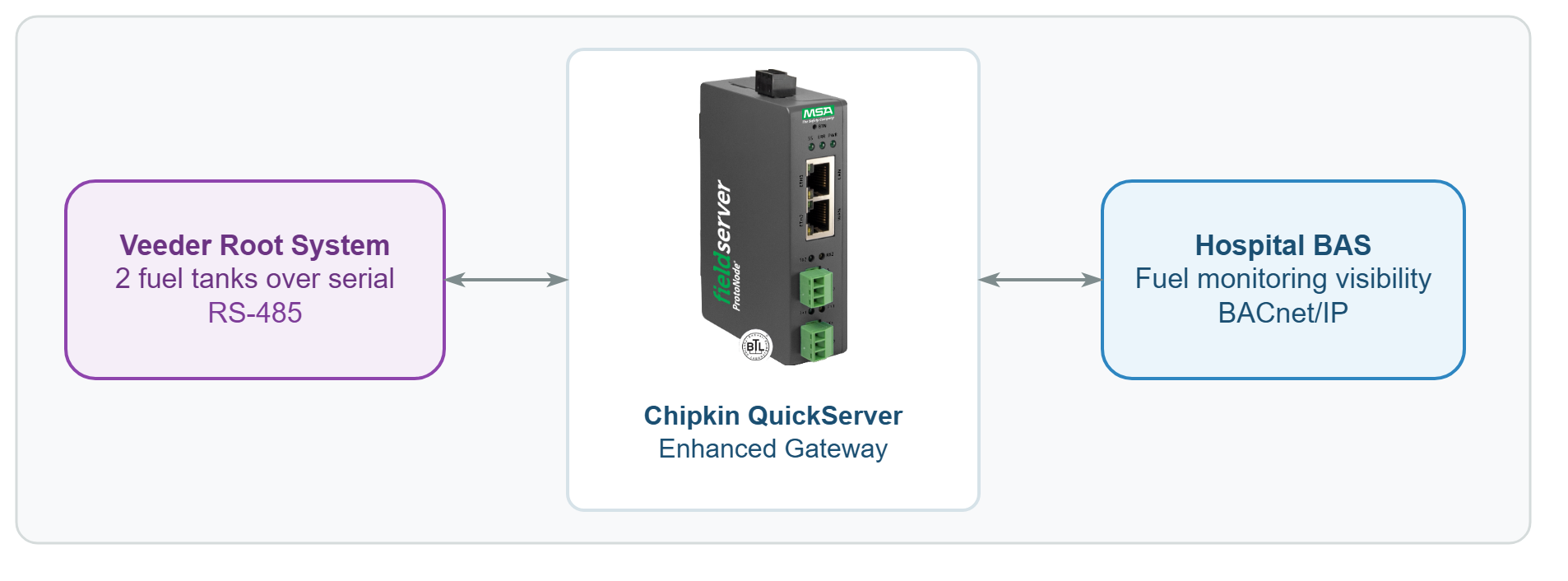
Veeder Root fuel tank system -> RS-485 -> Chipkin QuickServer -> BACnet/IP -> hospital Siemens BAS
Veeder Root to BACnet/IP Challenge
The upstream/server side was a Veeder Root fuel tank monitoring system using RS-485 serial communication. The downstream/client side needed that Veeder Root fuel tank data on a BACnet/IP platform inside the hospital’s Siemens BAS. For the facilities team, this was not a dashboard upgrade. It was part of a fuel-monitoring workflow tied to emergency-power awareness and campus operations.
The project had two practical challenges. First, the QuickServer deployment could not rely on the older gateway path as a drop-in shortcut. The Veeder Root integration had to be rebuilt around the current site documents and the actual hospital layout. Second, the customer already had a Siemens technician visit approaching, so the BACnet/IP handoff had to be ready in time for real BAS validation.
That made this a deadline-driven protocol gateway project rather than a lab-only Veeder Root integration. The team needed the Veeder Root serial data, the BACnet/IP presentation, and the Siemens BAS discovery path all lined up at the same time.
Why Chipkin for Veeder Root to BACnet/IP Integration
This project needed more than a replacement box. The customer needed a Veeder Root to BACnet/IP partner that could gather the right site details quickly, rebuild the gateway configuration around the current hospital installation, and deliver a usable file before the Siemens validation window passed.
Chipkin fit because the QuickServer platform and the support response both mattered. Once the Veeder Root system information was in hand, Chipkin could move quickly, build the BACnet/IP handoff around the real site setup, and help the hospital team get the Veeder Root device discoverable in the Siemens BAS instead of waiting through a long discovery cycle.
The Solution: QuickServer Veeder Root to BACnet/IP Bridge
Chipkin gathered the Veeder Root system setup details, site node information, BAS point expectations, and communication information needed to build the new Chipkin QuickServer deployment. The team then created a fresh Veeder Root to BACnet/IP configuration instead of trying to force an older gateway pattern into a new hospital environment.
The work centered on exposing the Veeder Root fuel tank data to the downstream Siemens BAS over BACnet/IP and making sure the BAS side could actually discover the device during the scheduled validation window. Same-day iteration was a real part of the value because the hospital team already had the Siemens technician visit on the calendar.
For another fuel-monitoring integration using QuickServer, see the Franklin EVO 550 to BACnet/IP Fuel Monitoring case study.
Fuel Tank Monitoring Results
The project delivered a working Veeder Root to BACnet/IP handoff for a hospital facilities deployment.
Project proof points:
- The Veeder Root data became discoverable on the hospital’s Siemens BAS.
- The configuration was rebuilt around the current site documents instead of depending on an old gateway history.
- Same-day delivery helped the customer meet a live Siemens technician validation window.
- The hospital team moved into BAS verification instead of waiting on gateway readiness.
The customer’s confirmation captured the outcome clearly:
“It looks to me like the device is connected. I can find it on the BAS. So, I’ll make sure that everything looks good to the Siemens tech, but for now I think we’re good!! Thank you all!”
— Maintenance technician, hospital facilities team
Have a Similar Veeder-Root-to-BACnet Project?
Need to expose Veeder Root fuel-system data to a BACnet/IP BAS without losing time to commissioning delays? Chipkin can help with QuickServer configuration, serial-to-BACnet protocol conversion, and site-ready validation support. Tell us about your project.
Frequently Asked Questions
Can QuickServer convert Veeder Root to BACnet/IP?
Yes. QuickServer can be used as a Veeder Root to BACnet/IP protocol gateway. In this deployment, Chipkin used that path to expose Veeder Root fuel tank data to the hospital’s Siemens BAS.
Does QuickServer support Veeder Root over RS-485?
Yes. This project centered on a Veeder Root serial connection over RS-485 feeding the QuickServer before the BACnet/IP handoff to the BAS.
How quickly can Chipkin deliver a Veeder Root to BACnet/IP configuration?
Timing depends on the project documents and field constraints. In this hospital deployment, same-day configuration delivery helped the customer meet the BAS technician validation window once the required site details were available.