
Overview
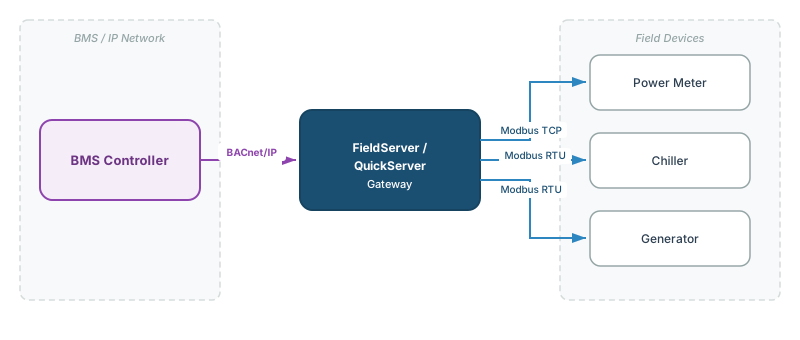
Modbus to BACnet conversion is the most common protocol conversion job in building automation. Thousands of field devices — generators, chillers, power meters, boilers, air handlers — speak Modbus but need to integrate with a BACnet-based Building Management System (BMS).
This guide walks through the complete conversion process using a QuickServer gateway, from intake through commissioning.
Before You Start
Gather this information before beginning configuration:
Source Device Information
- Device manufacturer and model
- Firmware version
- Modbus register map (correct revision for the installed firmware)
- Transport: Modbus RTU (RS-485 serial) or Modbus TCP (Ethernet)?
- Slave ID / Unit ID of each device
- Serial parameters (if RTU): baud rate, parity, stop bits, data bits
- Number of devices on the bus
Destination BMS Information
- BACnet transport: BACnet/IP or BACnet MS/TP?
- Assigned Device Instance number for the gateway
- Required BACnet object types and instance numbers (from BMS point list)
- BMS IP address and subnet (for BACnet/IP)
- BBMD configuration (if gateway and BMS are on different subnets)
Gateway Information
- QuickServer model and license tier (250, 500, or 1000 points)
- Gateway IP address
- Total point count requirement (must fit within the license tier)
[!WARNING] Validate the total point count against the gateway’s license tier before building the configuration. A 300-point job on a 250-point tier requires a tier upgrade. Point tier overruns are a common source of project delays.
Step 1: Map Modbus Registers to BACnet Objects
This is the core configuration task — defining how each Modbus data point translates to a BACnet object.
Mapping Rules
| Modbus Source | Function Code | BACnet Target | Notes |
|---|---|---|---|
| Holding Register (read-only measurement) | FC03 | Analog Input (AI) | Sensor values, status readings |
| Holding Register (read/write setpoint) | FC03/FC06 | Analog Value (AV) or Analog Output (AO) | Use AO for physical actuator commands, AV for software values |
| Input Register | FC04 | Analog Input (AI) | Always read-only |
| Coil (command) | FC01/FC05 | Binary Output (BO) | Discrete on/off commands |
| Discrete Input | FC02 | Binary Input (BI) | Read-only contact states |
| Holding Register (enumerated mode) | FC03/FC06 | Multi-State Value (MSV) | Map state integers to named states |
| Holding Register (bit-field status) | FC03 + bit extract | Binary Input (BI) per bit | Extract each bit as a separate BACnet object |
For detailed guidance on object type selection, see BACnet Object Types & Properties Reference.
Addressing: The Off-By-One Problem
The #1 integration issue in Modbus-to-BACnet conversion is register addressing mismatch. Manufacturers document registers using different conventions:
| Convention | Register Map Shows | PDU Address (Wire) |
|---|---|---|
| Modicon (1-based) | 40001 | 0 |
| Register number (1-based) | 1 | 0 |
| PDU offset (0-based) | 0 | 0 |
If the register map uses 1-based numbering and your gateway configuration expects 0-based offsets, every register will be off by one.
[!TIP] Always validate with a known-value read. Compare a register reading in your diagnostic tool against the device’s local display. If the value at the documented address is wrong, try address − 1. See How to Read a Modbus Register Map for the complete addressing interpretation guide.
Data Types and Scaling
Handle these conversions in the gateway point map:
- Scale factors — many devices store temperatures as integer × 10 (e.g.,
725= 72.5°F). Configure the gateway to divide by the scale factor. - 32-bit floats — values spanning two Modbus registers need correct word order configuration. See Modbus Data Types & Byte Order Reference.
- Bit extraction — status registers packing multiple booleans into one 16-bit word need bit masking to produce individual BACnet binary objects.
Step 2: Configure the Modbus Client (Source Side)
The gateway acts as a Modbus client (master) and polls the field device.
For Modbus RTU (Serial)
Configure the gateway’s serial port to match the device’s settings exactly:
| Parameter | Common Defaults | Notes |
|---|---|---|
| Baud Rate | 9600 or 19200 | Must match device; some equipment uses non-standard rates (e.g., 192000 for some boiler/chiller controllers) |
| Data Bits | 8 | Nearly universal |
| Parity | Even or None | Must match device |
| Stop Bits | 1 (with parity) or 2 (without parity) | Must match device |
| Slave ID | 1–247 | Must match device configuration |
[!NOTE] Every device on the RS-485 bus must use identical serial parameters (baud, parity, stop bits). If adding a gateway to an existing bus, match the existing configuration.
For Modbus TCP (Ethernet)
| Parameter | Typical Value | Notes |
|---|---|---|
| Device IP Address | Vendor-assigned | Static IP recommended |
| TCP Port | 502 | Modbus TCP standard port |
| Unit ID | 1 or 255 | For standalone devices; for RTU-to-TCP gateways, use the target Slave ID |
Step 3: Configure the BACnet Server (Destination Side)
The gateway acts as a BACnet server and responds to BMS read/write requests.
For BACnet/IP
| Parameter | Notes |
|---|---|
| Gateway IP address | Same subnet as BMS, or configure BBMD / FDR |
| UDP port | 47808 (0xBAC0) — BACnet/IP standard |
| Device Instance | Must be unique across the entire BACnet internetwork |
| Network number | Coordinate with BMS integrator |
For BACnet MS/TP
| Parameter | Notes |
|---|---|
| MAC address | 0–127; must be unique on the MS/TP trunk |
| Baud rate | Must match other devices on the trunk (typically 9600, 38400, or 76800) |
| Max Masters | Set to match or exceed the highest MAC address of any master on the trunk |
| Device Instance | Must be unique across the entire BACnet internetwork |
[!WARNING] Adding a gateway to an existing BACnet MS/TP trunk? Verify MAC address uniqueness and Max Masters settings on all existing devices. Duplicate MACs or incorrect Max Masters cause intermittent token passing failures that are difficult to diagnose.
Step 4: Configure Poll Rates and Timeouts
| Parameter | Recommended | Notes |
|---|---|---|
| Modbus poll interval | 1–10 seconds | Balance between data freshness and bus loading |
| Modbus response timeout | 500–2000 ms | Increase for slow devices or long RS-485 runs |
| Modbus retry count | 2–3 | Retries before marking a point as unreachable |
| BACnet COV increment | 0.5–1.0 (analog), N/A (binary) | If the BMS uses COV subscriptions instead of polling |
[!TIP] For RS-485 buses with multiple devices, stagger poll requests to avoid overwhelming slow devices. If one device has 200 registers, break the poll into smaller block reads.
Step 5: Commission and Validate
Validation Checklist
- Modbus reads working — use CAS Modbus Scanner to verify the gateway can read all configured registers from the source device
- Addressing confirmed — at least one known-value register matches the device’s local display
- Data types confirmed — 32-bit float values and scaled integers produce correct engineering values
- BACnet discovery working — use CAS BACnet Explorer to perform a Who-Is and confirm the gateway’s Device Instance appears
- Object list correct — browse the gateway’s BACnet objects and verify expected types, instance numbers, and present values
- Write operations working — if the integration requires writes (setpoints, commands), test a safe write and verify it takes effect on the source device
- BMS integration confirmed — the BMS can poll the gateway and display correct values
Common Commissioning Failures
| Symptom | Likely Cause | Fix |
|---|---|---|
| Gateway not discovered by BMS | Wrong subnet, BBMD not configured, firewall blocking UDP 47808 | Verify network config; check BACnet Discovery article |
| ”Unknown Object” errors in BMS | BMS requesting object IDs that don’t exist on the gateway | Compare BMS point list against gateway’s Object_List property |
| All BACnet values show 0 | Modbus poll not running, wrong register addresses | Check Modbus client diagnostics; try address − 1 |
| Values are garbled or wildly wrong | Byte order mismatch on 32-bit values | Try all 4 byte order permutations |
| Intermittent BACnet timeouts | MS/TP token passing issue or Modbus poll congestion | Check MAC addresses, Max Masters, and poll timing |
| Values are scaled wrong | Missing or incorrect scale factor | Verify scale factor against register map and physical reading |
| ”Illegal Data Address” from Modbus device | Off-by-one addressing or reading undefined registers | Reduce block size; verify address convention |
For more Modbus troubleshooting, see the Modbus Troubleshooting Guide. For BACnet MS/TP issues, see the BACnet MS/TP Troubleshooting Guide.
Multi-Device Configurations
Multiple Modbus Devices to One BACnet Gateway
A single gateway can poll multiple Modbus devices and expose all their data as BACnet objects under one Device Instance.
- Modbus RTU: Each device gets a unique Slave ID on the same RS-485 bus (max 247 devices per bus)
- Modbus TCP: Each device has a unique IP address; multiple TCP connections from the gateway
BACnet object instance numbers must be unique per type across all mapped devices. Use a numbering scheme like:
| Device | Slave ID | AI Instance Range | AV Instance Range | BI Instance Range |
|---|---|---|---|---|
| Generator 1 | 1 | AI:1–50 | AV:1–20 | BI:1–30 |
| Generator 2 | 2 | AI:51–100 | AV:21–40 | BI:31–60 |
| Power Meter | 3 | AI:101–150 | AV:41–50 | BI:61–70 |
Modbus RTU to Modbus TCP Bridge (No BACnet)
For jobs that need only a transport bridge — serial RS-485 to Ethernet TCP without protocol conversion — a QuickServer can act as a pass-through gateway. The Slave ID in the incoming Modbus TCP request maps directly to the target device’s Slave ID on the RTU side.
Related Articles
- BACnet Object Types & Properties Reference
- How to Read a Modbus Register Map
- Modbus Addressing & Register Reference
- Modbus Data Types & Byte Order Reference
- Modbus RTU Pre-Commissioning Checklist
- Modbus Troubleshooting Guide
- BACnet Discovery & Network Architecture Reference
- Troubleshooting Guide for BACnet MS/TP Networks
Chipkin Tools
- QuickServer — Protocol converter with web-based configuration
- CAS Modbus Scanner — Validate Modbus register reads before gateway deployment
- CAS BACnet Explorer — Discover and browse BACnet objects from the gateway
- Chipkin Support — Gateway configuration, register map interpretation, and commissioning assistance