
Overview
BACnet MS/TP is the serial RS-485 transport for BACnet. Most failures fall into three categories: physical wiring problems, device configuration errors, or protocol-level token-passing faults. Work through this checklist in order because most failures are still found at the physical layer.
For network architecture issues on routed BACnet/IP systems, start with BACnet Discovery & Network Architecture Reference. For protocol background, use the BACnet guide and BACnet International.
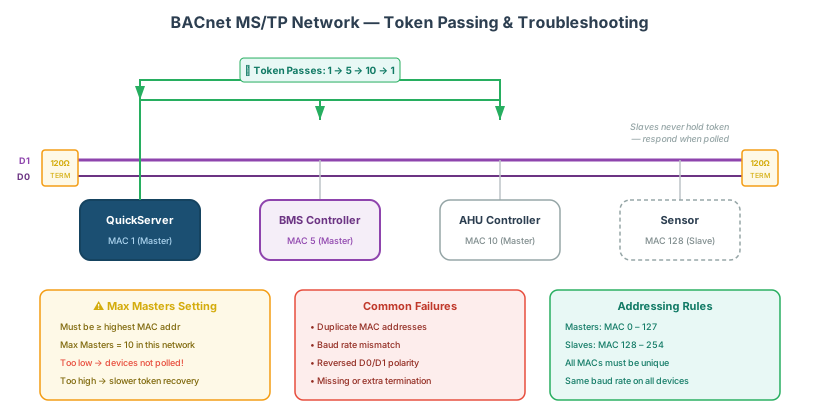
Diagnostic Flow
- Validate physical layer integrity (wiring, polarity, termination, grounding).
- Confirm all device addressing and serial parameters.
- Capture traffic to verify token circulation and error profile.
- Isolate segments to identify failing cable run or node.
- Validate firmware/configuration and re-test with production supervisory software.
1. Physical Layer Inspection
- Cabling: Check all cables for physical damage, kinks, or loose terminations.
- Wiring Polarity: Confirm A and B lines are not swapped on the RS-485 trunk. Reversed polarity is a common installation error.
- Termination Resistors: Install 120 Ω resistors at the two end nodes of the trunk only. Do not add terminators at intermediate nodes.
- Grounding: Ground the cable shield at one end only to prevent ground loops.
2. Device Configuration
- MAC Addresses: All devices must have unique MAC addresses. Masters: 0–127; slaves: 128–254.
- Baud Rate: Every device on the trunk must be set to the same baud rate. Common values: 9600, 19200, 38400, 76800, 115200 bps.
- Max Masters: The
Max Mastersparameter must be set to at least the highest master MAC address on the network. UndervaluedMax Masterssettings are a frequent cause of devices not being acknowledged on BACnet token passing.
3. Network Monitoring
- Capture Traffic: Use a BACnet MS/TP protocol analyzer to capture bus traffic and confirm tokens are circulating correctly.
- Token Passing: Verify the token is being passed between all master devices without excessive retries or timeouts.
- Error Counters: Check framing error and CRC error counters per device. Elevated counts point to physical layer problems, baud rate mismatch, or excessive electrical noise.
4. Duplicate Address Detection
Address conflicts (two devices sharing the same MAC address) cause intermittent or complete communication failures and are difficult to trace without a protocol analyzer. Confirm all MAC addresses are unique before proceeding.
5. Device Health
- Power Supply: Verify each device has a stable supply within its rated input range.
- Status LEDs: Check device LEDs against the manufacturer documentation for error codes.
6. Segment Testing
On large networks, isolate segments by disconnecting portions of the trunk and testing each independently. Once the faulty segment is identified, narrow down to the specific device or cable section.
7. Firmware and Configuration
- Firmware: Ensure all devices are running current firmware. Known MS/TP protocol bugs have been fixed in firmware updates for several common BACnet device families.
- Configuration: Verify device settings against manufacturer documentation, network as-built drawings, and the assigned Device Instance plan where the device is also exposed upstream to BACnet/IP.
8. Communication Error Analysis
- Error Counters: High CRC or framing error counts on a single device typically indicate that device is generating noise or has a misconfigured baud rate.
- Retry Patterns: Frequent communication retries suggest either a dropping device or excessive bus load.
9. Logs and Documentation
- Device Logs: Review onboard logs for error timestamps that correlate with reported failures.
- Network Management Logs: Check NMS or BMS logs for anomalies.
10. Diagnostic Tools
- BACnet MS/TP Analyzers: A dedicated hardware or software MS/TP analyzer is the most effective tool for confirming token circulation and capturing malformed frames.
- Chipkin Tools: CAS BACnet Explorer and QuickServer diagnostics help validate object visibility and response timing via gateway infrastructure.
Symptoms & Solutions
| Symptom | Likely Cause | Corrective Action | Related KB |
|---|---|---|---|
| No devices discovered on trunk | A/B polarity swap, open circuit, missing end termination | Re-verify wiring continuity and end-of-line termination on both ends | RS-485 |
| Some devices visible, others missing | Max Masters set below highest master MAC | Increase Max Masters and cycle the token ring | BACnet Token Passing |
| Intermittent timeouts | Duplicate MAC, electrical noise, loose shield/ground reference | Remove address conflicts and verify single-point shield grounding | BACnet MS/TP |
| High CRC or framing errors | Baud mismatch, poor cable quality, excessive segment length | Align serial settings and inspect cable path plus noise sources | RS-485 |
| Discovery works in tool but not in BMS | BMS polling assumptions or object/profile mismatch | Compare BMS expectation to exposed object list and service support | BACnet Objects |
Common Failure Patterns
| Symptom | Likely Cause | Corrective Action |
|---|---|---|
| No devices discovered on trunk | A/B polarity swap, open circuit, missing end termination | Re-verify wiring continuity and end-of-line termination on both ends |
| Some devices visible, others missing | Max Masters set below highest master MAC | Increase Max Masters and cycle token ring |
| Intermittent timeouts | Duplicate MAC, electrical noise, loose shield/ground reference | Remove address conflicts and verify single-point shield grounding |
| High CRC/framing errors | Baud mismatch, poor cable quality, excessive segment length | Align serial settings and inspect cable path/noise sources |
| Discovery works in tool but not in BMS | BMS polling assumptions or object/profile mismatch | Compare BMS expectation to exposed object list and service support |
Decision Tree
- If no traffic appears on the bus, troubleshoot wiring and power first.
- If token appears but devices drop intermittently, check MAC uniqueness and Max Masters.
- If protocol traffic is healthy but supervisory behavior is wrong, inspect object mapping/profile expectations.
- If failures appeared after changes, roll back the last config revision and reintroduce changes incrementally.
Related Articles
- BACnet
- BACnet MS/TP
- BACnet/IP
- BACnet Discovery & Network Architecture Reference
- BACnet Object Types & Properties Reference
- Modbus to BACnet Protocol Conversion Guide
Reference Documents
- BACnet International for general BACnet implementation guidance.
- ASHRAE 135 BACnet Standard for formal BACnet protocol reference.
- Wireshark BACnet Documentation for packet-level inspection guidance.
Chipkin Tools
- CAS BACnet Explorer - BACnet discovery, read/write testing, and object validation
- QuickServer - protocol gateway for BACnet/IP and BACnet MS/TP integrations
- Chipkin Support - design review and troubleshooting support for commissioning teams