
Overview
EtherNet/IP (Ethernet Industrial Protocol) is an industrial networking protocol built on CIP (Common Industrial Protocol). It runs over standard Ethernet infrastructure and is widely used with PLCs and factory automation — particularly Allen-Bradley ControlLogix systems.
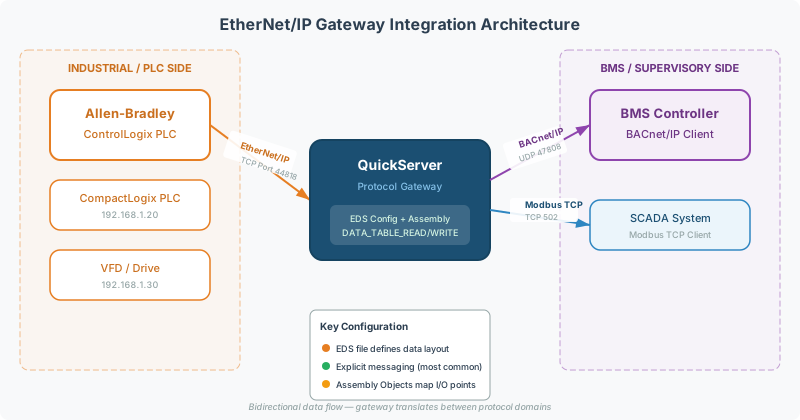
In building automation, EtherNet/IP typically appears in crossover projects where industrial equipment (chillers, generators, switchgear) needs to communicate with a BMS via BACnet or Modbus. A QuickServer gateway bridges the two worlds.
This guide covers the critical configuration concepts, the most common integration mistakes, and the intake information needed for a successful project.
CIP and EtherNet/IP Fundamentals
CIP (Common Industrial Protocol) is the application layer shared by EtherNet/IP, DeviceNet, and ControlNet. Understanding a few CIP concepts is essential for configuration:
Implicit vs Explicit Messaging
| Messaging Type | Purpose | Use Case |
|---|---|---|
| Explicit | Configuration, diagnostics, on-demand reads/writes | Reading a single register, uploading EDS files |
| Implicit (I/O) | Real-time, cyclic data exchange | Continuous monitoring of chiller status, setpoints |
Most gateway integrations use explicit messaging for point-by-point data exchange.
Assembly Objects
Assembly Objects are CIP data structures that group multiple data points into arrays for efficient transfer. In Allen-Bradley PLCs, these often appear as named arrays:
- DataFromDevice (e.g.,
DataFromChiller) — data flowing from the field device to the PLC - DataToDevice (e.g.,
DataToChiller) — data flowing to the field device from the PLC
[!TIP] Ask the PLC programmer for the Assembly Object names and sizes before starting configuration. These determine how the gateway’s data arrays map to the PLC.
EDS Files
An EDS file (Electronic Data Sheet) is a standardized text file that describes an EtherNet/IP device’s communication parameters — supported CIP objects, Assembly sizes, and connection parameters. Think of it as the EtherNet/IP equivalent of a BACnet PICS statement.
Why EDS Files Matter
- PLC programming software (e.g., RSLogix, Studio 5000) imports EDS files to auto-configure the EtherNet/IP connection
- Without the correct EDS file, the PLC programmer must manually configure Assembly sizes and connection parameters — error-prone and time-consuming
- The EDS file defines the device’s identity (Vendor ID, Product Type, Product Code) that the PLC uses to recognize it on the network
Obtaining EDS Files
| Source | How |
|---|---|
| QuickServer | Download from the QuickServer web interface under EtherNet/IP → EDS File, or extract via the web GUI |
| Third-party devices | Request from the device manufacturer, or check the ODVA EDS Library |
[!NOTE] The EDS file must match the gateway’s current firmware version and configuration. If you update firmware or change Assembly sizes, regenerate the EDS file.
DATA_TABLE_READ vs DATA_TABLE_WRITE
This is the #1 EtherNet/IP configuration mistake across all Chipkin support projects. Getting this wrong causes silent write failures that are difficult to diagnose on site.
The Problem
The EtherNet/IP driver’s service attribute controls the direction of data flow:
| Service Attribute | Behavior |
|---|---|
DATA_TABLE_READ | Gateway reads data from the PLC into its internal data array. Gateway cannot write to the PLC. |
DATA_TABLE_WRITE | Gateway reads and writes data — bidirectional communication with the PLC. |
[!WARNING]
DATA_TABLE_READallows data to flow into the gateway’s data array from the PLC, but silently blocks writes back to the PLC. There is no error message — the write simply doesn’t happen. This makes it extremely difficult to diagnose on site.
When to Use Each
- DATA_TABLE_READ — Only when every single point is read-only (monitoring only, no setpoints, no commands)
- DATA_TABLE_WRITE — Whenever any point requires write capability (setpoints, enable/disable commands, capacity limits)
Common Write-Required Points
These point types almost always require write capability:
- Setpoints —
CoolTempSetpoint,HeatTempSetpoint, capacity limits - Enable/Disable commands —
EnableStp,StartStop,OccupiedMode - Capacity/demand limits —
NetworkCapacityLimitPct,DemandLimit - Schedule overrides — occupancy commands, time-of-day overrides
[!TIP] Default to DATA_TABLE_WRITE unless the project is confirmed 100% read-only. The performance difference is negligible, and it prevents the most common EtherNet/IP field issue.
Configuration Intake Checklist
Collect this information before starting any EtherNet/IP gateway configuration. Missing items here cause delays and rework on site.
PLC Model and Programming Environment
Identify the PLC platform — this determines data array naming conventions, Assembly Object structure, and EDS file requirements. Common platforms:
- Allen-Bradley ControlLogix (RSLogix 5000 / Studio 5000)
- Allen-Bradley CompactLogix
- Siemens S7 (via EtherNet/IP adapter)
EDS File Availability
Does the PLC programmer have the gateway’s EDS file, or do they need one generated? If the gateway is already on site, the EDS file can be downloaded from the web interface.
Point List with Read/Write Direction
Every point in the mapping must be explicitly marked as read-only or read/write. This determines the DATA_TABLE_READ vs DATA_TABLE_WRITE setting. Ask the customer to annotate their point list — do not assume all points are read-only.
Assembly Object Names and Sizes
For Allen-Bradley PLCs, get the DataFromDevice / DataToDevice array names and sizes from the PLC programmer. These must match the gateway configuration exactly.
IP Address and Network Architecture
- Gateway IP address and subnet mask
- PLC IP address
- Any VLANs or firewalls between the gateway and PLC
- Whether the gateway sits on the same subnet as the PLC or requires routing
Paired Protocol Details
EtherNet/IP is almost always one side of a conversion. Collect the other protocol’s details too:
- For BACnet — device instance, network number, MAC addresses (if MS/TP)
- For Modbus — slave IDs, register map, baud rate (if RTU)
Common Integration Patterns
EtherNet/IP ↔ BACnet
The most common EtherNet/IP conversion — exposing PLC data points to a building management system (BMS) via BACnet/IP or BACnet MS/TP.
Typical scenario: Chiller plant with Allen-Bradley PLCs controlling multiple chillers. The BMS needs to monitor temperatures, statuses, and alarms, and send setpoints/commands back to the PLCs.
Key configuration:
- EtherNet/IP client connection to each PLC
- BACnet server exposing mapped points as BACnet objects
- DATA_TABLE_WRITE if any setpoints or commands are needed
EtherNet/IP ↔ Modbus TCP
Industrial devices with EtherNet/IP connecting to a Modbus TCP master — common in mixed industrial/building automation environments.
Key configuration:
- EtherNet/IP client connection to the device
- Modbus TCP server with register mapping
- Confirm data types and byte order for each register
Troubleshooting
Gateway Reads Data but Cannot Write to PLC
Symptom: Data flows into the gateway’s internal data array (values update), but writing values back to the PLC has no effect. No error messages.
Cause: EtherNet/IP service attribute set to DATA_TABLE_READ instead of DATA_TABLE_WRITE.
Fix: Change the service attribute to DATA_TABLE_WRITE in the gateway’s EtherNet/IP client configuration. Restart the connection.
PLC Does Not Recognize the Gateway
Symptom: The PLC cannot establish an EtherNet/IP connection. The gateway shows “no connection” or times out.
Possible causes:
- Wrong EDS file — regenerate from the gateway’s current firmware/config
- IP addressing — gateway and PLC not on the same subnet
- Assembly size mismatch — the gateway’s Assembly Object sizes don’t match what the PLC expects
- Firewall/VLAN — EtherNet/IP uses TCP port 44818 and UDP port 2222
Data Values Are Wrong or Offset
Symptom: Data arrives but values don’t match what’s expected — wrong point mapped to wrong value.
Possible causes:
- Array offset error — the data array index in the gateway config doesn’t match the PLC array position
- Data type mismatch — INT vs DINT vs REAL mapping. Confirm the PLC’s data type for each tag.
- Byte order — some devices swap bytes. See the byte order reference for diagnostic steps.
Related Articles
- Modbus Addressing & Register Reference — register mapping fundamentals (same concepts apply to EtherNet/IP data arrays)
- Modbus Data Types & Byte Order Reference — data type and byte order troubleshooting
- Modbus RTU Pre-Commissioning Checklist — pre-commissioning patterns for the Modbus side of mixed protocol jobs
- BACnet MS/TP Troubleshooting Guide — for the BACnet side of EtherNet/IP ↔ BACnet integrations
Chipkin Tools
- QuickServer — Multi-protocol gateway supporting EtherNet/IP, BACnet, Modbus, and 30+ other protocols
- QuickServer — Legacy protocol gateway with EtherNet/IP driver support
- CAS BACnet Explorer — Verify the BACnet side of EtherNet/IP ↔ BACnet conversions
- Chipkin Support — Configuration assistance and EDS file generation