What IO-Link Is
IO-Link is a short-distance, point-to-point smart sensor and actuator standard used between field devices and an IO-Link master. Its practical value is richer device visibility: instead of treating a sensor as a simple input, the system can expose diagnostics, identification, parameters, and process values through the master.
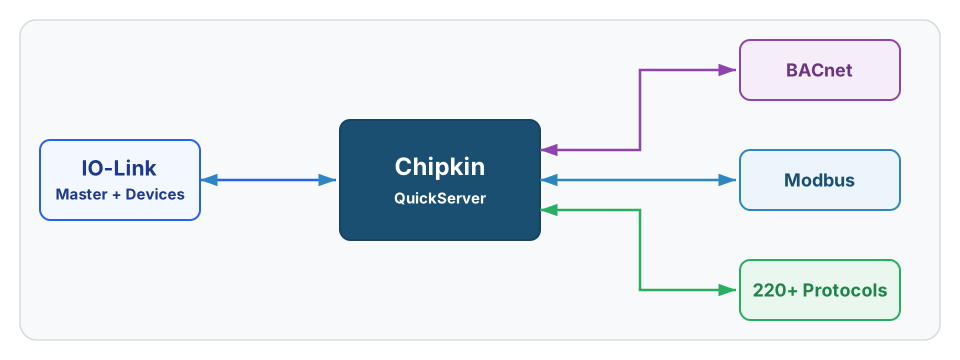
IO-Link is common in machine automation, sensor-rich process skids, condition-monitoring deployments, and OEM equipment where richer device data matters. In Chipkin work, the gateway usually does not convert raw IO-Link at the device layer. It more often reads the upstream interface of the IO-Link master.
For field-level diagnostic workflow, use the IO-Link Troubleshooting Guide.
See QuickServer for master-side IO-Link data exposure options
History
IO-Link was designed to give ordinary field devices a standardized digital path for richer information exchange without abandoning simple device-level wiring practices. That combination made it attractive for smart sensors, actuators, and machine diagnostics where a plain discrete signal or analog value was not enough.
That history matters because IO-Link projects are usually about device context, not just transport. The engineering value comes from IODD descriptions, port-level inventory, and master-side integration quality rather than from treating the field devices like anonymous points.
Core Concepts
IO-Link projects usually depend on:
- Master-device architecture: the master is the bridge between field devices and the higher-level controller or gateway.
- One device per port: IO-Link is fundamentally a point-to-point device connection, even when the master itself has many ports.
- IODD-driven engineering: device descriptions explain parameters, diagnostics, and process-data meaning.
- Port and data-class clarity: process data, parameter data, diagnostics, and event information should be distinguished early.
- Transport defaults: wired IO-Link commonly uses short unshielded three- or five-conductor cabling with one device per master port and a typical maximum cable length of 20 m.
- Master-side upstream protocol: many integration failures are really on the Modbus TCP, EtherNet/IP, or other master-side export rather than on raw IO-Link transport.
Most IO-Link delays are not caused by the sensor link itself. They come from incomplete master-side engineering data and weak definition of what the target system really needs.
IO-Link-Specific Information
Master And Device Architecture
An IO-Link system is built around an IO-Link master and one or more attached devices such as sensors, actuators, hubs, or mechatronic components. The master communicates with the higher-level controller or gateway and manages the actual device sessions on each port. That architecture is the first thing a public guide has to make clear, because an “IO-Link job” is usually really a master-integration job.
Each port is a defined device context. That means intake should capture the installed device by port, not just a loose device list. If the team cannot say which device is on which master port, the point list is not ready.
Process Data, Parameters, And IODD Files
IO-Link is valuable because it can expose more than process values. Depending on the device and master, the project may need live process data, identification data, diagnostics, parameter values, status bits, or event information. That richer model is why IODD files matter: they describe how the device data should be interpreted.
In real gateway work, this is where scaling, status-bit extraction, and packed-data interpretation enter the picture. A link can be healthy while the supervisory values are still wrong because the master-side export was interpreted incorrectly.
Upstream Integration Reality
Chipkin’s public IO-Link framing should stay grounded in master-side integration. The clearest internal example is an ifm IO-Link master exposing data upstream over Modbus TCP, not raw direct conversion of every IO-Link device conversation.
That distinction matters because the gateway often reads the master’s upstream protocol, not the device-side IO-Link wire protocol directly. If the master model, upstream export, or process-data layout is unclear, the scope is still incomplete.
Common Variants
| Variant | Where It Fits | Why It Matters |
|---|---|---|
| Wired IO-Link | Standard point-to-point sensor and actuator communication | Most common deployment path |
| Port class A | General sensor connections | Usually sufficient when separate actuator power is not required |
| Port class B | Devices needing additional power segregation | Relevant where actuator power or higher-power device wiring matters |
| IO-Link Wireless | Mobility-focused extension | Different commissioning and RF validation path from classic wired IO-Link |
| IO-Link Safety | Functional-safety extension | Requires safety-layer planning beyond base IO-Link assumptions |
How To Get The Points List
For IO-Link, point lists usually come from the IO-Link master engineering data, the device IODD files, and the upstream controller or gateway export rather than from a simple flat register spreadsheet.
Preferred sources:
- IODD files for each installed IO-Link device
- IO-Link master configuration export
- PLC, controller, or SCADA export showing the master-side mapping
- Vendor documentation describing process-data layout, scaling, and status bits
- Existing gateway configuration from a brownfield installation
In real projects, the field device may be IO-Link while the gateway actually reads Modbus TCP, EtherNet/IP, or another upstream protocol from the master. If that handoff is unclear, the points list is not ready.
Devices that Support IO-Link
Representative source environments include:
| Source Environment | Why It Matters |
|---|---|
| IO-Link sensors and actuators | Core field-device category for process values and diagnostics |
| IO-Link hubs and valve blocks | Often aggregate multiple simple signals into a master-side export |
| Condition-monitoring devices such as vibration or health sensors | Common reason teams want richer diagnostics and parameter access |
| IO-Link masters | The actual upstream integration point for most gateway jobs |
Common Integration Targets
- BACnet for supervisory visibility of machine and condition-monitoring data
- Modbus for PLC and SCADA interoperability
- MQTT for telemetry publishing and analytics
Tools & Diagnostics
| Tool | Type | Description |
|---|---|---|
| QuickServer | Gateway | Use when exposing master-side IO-Link data into BACnet, Modbus, MQTT, or related supervisory systems |
| FieldServer Toolbox | Gateway diagnostics | Useful for separating master-side export issues from downstream exposure issues |
| IODD viewer and engineering tools | Source validation | Useful for confirming parameter names, process values, and diagnostic fields |
| Manufacturer master software | Upstream protocol validation | Critical when the gateway reads the master rather than raw IO-Link |
| Master documentation and export tools | Mapping reference | Useful for proving the real upstream protocol and point structure |
Frequently Asked Questions
Is IO-Link the same thing as the protocol the gateway reads?
Not always. In many projects, the gateway reads the upstream interface of the IO-Link master, such as Modbus TCP or another controller-facing protocol.
Why do IODD files matter so much?
Because they describe the device data model. Without them, scaling, diagnostic meaning, parameter fields, and process-data interpretation often become guesswork.
What is the most common IO-Link scoping mistake?
Calling the project “IO-Link” without documenting the master model, upstream protocol, and per-port device inventory. That leaves the gateway team without the actual source interface definition.
Does every IO-Link project justify raw device-level protocol discussion?
No. For gateway work, the decisive engineering question is usually how the master exports the data upstream, not whether the device-side IO-Link wire protocol is theoretically available.
Reference Documents
- IO-Link System Description: Technology and Application - Official high-level system description for IO-Link architecture, device roles, and engineering concepts.
- Wikipedia: IO-Link - Useful overview source for system architecture, link speeds, cable limits, and common terminology.