
What Is a BACnet Trend Log?
A trend log is how a BACnet device records its own history. The TrendLog object, defined in Clause 12.25 of ANSI/ASHRAE 135-2024, samples one property over time (a temperature, a flow rate, a kilowatt reading) and stores each sample with a timestamp in an internal buffer. Its sibling, the TrendLogMultiple object (Clause 12.30), records a whole list of properties as a single timestamped record, so every value in the set shares one sample instant.
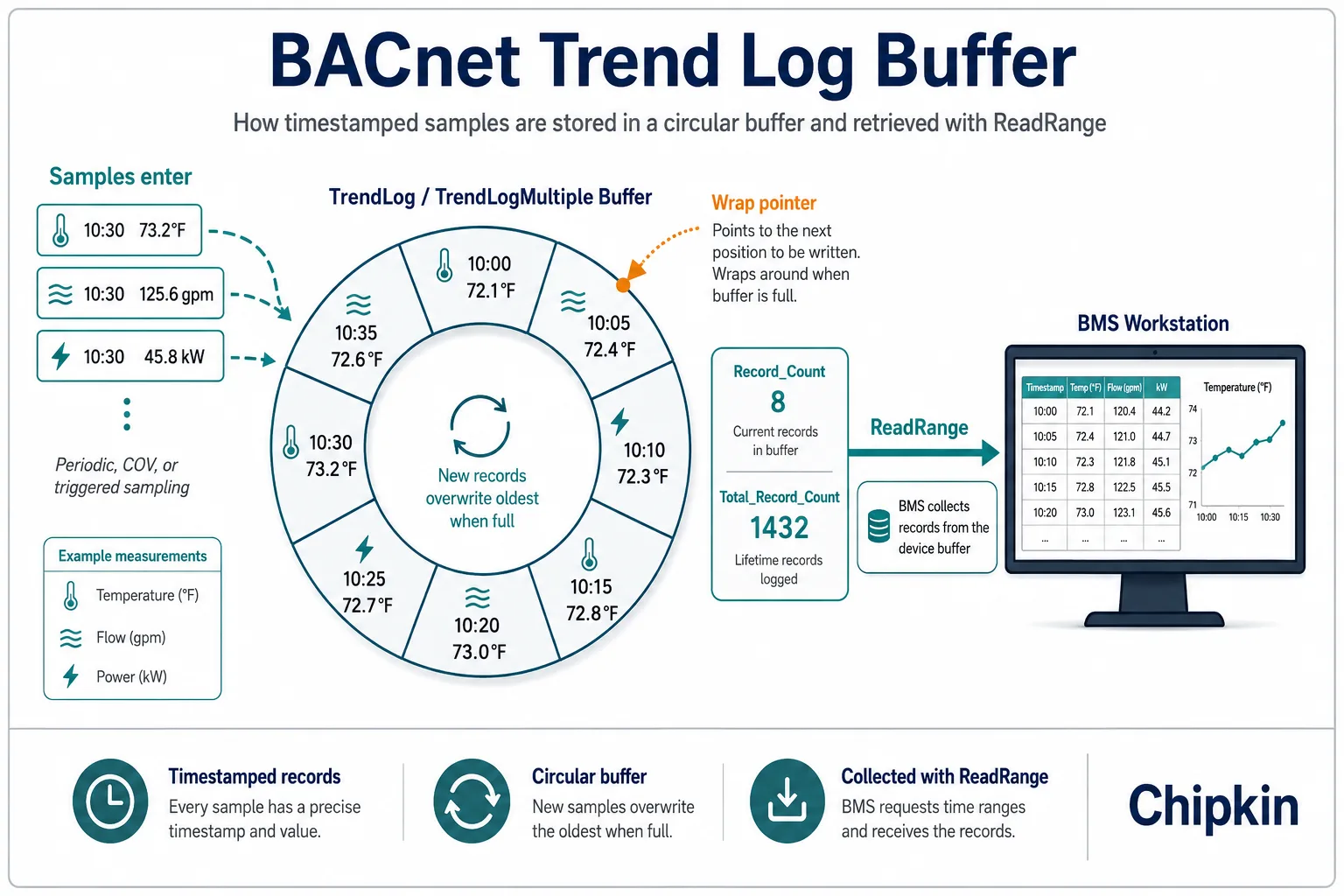
Alarming tells you what is happening right now. Trending tells you what has been happening all along, and the data accumulating in those buffers is often the most valuable thing a building system produces. The device keeps the history itself; a client collects it later with the ReadRange service. That split matters: logging keeps working while the network is down, while the head end (the central BMS, or Building Management System, server) is being replaced, and while nobody is watching.
Where You’d Hit This in the Field
The single-property case is everyday work: a TrendLog records a space temperature every five minutes so an operator can answer a comfort complaint with data instead of a site visit.
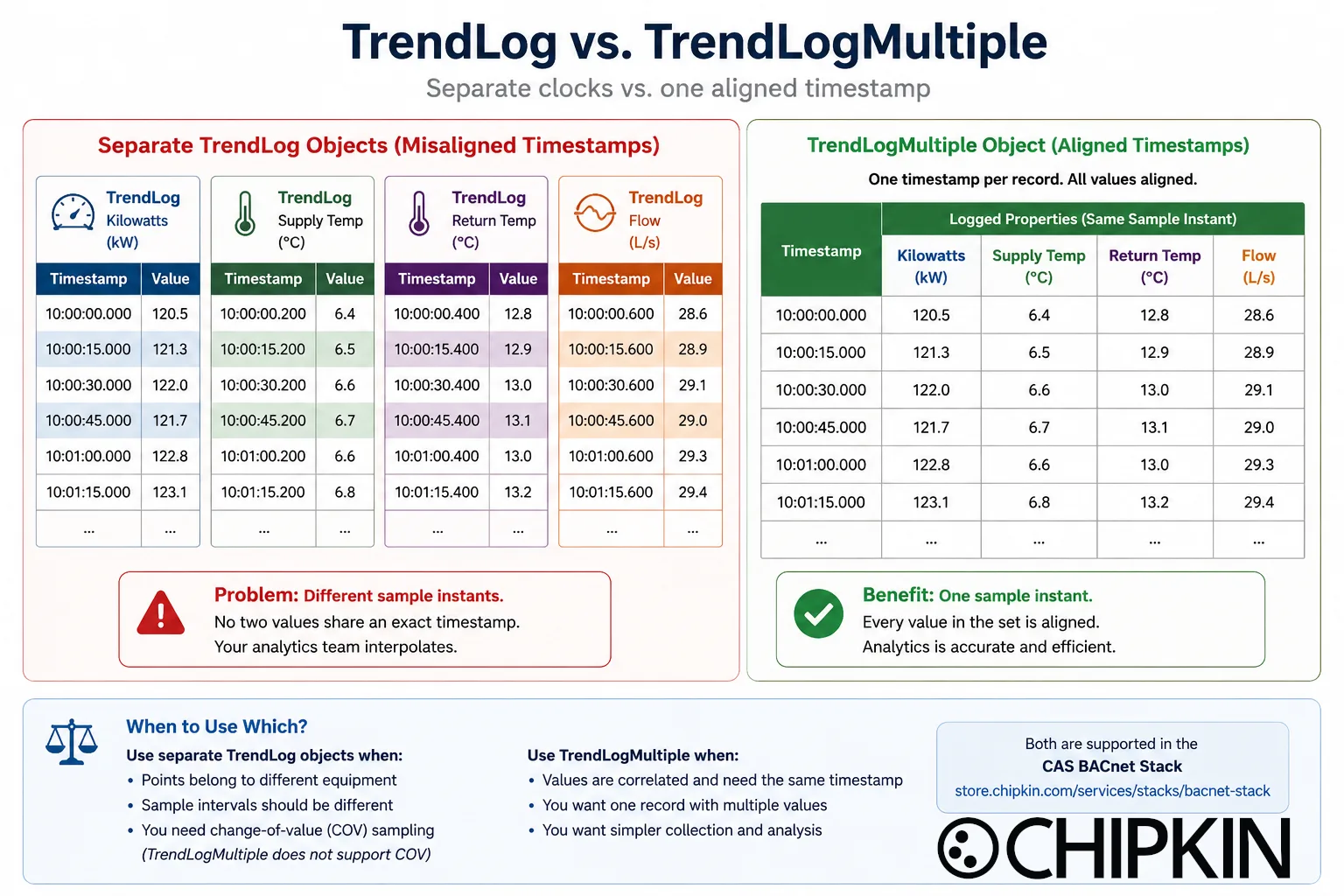
The multi-property case is where analytics live. Say a chiller plant logs four values per chiller: kilowatts, supply temperature, return temperature, and flow. Four separate TrendLog objects will capture them, but each samples on its own clock, so no two values share an exact timestamp and the efficiency calculation starts with interpolation. A TrendLogMultiple captures the whole set in one record on one clock. A year of aligned records is the kind of dataset that surfaces a staging inefficiency that has been quietly costing energy money the whole time (the scenario is illustrative, but every energy analyst will recognize it).
What the Spec Defines
Sampling. A TrendLog’s Logging_Type selects how samples are taken: periodically on Log_Interval, on change of value via COV (so irregular values log only when they move), or when triggered by a write to the Trigger property. A TrendLogMultiple samples periodically or on trigger; it does not do COV sampling. In both objects the referenced properties can live in the same device or in another device on the network.
The buffer and its counters. Records land in Log_Buffer, whose capacity is Buffer_Size. When the buffer fills, it either wraps and overwrites the oldest records or stops, depending on Stop_When_Full. Two counters describe the state, and they behave differently on purpose. Record_Count is how many records are retrievable right now; writing zero to it purges the buffer. Total_Record_Count is the running total of records ever collected: it never decreases, not even on a wrap, and rolls over only after 4,294,967,295 records. It is effectively a sequence number for everything the log has ever captured.
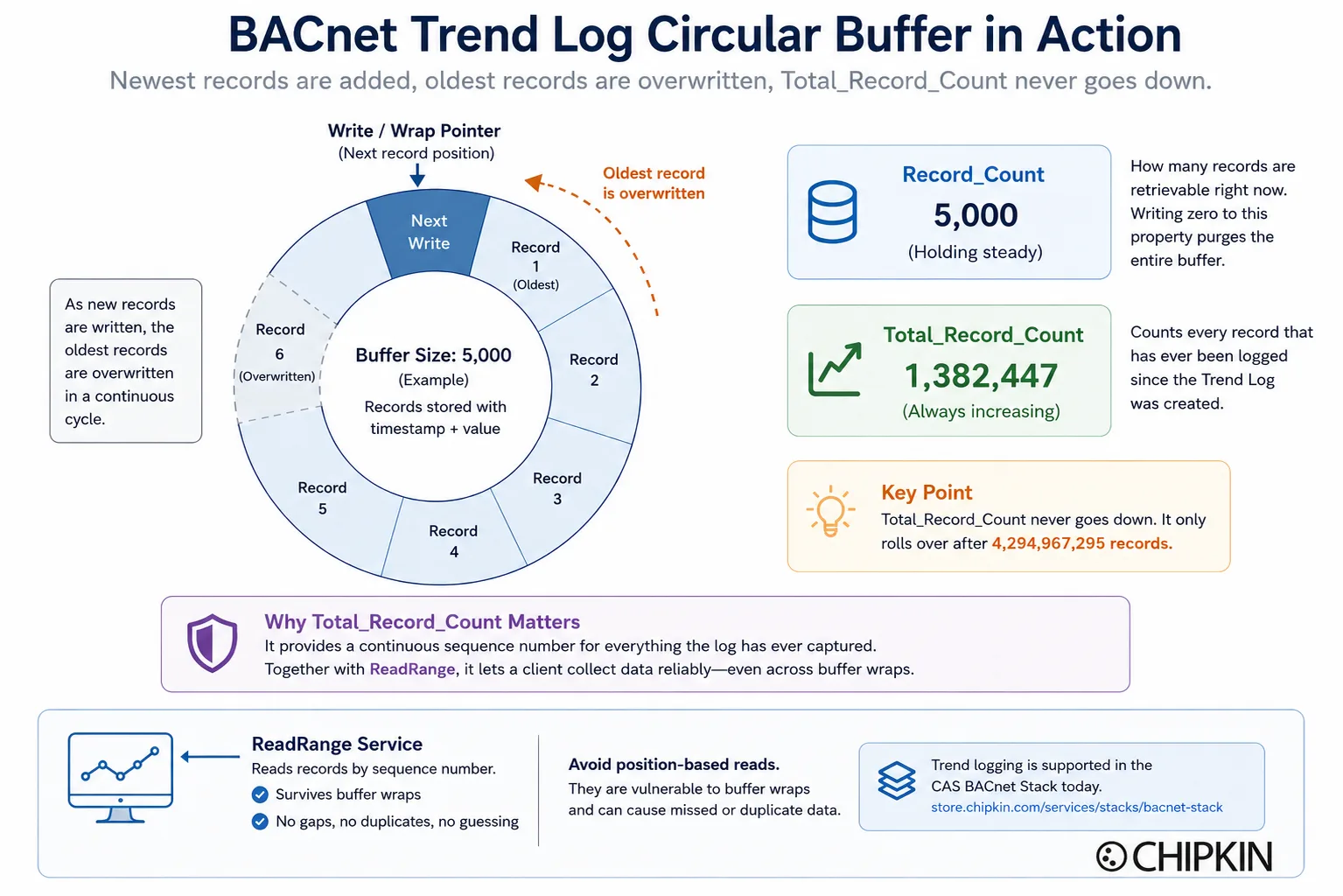
Reading history. ReadRange fetches records by position, by sequence number, by time, or as the last N records. By sequence number is the option a serious client uses, because sequence numbers survive a buffer wrap: the client always knows exactly which records it has already collected, with no gaps and no double-counting.
Knowing when to collect. A trend log with intrinsic reporting applies the BUFFER_READY event algorithm: once Notification_Threshold new records have accumulated, the log notifies its recipients that it is worth a visit. BUFFER_READY is unusual among BACnet events because it fires without an Event_State change, which is exactly why some implementations miss it.
When Do You Use Which?
Reach for a TrendLogMultiple when the values belong together and alignment matters: efficiency math, equipment snapshots, anything an analyst will line up sample for sample. Reach for separate TrendLog objects when the points belong to different equipment, need different sample intervals, or should log on change of value. The two coexist happily on one device, and most real devices carry both.
What the CAS BACnet Stack Supports Today
The CAS BACnet Stack supports both object types with their full property sets: periodic, COV, and triggered sampling on TrendLog, lockstep set logging on TrendLogMultiple, and BUFFER_READY intrinsic reporting on both. ReadRange is supported including by-sequence-number reads. Trend logging has been through our full test suite and is running on customer sites today.
One design decision the spec leaves to you: whether the buffer survives a reboot. The standard is silent on RAM versus non-volatile storage, and when you build on the stack that choice stays in your application’s hands. Ask that question early on any energy or analytics project; twelve months of trend data is only twelve months if it outlives a power cycle.
For the field side, the free CAS BACnet Explorer can walk a device’s trend log objects and pull a buffer over ReadRange, which is a quick way to confirm what a device is actually recording before the analytics team asks.
How 6.x Expands This
In 6.x we are hardening the BUFFER_READY dispatch path end to end. It is the one event that fires without an Event_State change, the corner of trend logging implementations most often get wrong, and we are also widening BTL verification of the trend objects’ behavior against the published test plans.
Where This Lives in the BACnet Spec
Trend logging touches a specific set of objects, services, BIBBs, and profiles. Each links to its reference page.
Object types
- TrendLog (Clause 12.25): the single-property log, with periodic, COV, and triggered sampling.
- TrendLogMultiple (Clause 12.30): the multi-property log; one timestamped record per sample instant.
- Notification Class: routes BUFFER_READY notifications to their recipients.
- Event Enrollment: algorithmic event reporting, the external alternative to a log’s intrinsic BUFFER_READY.
Services
- ReadRange (Clause 15.8): reads the log buffer by position, sequence number, or time.
- ConfirmedEventNotification and UnconfirmedEventNotification: carry the BUFFER_READY notification to the head end.
- SubscribeCOV: feeds COV-driven sampling when a TrendLog logs on change of value.
BIBBs (see the BIBBs reference for how the codes read)
T-VMT-I-B: the device exposes its own trend logs for viewing and modification over ReadRange.T-VMMV-I-B: the same for multi-value trends (TrendLogMultiple).T-ATR-B: automated trend retrieval; the device raises BUFFER_READY and serves the follow-up collection.
Profiles
- B-BC: the building-controller profile; required to collect trend data, which is why trend logs usually live here.
- B-AWS: the advanced operator workstation; the profile on the viewing and configuring side of the same data.
Where to Go Next
- Reference pages: the TrendLog object, the TrendLogMultiple object, and the ReadRange service with its four range types.
- Adding BACnet to a product with logging requirements? Request the CAS BACnet Stack developer kit.
- Have a specific BACnet need? Talk to us about your project.