
What BACnet Objects Are
BACnet represents all data as objects — standardized containers with a defined type, a unique instance number, and a set of properties. Unlike Modbus register maps, BACnet objects carry semantic meaning: an Analog Input object inherently represents a sensor reading, while a Binary Output represents a relay or actuator command.
Every BACnet device exposes a collection of objects. Each object is identified by its Object Identifier, which combines the object type and instance number (e.g., AI:1 = Analog Input, instance 1).
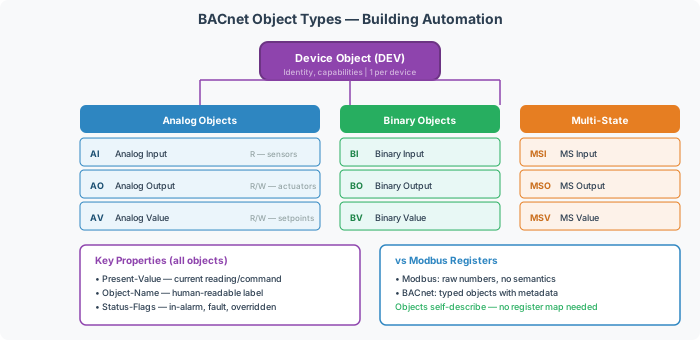
Common Object Types
These are the object types encountered most frequently in building automation gateway integrations:
| Type | Abbreviation | Access | Typical Use |
|---|---|---|---|
| Analog Input | AI | Read-only | Temperature sensors, pressure sensors, flow meters |
| Analog Output | AO | Read/Write | Valve positions, damper commands, fan speed setpoints |
| Analog Value | AV | Read/Write | Calculated values, setpoints, configuration parameters |
| Binary Input | BI | Read-only | Contact closures, alarm states, status flags |
| Binary Output | BO | Read/Write | Relay outputs, on/off commands |
| Binary Value | BV | Read/Write | Software flags, enable/disable states |
| Multi-State Input | MSI | Read-only | Enumerated states (e.g., fan mode: Off/Low/Med/High) |
| Multi-State Output | MSO | Read/Write | Enumerated commands |
| Multi-State Value | MSV | Read/Write | Enumerated configuration settings |
| Device | DEV | Read-only | Device identity and capabilities (one per device) |
[!NOTE] The ASHRAE 135-2020 standard defines 62 object types in total, but the types above cover the vast majority of building automation integrations.
Key Object Properties
Every BACnet object has a set of properties. The most commonly used:
| Property | Description | Example |
|---|---|---|
| Object Identifier | Type + Instance number | AI:1, AV:100, BO:5 |
| Object Name | Human-readable text label | "Zone Temp Sensor 1" |
| Present Value | Current value of the object | 72.5, Active, 3 |
| Status Flags | Four-bit status (In Alarm, Fault, Overridden, Out of Service) | {false, false, false, false} |
| Units | Engineering units (AI/AO/AV only) | degrees-fahrenheit |
| Number of States | State count (MSI/MSO/MSV only) | 4 |
| State Text | State name array (MSI/MSO/MSV only) | ["Off", "Low", "Med", "High"] |
| Description | Free-text description | "Return air temperature" |
Analog Value for Binary Data
[!WARNING] Some legacy integrations — especially Metasys N2 to BACnet conversions — use Analog Value objects to represent binary (on/off) states instead of Binary Value. The Present Value will be
0.0or1.0instead ofActive/Inactive. Always check what the upstream device actually exposes before assuming object type matches the data semantics.
Object Instance Numbering
Object instances are unique per type within a device. A device can have both AI:1 and AO:1 without conflict. Instance numbers range from 0 to 4,194,303 (22-bit).
When mapping objects in a protocol conversion gateway like a FieldServer or QuickServer, the object instance numbers are configurable — but they must be unique per type and must match what the downstream BMS expects.
Integration Notes
- When performing Modbus to BACnet conversion, each Modbus register or coil is mapped to a BACnet object. Holding registers typically map to AV or AO objects; coils map to BV or BO objects.
- The Device Instance identifies the gateway on the BACnet network — it must be unique across the entire BACnet internetwork.
- Use CAS BACnet Explorer or Who-Is discovery to verify which objects a device actually exposes vs. what the documentation claims.