
A government engineering team needed to retire an older CAS-2700 gateway and move a Hobart HPG integration onto QuickServer. Chipkin combined a custom Hobart HPG driver with hands-on serial troubleshooting to recover live Hobart HPG data and expose it to a downstream Modbus RTU client.
This was not a standard protocol conversion with a mature public driver stack. It involved legacy Hobart equipment, a migration away from an older gateway already familiar to the site, and a serial path that looked correct on paper but kept failing in practice.
At a Glance
- Industry: Government / industrial equipment support
- Customer: Government engineering team
- Facility type: Legacy equipment monitoring environment
- Client role: Engineering lead replacing an obsolete gateway workflow
- Project scale: Legacy Hobart HPG migration to a Modbus RTU monitoring workflow
- Protocols: From: Hobart HPG -> To: Modbus RTU
- Chipkin product: Chipkin QuickServer CAS-2220 / FS-QS-2X10
- Project start: May 2022
- Internal reference: FSE14756
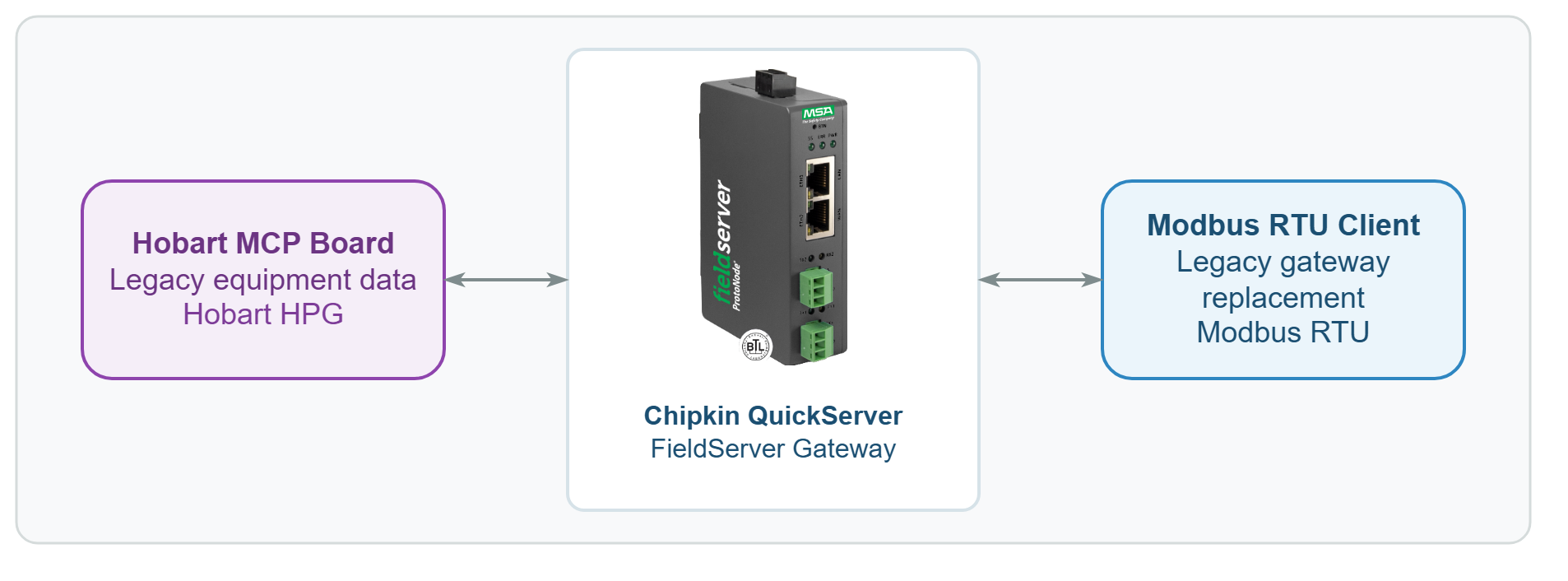
Hobart MCP board -> Hobart HPG serial data -> Chipkin QuickServer -> Modbus RTU -> monitoring client
Hobart HPG to Modbus RTU Challenge
The upstream/server side was a Hobart MCP board using the Hobart HPG protocol over a fragile serial connection. The downstream/client side needed a stable Modbus RTU presentation that could replace an older CAS-2700 workflow already known at the site. That meant Chipkin had to do more than translate points. The team had to replace a legacy operational pattern the customer already trusted.
The first complication was that this was a custom-driver job. There was no plug-and-play public Hobart HPG workflow that the customer could configure alone. Chipkin had to build and support the custom Hobart HPG driver, answer migration questions, and help the site understand where the live Hobart HPG values appeared inside QuickServer.
The second complication was more stubborn: the gateway would connect, but the live Hobart HPG values were still not behaving consistently. The customer reported that all of the fields were still zero in the data array, even with the hardware connected. That is exactly the kind of symptom that wastes days if the team treats it as a pure mapping problem when the real fault lives in the physical serial layer.
Why Chipkin for Hobart HPG to Modbus RTU Integration
This project fit Chipkin because it required both custom protocol work and field-grade troubleshooting discipline. A generic gateway vendor could have supplied hardware, but the hard part here was the combination of a custom Hobart HPG driver, the need to preserve a legacy integration outcome, and the serial-layer debugging required to prove why the Hobart HPG data stayed at zero.
Chipkin support did not stop at sending a file. The team clarified how the customer should read the mapped Modbus RTU side, pushed for diagnostics when the live Hobart HPG data stayed blank, and reproduced the same behavior on a Hobart test setup. That reproduction step mattered because it turned the troubleshooting from speculation into an actionable explanation.
The Solution: QuickServer Hobart HPG to Modbus RTU Bridge
Chipkin first delivered the custom Hobart HPG driver and mapped the Hobart-side values so they could be exposed through Modbus RTU. The support thread then shifted into commissioning mode. The customer asked where the live Hobart HPG values should appear, Chipkin pointed them to the data array and the correct Modbus access pattern, and the team used that as the primary validation surface instead of relying on the older CAS-2700 status-page habit.
When the live Hobart HPG values still stayed at zero, Chipkin escalated the debugging properly, reproduced the same symptoms on a Hobart test rig, and identified the decisive issue: the Hobart RS-232 connection was mechanically unreliable. That changed the whole direction of the job. Instead of endlessly reworking the logical mapping, the team treated the connection as intermittent hardware behavior and delivered an updated firmware and configuration pair for retesting.
For another Modbus RTU deployment, see the Modbus RTU to BACnet/IP Remote Chiller Integration case study.
Legacy Gateway Replacement Results
The project achieved a working Hobart HPG to Modbus RTU handoff without replacing the underlying Hobart equipment.
Project proof points:
- A custom Hobart HPG driver made the QuickServer migration possible.
- The real blocking issue was reproduced and isolated to intermittent serial-port seating on the Hobart side.
- Updated firmware and configuration gave the customer a clear retest path after the physical-layer issue was identified.
- The last working configuration was archived for future support and repeatability.
The customer confirmed that the updated setup was no longer stuck at zero-value troubleshooting:
“With the updated Firmware and the config file, we were able to get the full data from the Hobart within 10 to 20 seconds. That is a big step forward.”
— Engineering lead, government equipment integration team
Have a Similar Legacy Serial Migration?
Need to replace an aging gateway without replacing the legacy device it talks to? Chipkin can help with custom protocol support, serial troubleshooting, and protocol gateway delivery that preserves the downstream Modbus RTU workflow your team already depends on. Tell us about your project.
Frequently Asked Questions
Can QuickServer convert Hobart HPG to Modbus RTU?
Yes. QuickServer can be used as a Hobart HPG to Modbus RTU protocol gateway when the project includes the required custom driver support. This deployment is an example of that legacy migration path.
Does Chipkin support Hobart HPG with a custom driver?
Yes. This project required a custom Hobart HPG driver because the customer was replacing a legacy workflow rather than using a standard off-the-shelf mapping path.
What if the Hobart HPG data stays at zero after connection?
That symptom can point to a physical serial issue instead of a mapping problem. In this deployment, the critical breakthrough was identifying an intermittent RS-232 seating problem on the Hobart side.