
Overview
Modbus registers are 16-bit integers. They don’t inherently carry unit information, decimal points, or scaling factors. A register value of 2500 could mean 25.00°C, 250.0 PSI, 2500 RPM, or just the number 2500 — the register map documentation defines the interpretation.
Converting raw register values to meaningful engineering units is one of the most error-prone steps in Modbus integration. This guide covers the common scaling methods, how to identify them in device documentation, and how to configure them in gateway devices.
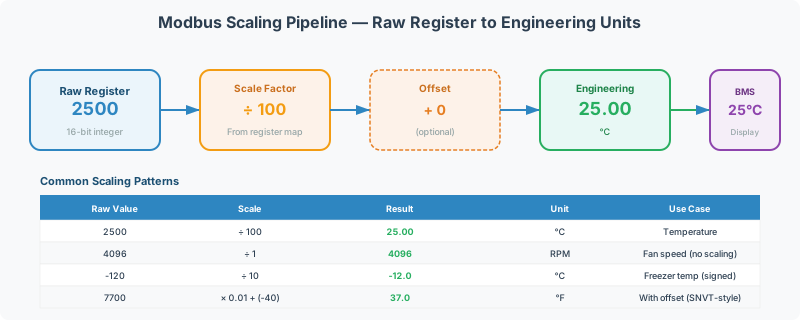
Common Scaling Methods
Method 1: Fixed Multiplier / Divisor (Most Common)
The raw register value is divided (or multiplied) by a fixed factor to produce the engineering value:
Engineering Value = Raw Value × Multiplieror equivalently:
Engineering Value = Raw Value ÷ Divisor| Raw Value | Divisor | Scale Factor | Engineering Value | Unit |
|---|---|---|---|---|
| 2500 | 100 | ×0.01 | 25.00 | °C |
| 2500 | 10 | ×0.1 | 250.0 | PSI |
| 2500 | 1 | ×1 | 2500 | RPM |
| 1234 | 10 | ×0.1 | 123.4 | kW |
| 456 | 100 | ×0.01 | 4.56 | pH |
[!TIP] The most common divisors in building automation are 10 and 100. When a register map says “resolution: 0.1” or “decimal places: 1,” divide by 10. When it says “resolution: 0.01” or “decimal places: 2,” divide by 100.
How to Identify the Scale Factor
Look for these clues in the device register map documentation:
| Documentation Says | Scale Factor | Example |
|---|---|---|
| ”Resolution: 0.1” | ÷10 | Raw 250 → 25.0 |
| ”Resolution: 0.01” | ÷100 | Raw 2500 → 25.00 |
| ”×10” or “Multiplier: 10” | ÷10 (to get back to real value) | Raw 250 → 25.0 |
| ”Scaled by 100” | ÷100 | Raw 2500 → 25.00 |
| ”Integer, no decimal” | ÷1 (no scaling) | Raw 72 → 72 |
| ”Units: 0.1°F” | ÷10, value is in °F | Raw 720 → 72.0°F |
Writing Scaled Values
When writing setpoints back to a device with scaling, apply the inverse operation:
Raw Value = Engineering Value × DivisorExample: To set a temperature setpoint of 23.5°C on a device with divisor 10:
Raw Value = 23.5 × 10 = 235Write 235 (0x00EB) to the setpoint register via FC06 or FC16.
[!CAUTION] Always verify the acceptable range before writing. If the register accepts 0–500 (representing 0.0–50.0°C), writing a raw value of 1000 (100.0°C) may cause exception code 03 (Illegal Data Value) or damage the controlled equipment.
Method 2: IEEE 754 Floating Point (32-Bit)
Some devices store values as 32-bit IEEE 754 floating-point numbers, spread across two consecutive 16-bit holding registers:
| Byte | Content |
|---|---|
| Bits 31–23 | Sign (1 bit) + Exponent (8 bits) |
| Bits 22–0 | Mantissa (23 bits) |
A 32-bit float spans 2 Modbus registers. The register order varies by manufacturer — see Modbus Data Types & Byte Order Reference for byte/word order details.
| Register Order | Description | Also Called |
|---|---|---|
| Big-endian (AB CD) | High word first, high byte first | ”Normal” |
| Little-endian (CD AB) | Low word first, high byte first | ”Word-swapped” |
| Byte-swapped (BA DC) | High word first, low byte first | Uncommon |
| Fully reversed (DC BA) | Low word first, low byte first | Some Asian manufacturers |
Example: 25.5°C as IEEE 754 Float
25.5 in IEEE 754 = 0x41CC0000
| Register Order | Register N | Register N+1 |
|---|---|---|
| Big-endian (AB CD) | 0x41CC | 0x0000 |
| Little-endian (CD AB) | 0x0000 | 0x41CC |
[!WARNING] If you read two registers and the resulting float is an impossibly large or small number (like
1.2e+38or3.4e-43), the register order is almost certainly wrong. Try swapping the two register values.
Method 3: Signed Integer (Two’s Complement)
Modbus registers are unsigned by default (0–65,535). For negative values (e.g., below-zero temperatures), devices use two’s complement signed representation:
| Raw Value (unsigned) | Raw Value (hex) | Signed Interpretation |
|---|---|---|
| 0 | 0x0000 | 0 |
| 100 | 0x0064 | 100 |
| 32,767 | 0x7FFF | 32,767 (maximum positive) |
| 32,768 | 0x8000 | -32,768 (minimum negative) |
| 65,435 | 0xFFAB | -85 |
| 65,535 | 0xFFFF | -1 |
How to Detect Signed Values
If a register represents temperature, pressure, position, or any value that can be negative, it’s likely signed. If you read a value around 65,500 when expecting a small negative number, the value needs signed interpretation.
Conversion: If the unsigned value is > 32,767, subtract 65,536 to get the signed value.
Signed = Unsigned - 65536 (when Unsigned > 32767)Example: Raw register = 0xFFAB (65,451 unsigned)
65451 - 65536 = -85 → with divisor 10 → -8.5°C ✅Method 4: 32-Bit Integer (Long)
Energy meters, flow meters, and counters frequently use 32-bit unsigned or signed integers across two registers for values that exceed the 16-bit range (0–65,535):
| Format | Range | Use Case |
|---|---|---|
| 32-bit unsigned | 0 to 4,294,967,295 | Energy totals (kWh), flow totals, runtime hours |
| 32-bit signed | -2,147,483,648 to 2,147,483,647 | Bidirectional totals (import/export energy) |
Like floats, the register order (high word first vs low word first) varies by manufacturer. See Modbus Data Types & Byte Order Reference.
Temperature Conversion
Building automation frequently requires temperature conversion between °C and °F:
| Conversion | Formula |
|---|---|
| °C to °F | °F = (°C × 9/5) + 32 |
| °F to °C | °C = (°F - 32) × 5/9 |
Common Temperature Scaling Table
| Device Reports | Raw Value | Divisor | Engineering Value |
|---|---|---|---|
| Temperature in 0.1°C | 235 | 10 | 23.5°C |
| Temperature in 0.01°C | 2350 | 100 | 23.50°C |
| Temperature in 0.1°F | 745 | 10 | 74.5°F |
| Temperature in 0.1°C, signed | 65501 | 10 | (65501-65536)/10 = -3.5°C |
[!NOTE] Some devices report temperature in °F while the BACnet side expects °C (or vice versa). When configuring a protocol conversion gateway, apply both the scaling divisor AND the unit conversion in the point map.
Scaling in Gateway Configuration
QuickServer Scaling
When configuring a QuickServer point map:
| Mapping Step | Parameter | Example |
|---|---|---|
| 1. Read raw register | Source address, FC | FC03, Register 0 |
| 2. Apply data type | Signed/unsigned, 16/32-bit | Signed 16-bit |
| 3. Apply scale factor | Multiplier or divisor | ÷10 |
| 4. Apply unit conversion | °F→°C, PSI→kPa, etc. | (°F-32)×5/9 |
| 5. Write to destination | Target BACnet object, register, etc. | BACnet AV, Present Value |
Common Pitfalls
| Mistake | Result | Fix |
|---|---|---|
| Forgot to apply divisor | Value is 10× or 100× too large | Check register map for scale factor |
| Applied wrong divisor | Value is close but off by a factor | Verify divisor against a known reading |
| Wrong sign interpretation | Negative values appear as ~65,000 | Configure as signed 16-bit |
| Wrong register order for 32-bit | Value is impossibly large or garbage | Swap register order |
| Scaling applied twice | Value is 100× or 10,000× too small | Check if the device already provides scaled values |
Verifying Scaling
Sanity-Check Workflow
- Read the raw register value using CAS Modbus Scanner or equivalent tool
- Compare against a known reference — read the device’s display panel, check with a handheld meter, or compare to a known setpoint
- Apply the documented scaling and verify the math:
Raw ÷ Divisor = Expected Value ± tolerance - Test extremes — verify scaling holds at both high and low ends of the range (not just midrange)
- Test negative values (if applicable) — confirm signed interpretation works for below-zero readings
Example Verification
Device documentation: “Register 100 = Room Temperature, 0.1°C resolution”
| Test | Raw Value | Calculation | Expected | Verified? |
|---|---|---|---|---|
| Normal range | 235 | 235 ÷ 10 = 23.5°C | ~23.5°C on display | ✅ |
| Cold room | 55 | 55 ÷ 10 = 5.5°C | ~5.5°C on display | ✅ |
| Below zero | 65516 | (65516-65536) ÷ 10 = -2.0°C | ~-2.0°C on display | ✅ |
Related Articles
- Modbus Data Types & Byte Order Reference — byte/word order for 32-bit values
- How to Read a Modbus Register Map — interpreting manufacturer documentation
- Modbus Register Addressing: Modicon, PDU, and Page-Based Conventions — addressing conventions
- Modbus Exception Codes & Error Handling Reference — exception 03 for out-of-range writes
- Modbus to BACnet Protocol Conversion Guide — scaling in protocol conversion
Chipkin Tools
- CAS Modbus Scanner — Read raw registers and verify scaling against known values
- QuickServer — Protocol conversion gateway with built-in scaling, offset, and unit conversion
- QuickServer — Multi-protocol gateway supporting complex scaling expressions per point
- Chipkin Support — Register map analysis and scaling configuration assistance