
Overview
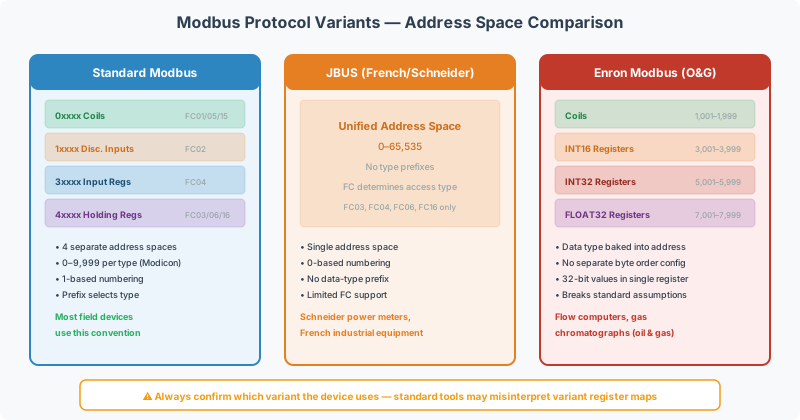
Standard Modbus (as defined by the Modbus Organization specification) is the baseline protocol — but several proprietary variants exist that modify register numbering, data types, or message structure. These variants look like Modbus on the wire and use the same function codes, but their register maps and data interpretation differ enough to cause integration failures if you assume standard Modbus behavior.
This article covers the three most commonly encountered variants in field integration work: JBUS, Enron Modbus, and Daniel Modbus.
[!NOTE] Modbus ASCII is a different transmission mode (framing format), not a protocol variant. Modbus ASCII uses the same register model and function codes as standard Modbus RTU — only the wire encoding differs.
JBUS (April / AEG)
Origin
JBUS was developed by the French company April (later acquired by AEG Schneider) in the early 1980s. It was widely adopted in French industrial equipment — particularly power meters, energy analyzers, and building controllers from Schneider Electric and Merlin Gerin.
Key Differences from Standard Modbus
| Feature | Standard Modbus | JBUS |
|---|---|---|
| Register numbering | 0-based PDU addressing with data-type prefixes (4xxxx) | Simple 0-based numbering, no data-type prefix |
| Data type separation | Coils, Discrete Inputs, Input Registers, Holding Registers are separate address spaces | Single unified address space |
| Address range | 0–9,999 per data type (65,535 with extended addressing) | 0–65,535 unified |
| Supported function codes | Full set (FC01–FC23+) | Typically limited to FC03, FC04, FC06, FC16 |
The Numbering Trap
The most common integration mistake with JBUS devices is off-by-one errors. JBUS documentation often lists register addresses as the raw PDU address, but some JBUS devices use 1-based numbering in their documentation while others use 0-based.
When working with a JBUS device:
- Read the vendor’s register map carefully — note whether addresses start at 0 or 1
- Try reading a known register (e.g., a device ID or firmware version register) to confirm the addressing convention
- If the CAS Modbus Scanner returns unexpected values, try offsetting the address by ±1
[!TIP] Many Schneider Electric power meters (PM5xxx, PM8xxx series) use JBUS-style addressing. If the register map shows simple numeric addresses without 4xxxx prefixes, expect JBUS conventions.
Gateway Configuration
When configuring a QuickServer to communicate with a JBUS device, treat it as standard Modbus RTU on the wire — the framing and CRC are identical. Adjust the register offset in the point map to match the device’s specific numbering convention.
Enron Modbus
Origin
Enron Modbus was developed by Enron (the energy company) for their SCADA and flow measurement systems, primarily in the oil and gas industry. Despite Enron’s collapse, the protocol variant persists in many flow computers, gas chromatographs, and custody transfer measurement devices.
Key Differences from Standard Modbus
| Feature | Standard Modbus | Enron Modbus |
|---|---|---|
| Register size | 16-bit (2 bytes per register) | 32-bit (4 bytes per register) |
| Data types | UINT16 natively; 32-bit requires combining two registers | INT32 and FLOAT32 native in a single register |
| Register ranges | 0–65,535 | Segmented by data type (see table below) |
| Historical data | Not supported | Built-in historical data registers |
| Event/alarm registers | Not standardized | Defined alarm and event register blocks |
Enron Register Map Structure
Enron Modbus defines specific register ranges for different data types:
| Register Range | Data Type | Size | Description |
|---|---|---|---|
| 1,001–1,999 | Boolean (Coils) | 1 bit | Discrete outputs |
| 3,001–3,999 | INT16 | 16 bits | 16-bit integer inputs |
| 5,001–5,999 | INT32 | 32 bits | 32-bit integer values |
| 7,001–7,999 | FLOAT32 | 32 bits | IEEE 754 floating-point values |
[!WARNING] The critical difference: in standard Modbus, each register is 16 bits. In Enron Modbus, the register width depends on the register range. An FC03 read of register 7001 returns 4 bytes (one 32-bit float), not 2 bytes. If your gateway or scanner assumes standard 16-bit registers, the data will be misaligned.
Historical Data
Enron Modbus includes a mechanism for reading historical log data (hourly, daily, and batch records). Historical register reads use standard function codes but target specific register ranges. The historical data layout is vendor-specific — consult the device documentation for the exact register map.
Gateway Configuration
Configuring a gateway for Enron Modbus requires:
- 32-bit register mode — the gateway must know that registers in certain ranges are 4 bytes, not 2
- Correct byte order — Enron devices may use different endianness than standard Modbus
- Register range mapping — map the Enron register ranges to standard Modbus or BACnet objects in the point map
QuickServer supports Enron Modbus through specific driver configuration that handles the 32-bit register interpretation automatically.
Daniel Modbus
Origin
Daniel Modbus is used by Daniel Measurement and Control (now part of Emerson) in their flow measurement products — primarily turbine meters, ultrasonic flow meters, and flow computers. It is closely related to Enron Modbus but has some implementation differences.
Key Differences
| Feature | Enron Modbus | Daniel Modbus |
|---|---|---|
| Register layout | Standardized Enron ranges | Daniel-specific register map |
| Program/data registers | Unified | Separate “program” and “data” register sets |
| Historical data format | Enron-standard historical blocks | Daniel-specific history format |
| Configuration access | Standard write function codes | Some configuration requires proprietary handshaking |
Practical Impact
For most integration work, Daniel Modbus devices are treated as Enron Modbus with a device-specific register map. The key steps are:
- Obtain the Daniel device register map (usually in the device manual appendix)
- Note which registers are 16-bit vs 32-bit
- Configure the gateway with the appropriate register width for each mapped point
Identifying Which Variant You Have
If the device documentation doesn’t explicitly state the protocol variant, use these indicators:
| Clue | Likely Variant |
|---|---|
| Register addresses have no 4xxxx prefix, simple numbering | JBUS |
| French manufacturer (Schneider, Merlin Gerin, April) | JBUS |
| Register map shows 32-bit registers natively | Enron or Daniel |
| Oil & gas / flow measurement device | Enron or Daniel |
| Register ranges segmented by data type (1xxx, 3xxx, 5xxx, 7xxx) | Enron |
| Daniel/Emerson flow computer | Daniel |
| Register map uses standard Modicon 4xxxx notation | Standard Modbus |
Quick Test with CAS Modbus Scanner
- Read holding registers starting at the device’s documented register offset using CAS Modbus Scanner
- Display as Float32 — if values make physical sense (e.g., reasonable temperature, pressure, flow rates), the device may be using 32-bit Enron-style registers
- If Float32 values look wrong, try UINT16 — if those values match the documentation, you’re dealing with standard Modbus or JBUS
- If values are wrong by a factor or offset, check for off-by-one addressing
Quick Reference
| Variant | Origin | Key Feature | Register Width | Common In |
|---|---|---|---|---|
| Standard Modbus | Modicon (1979) | 4xxxx addressing, 16-bit registers | 16-bit | Everything |
| JBUS | April/AEG (1980s) | Simplified numbering, unified address space | 16-bit | French power meters, Schneider devices |
| Enron Modbus | Enron Corp | 32-bit registers, historical data | 32-bit (type-dependent) | Oil & gas flow computers, gas chromatographs |
| Daniel Modbus | Daniel/Emerson | Enron variant with Daniel-specific register map | 32-bit (type-dependent) | Daniel flow meters, ultrasonic meters |
Related Articles
- Modbus Register Addressing: Modicon, PDU, and Page-Based Conventions — understanding the three addressing conventions
- Modbus Data Types & Byte Order Reference — 16-bit vs 32-bit data handling
- Modbus Scaling & Data Conversion Guide — converting between data formats
- How to Read a Modbus Register Map — interpreting vendor documentation
- Modbus Function Code Deep Dive — function codes used across all variants
- Modbus RTU vs ASCII Transmission Modes Explained — framing modes (not to be confused with protocol variants)
Chipkin Can Help
Integrating a JBUS or Enron Modbus device with a building automation system? Chipkin support has extensive experience configuring QuickServer gateways for non-standard Modbus variants. We can help with register mapping, byte order configuration, and protocol conversion to BACnet or other protocols.