
Overview
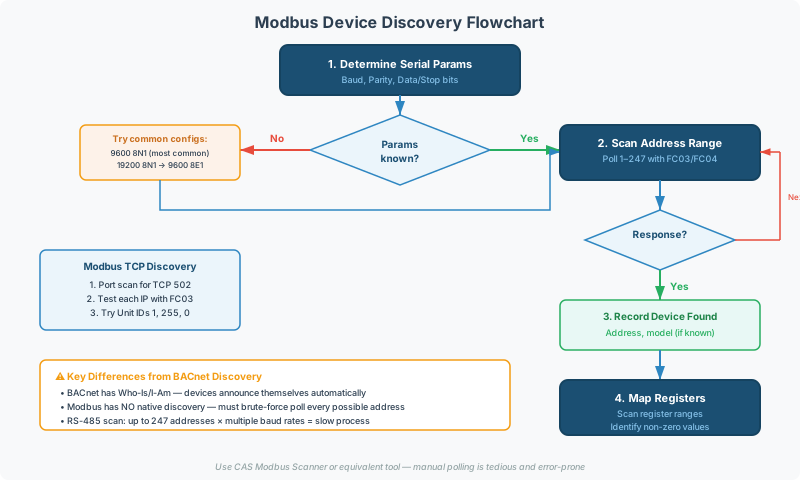
Discovering Modbus devices on a network when you have no documentation — or the documentation is outdated — is one of the most common tasks in building automation commissioning. Unlike BACnet, which has built-in discovery mechanisms (Who-Is / I-Am), Modbus has no native discovery protocol. Finding devices requires methodical scanning.
This guide covers the process of discovering Modbus devices on both serial (RS-485) and Ethernet (TCP) networks, from identifying communication parameters to mapping unknown register spaces.
Why Modbus Has No Discovery
Modbus was designed in 1979 for a master/slave architecture where the master already knows which devices are on the bus. The protocol has no mechanism for:
- Devices announcing their presence
- Masters querying “who is on the network?”
- Auto-negotiation of baud rate, parity, or addressing
Every discovery operation is performed by brute-force polling — sending requests to each possible address and observing which addresses respond.
Modbus RTU Discovery (RS-485)
Step 1: Determine Serial Parameters
Before scanning addresses, you must use the correct baud rate, parity, and data bits. If these are unknown, try the most common configurations:
| Priority | Baud Rate | Data/Parity/Stop | Notes |
|---|---|---|---|
| 1 | 9,600 | 8N1 | Most common in field devices |
| 2 | 9,600 | 8E1 | Specification default |
| 3 | 19,200 | 8N1 | Common for newer devices |
| 4 | 19,200 | 8E1 | Second-most common |
| 5 | 38,400 | 8N1 | Higher-speed installations |
| 6 | 115,200 | 8N1 | Some modern devices |
Process:
- Set the scanner to the first configuration (9600, 8N1)
- Send a read request to address 1 (FC03, register 0, count 1)
- If you get a valid response → baud rate and parity found
- If timeout → try the next configuration
- Repeat until you find a combination that produces a response
[!TIP] If you can physically access a device, check its display panel or label for serial settings. Many devices print the baud rate on a sticker or display it in a setup menu. This saves significant time vs trial-and-error scanning.
Step 2: Scan Address Range
Once serial parameters are confirmed, scan the valid Modbus address range:
| Range | Addresses | Description |
|---|---|---|
| Full scan | 1 – 247 | All valid Modbus addresses |
| Common range | 1 – 32 | Most installations use low addresses |
| Quick scan | 1 – 10 | Small installations |
For each address, send a simple read request:
- FC03 (Read Holding Registers), register 0, count 1
- If exception 01 (Illegal Function), try FC04 (Read Input Registers)
- If any response (data or exception), the address is occupied
- If timeout (no response), the address is empty (or the device is offline)
Scan Timing
| Parameter | Recommended Value | Notes |
|---|---|---|
| Response timeout | 500 ms | Allow for slow devices |
| Inter-request delay | 50 ms | Prevent bus congestion |
| Time per address (worst case) | ~550 ms | Timeout + delay |
| Full scan (247 addresses) | ~2.5 minutes | At 9600 baud with 500ms timeout |
| Quick scan (32 addresses) | ~18 seconds | Same parameters |
[!NOTE] Use short response timeouts for scanning (500ms) even though production polling might use longer timeouts. If a device doesn’t respond within 500ms during discovery, it’s either not present or not functional — move on.
Step 3: Confirm Device Identity
For each responding address, try to identify the device:
| Method | Function Code | What You Learn |
|---|---|---|
| Read Device ID | FC43/14 (MEI Type) | Vendor name, product code, revision (if supported) |
| Report Server ID | FC17 | Device-specific ID string (if supported) |
| Read known registers | FC03/04 | Model number, firmware version, serial number (if documented) |
[!WARNING] FC43 (Read Device Identification) and FC17 (Report Server ID) are optional and rarely supported by field devices. Don’t rely on them — most devices will return exception 01. In practice you will need to identify devices by: physical inspection, label reading, or comparing register values to known documentation.
Modbus TCP Discovery (Ethernet)
Step 1: Find Devices on the Network
Before Modbus-level scanning, identify which IP addresses have Modbus TCP servers:
| Method | Tool | What It Finds |
|---|---|---|
| Port scan for TCP 502 | CAS Modbus Scanner, nmap | IP addresses listening on the Modbus port |
| ARP scan | Network scanner | All devices on the subnet (MAC addresses) |
| DHCP lease table | Router/switch admin page | IP addresses assigned by DHCP |
| Static IP documentation | Project files | Pre-configured addresses |
Step 2: Scan Unit Identifiers
Each Modbus TCP device may host multiple logical devices via different Unit Identifiers:
| Scenario | Unit ID Range to Scan |
|---|---|
| Direct TCP device (no gateway) | Try 0x01 and 0xFF (255) |
| TCP-to-RTU gateway | Scan 1–247 (maps to serial slave addresses) |
| Unknown | Start with 1, then 255, then scan 1–32 |
For each IP address that has port 502 open:
- Connect via TCP to port 502
- Send FC03, register 0, count 1, with Unit ID = 1
- If valid response → record the device
- If exception 0A/0B → the Unit ID doesn’t map to a downstream device (try others)
- Repeat for other Unit IDs as needed
[!TIP] If a device responds to all Unit IDs with the same data, it’s likely a direct TCP device that ignores the Unit Identifier field. If it responds to specific Unit IDs and returns exception 0B for others, it’s a TCP-to-RTU gateway routing to serial devices.
Register Mapping (Unknown Devices)
Once you’ve found a device but have no register documentation, you can explore the register space by reading sequential blocks:
Systematic Register Exploration
- Read registers 0–99 (FC03) — look for non-zero values
- Read registers 0–99 (FC04) — the device may use input registers
- Read coils 0–99 (FC01) — check for discrete outputs
- Read discrete inputs 0–99 (FC02) — check for discrete inputs
For each block of responding registers, note:
| Property | What to Look For |
|---|---|
| Non-zero values | Likely contain live data |
| Values that change | Sensor readings, status values |
| Values near 0 or 65535 | Potential signed values (negative temperatures) — see scaling guide |
| Sequential 0s | Unused or reserved register range |
| Exception 02 at specific addresses | End of valid register range |
Identifying Data Without Documentation
| Register Value Pattern | Likely Content |
|---|---|
| 200–300 (FC03) | Temperature in 0.1°F or 0.1°C (20–30°C or 68–86°F) |
| 0 or 1 (FC01) | Switch/relay state (on/off) |
| Slowly incrementing | Counter (runtime hours, energy total) |
| ~500–1013 | Barometric pressure in 0.1 mbar |
| Large number that swings | Analog value with multiplication factor |
0xFFFF (65535) | Unused / error / not configured |
[!CAUTION] Never write to unknown registers during discovery. Some registers control physical outputs (relays, actuators, setpoints). Writing arbitrary values to an unidentified register could cause equipment damage or safety hazards. Only read during discovery.
Finding 32-Bit Values
Look for pairs of adjacent registers where:
- Both registers change together
- Individual register values don’t make sense alone
- The device documentation (if partially available) mentions “double register” or “32-bit”
Try interpreting the pair as a 32-bit value in both word orders — see Modbus Data Types & Byte Order Reference.
CAS Modbus Scanner Discovery Features
The CAS Modbus Scanner provides automated discovery workflows:
| Feature | What It Does |
|---|---|
| Address scan | Polls address range 1–247, reports responding devices |
| Auto-detect baud rate | Tries common baud rates and parity settings automatically |
| Register map read | Reads contiguous register blocks and displays values |
| Data type interpretation | Shows values as 16-bit unsigned, signed, float (both word orders) |
| Continuous monitoring | Polls selected registers repeatedly, highlights changing values |
Discovery Workflow with CAS Modbus Scanner
- Connect to the RS-485 bus or specify the TCP IP address
- Auto-detect serial parameters (baud, parity) if unknown
- Scan the address range — the scanner reports all responding addresses
- Read register blocks from each discovered device
- Monitor changing values to identify live sensor data
- Export the findings for gateway configuration
Building a Device Inventory
After discovery, document each device:
| Field | Example |
|---|---|
| Address | 1 |
| IP (if TCP) | 192.168.1.100 |
| Manufacturer | (from label or FC43) |
| Model | (from label or register) |
| Baud/Parity | 9,600 / 8N1 |
| Responding FCs | FC03, FC04, FC06 |
| Active register range | 0–49 (FC03), 0–19 (FC04) |
| Known data points | Reg 0 = temperature, Reg 1 = humidity |
| Physical location | Building A, Mech Room, Panel 3 |
[!TIP] Take photos of device labels during the site visit. Labels often contain model numbers, serial numbers, and MAC addresses that help identify the correct register map documentation later. Many manufacturers publish register maps on their websites if you know the exact model number.
Troubleshooting Discovery Issues
| Problem | Likely Cause | Fix |
|---|---|---|
| No devices respond on any address | Wrong baud rate/parity, wiring fault, or devices powered off | Try all common serial parameter combinations; verify power and wiring |
| Device responds to some FCs but not others | Normal — device doesn’t support all function codes | Document which FCs work and use those |
| All addresses return the same data | Star topology causing bus reflections; or device responding to all addresses | Check wiring topology; isolate devices one at a time |
| Discovery finds devices that don’t exist | Bus reflections or noise causing false positive | Add proper termination; reduce scan timeout to 300ms |
| TCP port 502 is open but all requests timeout | Device requires specific Unit ID; or device is busy | Try Unit IDs 1 and 255; check if another client has the connection |
| Device found but register reads all return 0 | Wrong register range, or device is in initialization mode | Try higher register ranges (100+, 1000+); wait for device to finish startup |
Related Articles
- Modbus RTU Pre-Commissioning Checklist — verify physical layer before scanning
- Modbus Exception Codes & Error Handling Reference — interpreting responses during discovery
- Modbus Register Addressing: Modicon, PDU, and Page-Based Conventions — understanding address offsets
- Modbus Scaling & Data Conversion Guide — interpreting raw register values
- Modbus RTU Multi-Device Daisy Chain Wiring Guide — network topology verification
Chipkin Tools
- CAS Modbus Scanner — Complete discovery tool with address scanning, baud auto-detection, and register mapping
- QuickServer — Protocol conversion gateway — configure mappings after discovery
- QuickServer — Multi-protocol gateway supporting auto-discovery on some protocols
- Chipkin Support — Unknown device identification and register mapping assistance