
Overview
BACnet/IP device discovery uses UDP broadcast messages — a device sends a Who-Is request, and every BACnet device on the network responds with an I-Am containing its Device Instance, vendor ID, and capabilities. This works seamlessly on a single subnet but breaks the moment you cross subnet boundaries, NAT routers, VLANs, or virtual machine networks.
Understanding this architecture is critical for:
- Designing multi-building or multi-subnet BACnet/IP installations
- Troubleshooting “no devices found” scenarios with CAS BACnet Explorer
- Configuring QuickServer gateways on segmented networks
- Planning BBMD deployment for enterprise BACnet networks
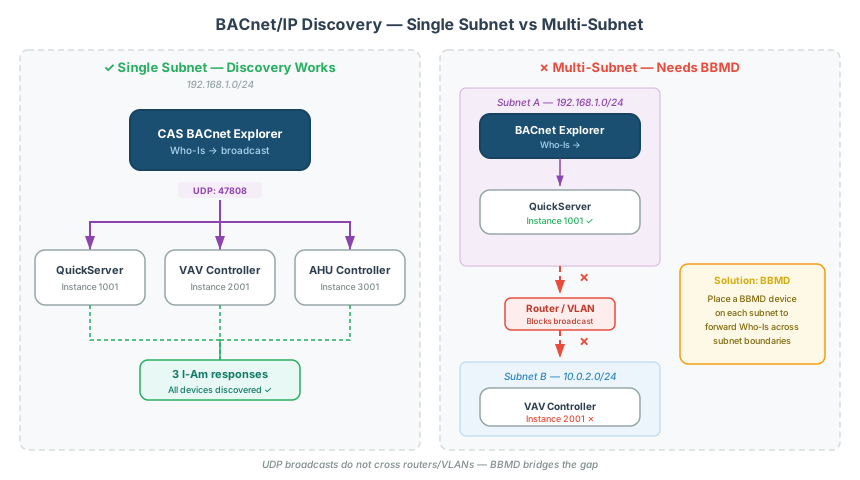
How BACnet/IP Discovery Works
Who-Is / I-Am Services
| Service | Direction | Purpose |
|---|---|---|
| Who-Is | Broadcast (or directed) | “Which BACnet devices are on this network?” |
| I-Am | Broadcast response | ”I’m here — Device Instance 1234, Vendor Chipkin, Model QuickServer” |
Who-Is is sent as a UDP broadcast on port 47808 (hex 0xBAC0). Every BACnet/IP device on the same subnet receives the broadcast and responds with I-Am.
[!NOTE] BACnet/IP uses UDP port 47808 by default. Some installations use non-standard ports (e.g., 47812) — these are editable in the device’s web interface, but both sides must agree on the port number.
Device Instance Numbers
Every BACnet device has a unique Device Instance — a 22-bit identifier ranging from 0 to 4,194,302. No two devices on the same BACnet internetwork can share a Device Instance.
Key facts:
- Device Instance is configured via the gateway’s web interface or config file
- It survives firmware updates and config reloads
- When replacing a gateway (e.g., legacy gateway → QuickServer), preserve the Device Instance to avoid BMS re-discovery
[!TIP] When replacing a gateway on an existing BACnet network, set the new gateway’s Device Instance to match the old one. The BMS may still require a re-scan, but preserving the Device Instance minimizes reconfiguration.
Single-Subnet Discovery
On a single subnet, discovery just works:
- CAS BACnet Explorer or BMS sends Who-Is broadcast on UDP 47808
- All BACnet/IP devices on the subnet receive the broadcast
- Each device responds with I-Am
- The explorer/BMS builds a device table
Requirements for single-subnet discovery:
- All devices on the same IP subnet
- UDP port 47808 open (no firewall blocking)
- Correct network adapter selected in the discovery tool
- No duplicate Device Instance numbers
[!WARNING] If your discovery tool has multiple network adapters (common on laptops with Wi-Fi + Ethernet), make sure you select the adapter connected to the BACnet network. Sending Who-Is on the wrong adapter is a frequent cause of “no devices found.”
Multi-Subnet Discovery: BBMD
UDP broadcasts do not cross subnet boundaries — this is a fundamental IP networking constraint, not a BACnet limitation. For BACnet/IP installations spanning multiple subnets, you need a BBMD (BACnet Broadcast Management Device).
What BBMD Does
A BBMD forwards broadcast messages between subnets so that Who-Is/I-Am discovery works across the entire BACnet internetwork:
┌──────────────┐         ┌──────────────┐         ┌──────────────┐
│   Subnet A   │         │   Subnet B   │         │   Subnet C   │
│  10.1.1.0/24 │         │  10.1.2.0/24 │         │  10.1.3.0/24 │
│              │         │              │         │              │
│  Gateway 1   │◄──────► │    BBMD      │◄──────► │  Gateway 2   │
│  QuickServer │  fwded  │  forwards    │  fwded  │  QuickServer │
│              │  bcast  │  broadcasts  │  bcast  │              │
└──────────────┘         └──────────────┘         └──────────────┘
Broadcast Distribution Table (BDT)
The BBMD maintains a BDT — a table listing every BBMD peer and their subnet information. When a broadcast arrives, the BBMD forwards it to every entry in the BDT.
Configuration: The BDT is typically configured via a bdt.ini file uploaded to the BBMD device, or through a web interface.
Foreign Device Registration (FDR)
For devices that aren’t on any BBMD-managed subnet (e.g., a laptop on a VPN, a cloud service, or a virtual machine), Foreign Device Registration allows the device to register with a BBMD and receive forwarded broadcasts.
Common FDR use cases:
- Remote diagnostic tools accessing a building’s BACnet network via VPN
- Virtual machines running BACnet software (the VM’s virtual NIC is typically NAT’d)
- Cloud-based BMS platforms monitoring on-premise BACnet devices
[!TIP] If you’re running CAS BACnet Explorer in a virtual machine, BACnet discovery won’t work unless you configure Foreign Device Registration with a BBMD on the physical network. VM NAT networking blocks UDP broadcasts.
Network Architecture Patterns
Pattern 1: Single Building, Single Subnet
Simplest deployment. All BACnet/IP devices and the BMS on one subnet.
- No BBMD required
- Discovery works via broadcast
- Suitable for small-to-medium buildings
Pattern 2: Single Building, Multiple VLANs
Common in managed networks (hospitals, universities, corporate campuses) where IT separates automation traffic into VLANs.
- BBMD required on each VLAN, or a central BBMD with BDT entries for each VLAN
- Firewall rules must allow UDP 47808 between VLANs
- Coordinate with the IT team — they may block broadcast traffic by default
Pattern 3: Multi-Building Campus
Multiple buildings, each with its own subnet, connected via WAN or campus backbone.
- BBMD at each building’s BACnet subnet
- BDT entries for all peer BBMDs across buildings
- Consider bandwidth — forwarding all broadcasts across WAN links can create congestion on large installations
- CAS BACnet BBMD can run as a software BBMD on a server at the head end
Pattern 4: Remote Access / Cloud
Remote diagnostics or cloud-based analytics accessing on-premise BACnet/IP.
- BBMD on the local network with Foreign Device Registration enabled
- Remote device registers as a Foreign Device via the BBMD’s IP address
- VPN or secure tunnel for the connection
- UDP 47808 must be forwarded through any NAT/firewall
BACnet MS/TP Discovery
BACnet MS/TP uses a different discovery mechanism — token-passing on an RS-485 serial bus rather than UDP broadcasts.
Key Differences from BACnet/IP
| Aspect | BACnet/IP | BACnet MS/TP |
|---|---|---|
| Transport | UDP over Ethernet | RS-485 serial |
| Discovery | Who-Is/I-Am broadcast | Token-passing poll |
| Address range | Device Instance (0–4,194,302) | MAC address (Masters: 0–127, Slaves: 128–254) |
| Subnet bridging | BBMD | Gateway (e.g., QuickServer with BACnet Router) |
| Max devices | Practically unlimited per subnet | 127 masters + 127 slaves per trunk |
| Baud rate | N/A (Ethernet speed) | 9600, 19200, 38400, 76800 bps — must match all devices |
MS/TP Token-Passing
Devices take turns transmitting by passing a “token” around the bus. A device only discovers peers that participate in the token ring. If a device’s Max Masters parameter is set too low (below the highest MAC address on the bus), devices above that MAC won’t be discovered.
[!WARNING] The
Max Mastersparameter must be set to at least the highest master MAC address on the trunk. Setting it too low is a frequent cause of “missing devices” on MS/TP networks. See the BACnet MS/TP Troubleshooting Guide for more.
Troubleshooting Discovery Failures
No Devices Found
Symptom: Who-Is sent but no I-Am responses received.
| Check | Details |
|---|---|
| Network adapter | Correct NIC selected? Laptop Wi-Fi vs Ethernet? |
| Subnet | Discovery tool on the same subnet as BACnet devices? If not, BBMD needed. |
| Port 47808 | Firewall blocking UDP 47808? Check both Windows Firewall and network firewalls. |
| Device power | Are the target devices powered on and running? |
| Device Instance conflict | Two devices sharing the same Device Instance can cause both to stop responding. |
Partial Discovery (Some Devices Missing)
Symptom: Some devices respond, others don’t.
| Check | Details |
|---|---|
| Multi-subnet | Missing devices on a different subnet? BBMD required. |
MS/TP Max Masters | Set too low — devices above the threshold are invisible. |
| MAC conflicts | Two MS/TP devices sharing a MAC address — one will be intermittent. |
| Point count tier | QuickServer point tiers (250/500/1000) limit the number of exposable points — verify the tier matches the total point count. |
Discovery Worked Before, Now Fails
Symptom: Network was working, discovery suddenly stops after a change.
| Check | Details |
|---|---|
| Config file format | Uploading .xlsx instead of .csv can corrupt the config and break discovery. |
| Firmware update | New firmware may reset network settings — verify Device Instance and port survived the update. |
| Gateway replacement | BMS may need a full re-scan after hardware replacement, even with preserved Device Instance. |
| Config regression | Adding new points to an existing config can break MS/TP communication — always validate existing functionality after changes. |
Related Articles
- BACnet MS/TP Troubleshooting Guide — physical layer and token-passing troubleshooting
- EtherNet/IP Integration Guide — for EtherNet/IP ↔ BACnet crossover projects
- Modbus Addressing & Register Reference — for Modbus ↔ BACnet conversions
- Modbus Troubleshooting Guide — for diagnosing the Modbus side of mixed-protocol integrations
Chipkin Tools
- CAS BACnet Explorer — BACnet/IP and MS/TP device discovery, diagnostic tool, and network browser
- CAS BACnet BBMD — Software BBMD for multi-subnet BACnet/IP broadcast forwarding and Foreign Device Registration
- QuickServer — Multi-protocol gateway with BACnet/IP and MS/TP support, including BACnet Router functionality
- QuickServer — Legacy protocol gateway for BACnet integrations
- Chipkin Support — Configuration assistance, BBMD setup, and network architecture consulting