What M-Bus Is
M-Bus is a metering protocol family used for heat, water, energy, and utility devices that need a common field bus for collection and supervisory handoff. Its practical advantage is that it is built around meter-reading workflows instead of general-purpose automation semantics, which makes it especially useful when the project starts from installed meters rather than from a controller-first architecture.
It is especially common in building and utility metering environments where many devices must be discovered, identified, and polled in a disciplined way. In gateway work, M-Bus usually appears as a source protocol that needs to be exposed upward as BACnet, Modbus, or another management-facing protocol.
For detailed field troubleshooting, use the M-Bus Troubleshooting Guide.
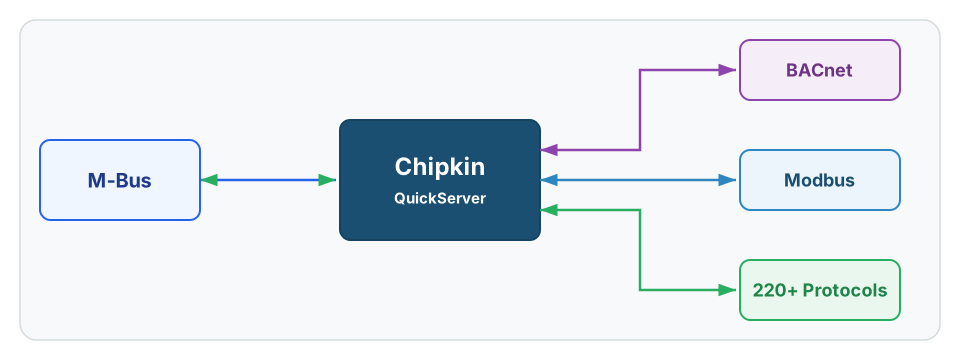
See QuickServer for M-Bus protocol conversion options
History
M-Bus was created for utility and building metering workflows where many meters needed a dedicated collection bus rather than a general-purpose control protocol. Its strength is that it speaks directly to consumption and meter-state use cases instead of forcing metering into a PLC-first model.
That history matters because M-Bus projects are usually specialized. They succeed when the real meter family, addressing method, and data records are known early, not when a site is simply labeled as metering.
Core Concepts
M-Bus projects usually depend on:
- Wired versus wireless identification: This changes the collection model immediately and should be resolved before any scope assumptions are made.
- Primary versus secondary addressing: Discovery and reconciliation depend on how the site identifies installed meters.
- Meter count and bus loading: The installed meter population affects discovery time, infrastructure assumptions, and how aggressively the source network can be polled.
- Manufacturer record definitions: The useful data often depends on meter-family-specific records rather than a universal point list.
- Purpose-built metering semantics: Consumption, totals, status records, and billing-adjacent values need different handling than ordinary controller points.
Metering projects often fail because the site knows the devices physically exist but does not have a dependable point inventory.
M-Bus-Specific Information
M-Bus work is less about generic protocol theory and more about meter-family reality. The important questions are whether the deployment is wired or wireless, how discovery will work, and which records the consuming system actually needs.
Addressing And Discovery
M-Bus projects typically start with a discovery problem, not a mapping problem. If the installation only has loose labels or partial schedules, the first job is to reconcile the installed meters to a dependable addressing method. That is why primary and secondary addressing questions should be treated as startup gates, not later implementation details.
In practice, that often means deciding early whether the site depends mainly on primary addresses or on M-Bus Secondary Addressing to reconcile the installed meters. That distinction affects how realistic the discovery and mapping plan really is.
This also explains why installed inventory quality matters so much. A meter may be electrically present on the bus while still being unusable for project delivery because the site cannot confidently match it to the expected building, tenant, loop, or utility service.
Record Selection Drives The Useful Scope
Meters often expose more than one useful record family, but not every record needs to be surfaced upward. The right approach is to decide early whether the project needs only headline consumption values or whether it also needs device health, counters, timestamps, status flags, and related meter-specific records.
That distinction keeps metering integrations from becoming noisy point-dump exercises. Good M-Bus work is selective and inventory-driven.
The same discipline applies to Wired M-Bus and Wireless M-Bus. The transport changes how the site is reached, but the real deliverable is still a curated metering model rather than a raw dump of every discoverable record.
Metering Intake Risk
| Area | Why It Matters | Common Failure Mode |
|---|---|---|
| Wired versus wireless identification | Changes the collection model immediately | The project is scoped as generic M-Bus and then has to be rebuilt |
| Primary versus secondary addressing | Affects discovery and reconciliation | Meters exist onsite, but there is no dependable way to match them |
| Meter family and record selection | Controls actual useful data | Generic consumption assumptions do not match the installed meters |
| Installed inventory quality | Sets the baseline for mapping | The bus is present, but no credible device list exists |
Common Variants
| Variant | Where It Fits | Why It Matters |
|---|---|---|
| Wired M-Bus | Utility and building metering trunks | Standard metering collection path |
| M-Bus Secondary Addressing | Meter discovery and reconciliation workflows | Often critical when records and labels are weak |
| Wireless M-Bus | Radio-based metering deployments | Must be identified separately from wired M-Bus |
How To Get The Points List
For M-Bus, the points list should come from the meter inventory and manufacturer documentation, not from broad assumptions about what every meter exposes.
Preferred sources:
- Meter schedule and device inventory
- Manufacturer meter documentation
- Existing metering supervisory export
- Discovery results tied back to the installed asset list
- Proven point list from an existing gateway or BMS integration
Devices that Support M-Bus
QuickServer is Chipkin’s primary gateway for normalizing M-Bus meter data into BACnet, Modbus, MQTT, and related supervisory systems.
Representative source devices include heat meters, water meters, BTU meters, energy meters, and other building or utility metering products that expose usable records over M-Bus.
Common Integration Targets
- BACnet for building utility dashboards and trending
- Modbus for PLC and controller-oriented consumption data
- MQTT for telemetry publishing and analytics pipelines
Tools & Diagnostics
| Tool | Type | Description |
|---|---|---|
| QuickServer | Protocol gateway | Normalizes M-Bus source data into BACnet, Modbus, MQTT, and many other downstream protocols |
| FieldServer Toolbox | Gateway diagnostics | Useful for validating downstream point exposure after source discovery is complete |
| Manufacturer meter tools | Source validation | Useful for confirming actual exposed values |
| M-Bus masters and level converters | Bus access | Useful for discovery, segment access, and source-side validation |
| Site meter schedule | Scope control | Critical for reconciling the point inventory |
Frequently Asked Questions
What is the most common M-Bus project problem?
Incomplete source inventory. The devices may be installed, but the point-level documentation is often not ready for mapping.
Is M-Bus more like BACnet or Modbus?
Neither exactly. It is a specialized metering protocol, but in practice its data often ends up handed off into BACnet or Modbus workflows.
What is the first scoping question on an M-Bus project?
Whether the installation is wired M-Bus or wireless M-Bus. That answer changes discovery, infrastructure assumptions, and collection design immediately.
Why is addressing treated as an early project gate?
Because you cannot build a dependable point list until the installed meters are reconciled to a real addressing model. Discovery without identification just creates a second inventory problem.
Why do M-Bus projects stall even when the meters are installed?
Because the installed inventory and record selection are often incomplete. Physical presence of meters is not the same thing as having a usable mapping package.
Reference Documents
- M-Bus overview - Introductory overview of the wired meter-bus standard and its metering use cases.
- Wikipedia: M-Bus - Useful background on the protocol family and its metering focus.