What Hochiki FireNET Is
Hochiki FireNET is a fire-panel integration family relevant to life-safety systems that need to expose alarms, status points, and supervisory data into broader monitoring platforms. Its primary practical advantage is preserving the installed fire-panel environment while making selected point data visible to another supervisory system.
Hochiki FireNET belongs in fire-alarm and life-safety environments where point visibility is needed in BACnet, Modbus, or another monitoring layer. Current Chipkin evidence is real, but it should stay family-specific. Public wording should emphasize FireNET or Apollo-adjacent driver alignment, loop schedules, and multi-node template or firmware constraints instead of claiming broad generic fire-panel coverage.
For field-level diagnostic workflow, use the Hochiki FireNET Troubleshooting Guide.
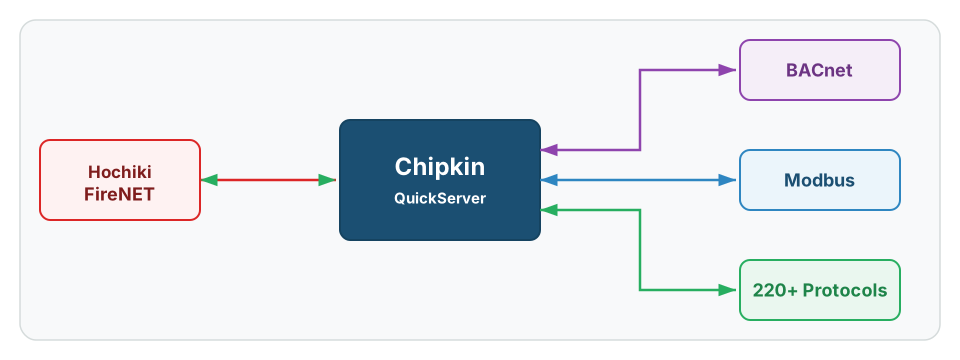
See QuickServer for fire-panel protocol conversion options
History
Hochiki FireNET remains relevant because many installed life-safety systems still need a path for point visibility into building or monitoring platforms without replacing the fire-panel environment itself. That usually makes these jobs family-specific retrofits rather than general-purpose protocol deployments.
In Chipkin terms, the main public lesson is alignment. The protocol work succeeds when the actual installed FireNET family, loop schedule, and multi-node reality match the chosen driver or template. It goes sideways when the project starts from example files or family assumptions that were never validated.
Core Concepts
Hochiki FireNET projects usually depend on:
- Family alignment: the installed panel family and driver assumptions must match before mapping starts.
- Loop and address schedules: point work depends on the real loop, node, and device-address inventory.
- Template discipline: example files help only after the real site topology is confirmed.
- Multi-node scope: one cabinet or node working does not prove a larger topology will align automatically.
- Naming and event consistency: point labels and downstream event expectations have to stay coherent across the full panel scope.
Hochiki FireNET-Specific Information
Family-Specific Driver Alignment
The first Hochiki FireNET question is whether the installed system actually matches the assumed driver family. That matters because public evidence supports real work, but not a generic “any Hochiki fire panel” claim. FireNET or Apollo-adjacent alignment has to be proven before anything downstream is trusted.
If the field terminology is drifting between families, stop and normalize the system identity first. A correct map built for the wrong family will still fail.
Loop Schedules And Point Identity
FireNET jobs are defined by loop numbers, addresses, point labels, and the event families the site expects to see downstream. Without the real schedule, the project is still relying on examples rather than on the installed system.
This is why public FireNET docs should keep the point-model discussion concrete. The useful engineering artifact is the loop and address schedule, not just a generic fire-panel label.
Multi-Node Templates And Firmware Constraints
Some FireNET projects behave well on one node and then break as the topology expands. Multi-cabinet, multi-node, or larger-template jobs can carry scale and firmware constraints that are invisible when the team is only validating a small example.
That is why example files need careful framing. They can be a useful accelerator, but they do not define the real site topology or prove the full-node build automatically.
Common Variants
| Variant | Where It Fits | Why It Matters |
|---|---|---|
| Single-node FireNET workflow | Smaller, well-defined fire-panel integrations | Best fit for direct loop-schedule-based mapping |
| Multi-node FireNET topology | Larger campuses or cabinet groups | Requires real node and loop inventory, not just a single-panel template |
| Apollo-adjacent alignment workflow | Sites where driver-family terminology or heritage matters | Family identity must be locked before mapping |
How To Get The Points List
For Hochiki FireNET, point lists usually come from the loop and address schedule, the real node topology, and a site-confirmed list of labels and event expectations.
Preferred sources:
- Loop and device-address schedule
- Node or cabinet topology details
- Point labels and event-class expectations from the installed panel environment
- Firmware or template notes when the job depends on a known example file
The most useful intake package combines the family identity, the loop schedule, and the true node count rather than assuming a single example file represents the full system.
Devices that Support Hochiki FireNET
QuickServer is Chipkin’s primary gateway platform when Hochiki FireNET data needs to be normalized into BACnet, Modbus, or another supervisory protocol.
Representative contexts include fire-panel monitoring overlays, building-management visibility for life-safety states, and retrofit projects where the site needs structured downstream access without replacing the installed panel stack.
Common Integration Targets
- BACnet for BMS and monitoring visibility
- Modbus when the downstream platform is more controller-oriented
Tools & Diagnostics
| Tool | Type | Description |
|---|---|---|
| QuickServer | Protocol gateway | Normalizes Hochiki FireNET data into BACnet, Modbus, and many other downstream protocols |
| FieldServer Toolbox | Gateway diagnostics | Useful for separating source-family and topology issues from downstream mapping issues |
| Loop and address schedules | Intake artifact | Useful for proving the installed point model before the map is revised |
| Fire-panel family documentation | Source validation | Useful for confirming FireNET alignment and any template or firmware constraints |
Frequently Asked Questions
Is Hochiki FireNET a broad generic fire-panel guide?
No. Public wording should stay family-specific and centered on the installed FireNET or closely aligned environment.
Why do example files create problems on FireNET jobs?
Because example files can help one topology while hiding the real loop schedule or multi-node structure of the installed site.
What is the most important FireNET intake artifact?
The real loop and address schedule tied to the correct panel family and node topology.
Why can one cabinet work while the rest of the job still fails?
Because single-node success does not automatically prove the larger template, firmware, or topology assumptions.
Reference Documents
- Hochiki official site - Official manufacturer context for Hochiki fire and life-safety product families.
- Wikipedia: Hochiki - Useful overview source for brand history and market context.