
What Is a BACnet Device Profile?
A BACnet device profile is a standardized capability level: a named checklist of things a device must be able to do before it can wear the label. Profiles are defined in Annex L of ANSI/ASHRAE 135-2024, which lists nearly forty of them across eight families, and each checklist item is a BIBB (BACnet Interoperability Building Block), a named unit of behavior like “answers read requests.” A device declares its profile in its PICS (Protocol Implementation Conformance Statement).
That is why “it’s a BACnet device” tells you almost nothing on its own. A B-BC building controller and a B-SS smart sensor are both BACnet devices; one is required to alarm, schedule, trend, and support backup and restore, and the other serves a value. The profile is the sentence that means something.
Profiles come in two roles. B-role profiles are the devices and servers that answer requests: controllers, sensors, actuators. A-role profiles are the operator interfaces and clients that initiate them: workstations and displays.
Where You’d Hit This in the Field
Profiles are contracts, and both sides of the contract get burned the same way: by reading the name instead of the checklist.
The specifier’s side: a tender document says “all controllers shall be B-BC” because it sounded thorough, and now every VAV box on the project is required to carry backup-and-restore machinery it will never use, at a price the project feels. The OEM’s side is the expensive one: a product team picks a profile from a competitor’s datasheet vibes, builds the device, and discovers at BTL (BACnet Testing Laboratories) submission that the profile they claimed requires alarming behavior they never implemented. (Both scenarios are illustrative; both happen.)
What the Spec Defines
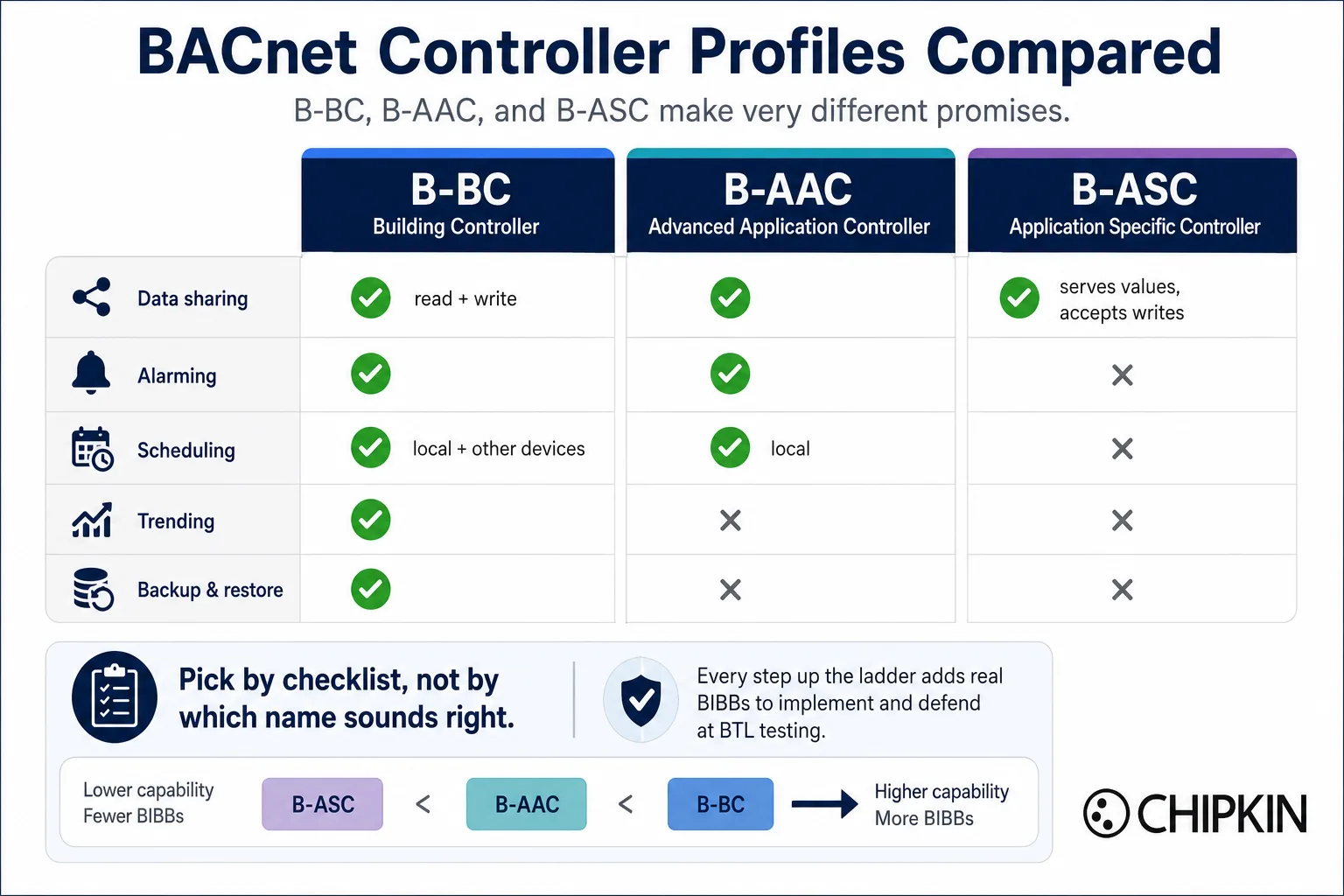
The controller ladder. The everyday profiles form a capability ladder, and the steps between them are specific:
- B-BC (Building Controller): the heaviest requirement set. Shares data in both directions, generates and manages alarms, schedules actions in itself and in other devices, collects trend data, and supports backup and restore.
- B-AAC (Advanced Application Controller): one tier down. Shares data both ways, alarms, and schedules actions in itself, but has no trending requirement and no backup-and-restore requirement.
- B-ASC (Application Specific Controller): a data-sharing device. It serves its values, accepts writes, answers discovery, and honors communication control; no alarming, scheduling, or trending required.
- B-SA (Smart Actuator) and B-SS (Smart Sensor): the simplest device profiles at the bottom of the ladder.
The families beyond HVAC. Annex L groups its profiles into families: the controllers above, the operator interfaces (B-AWS, B-OWS, B-OD, and the cross-domain B-XAWS), and then the vertical families: life safety, access control, lighting, and elevators, each with its own controller and workstation tiers. The profiles reference lists every one.
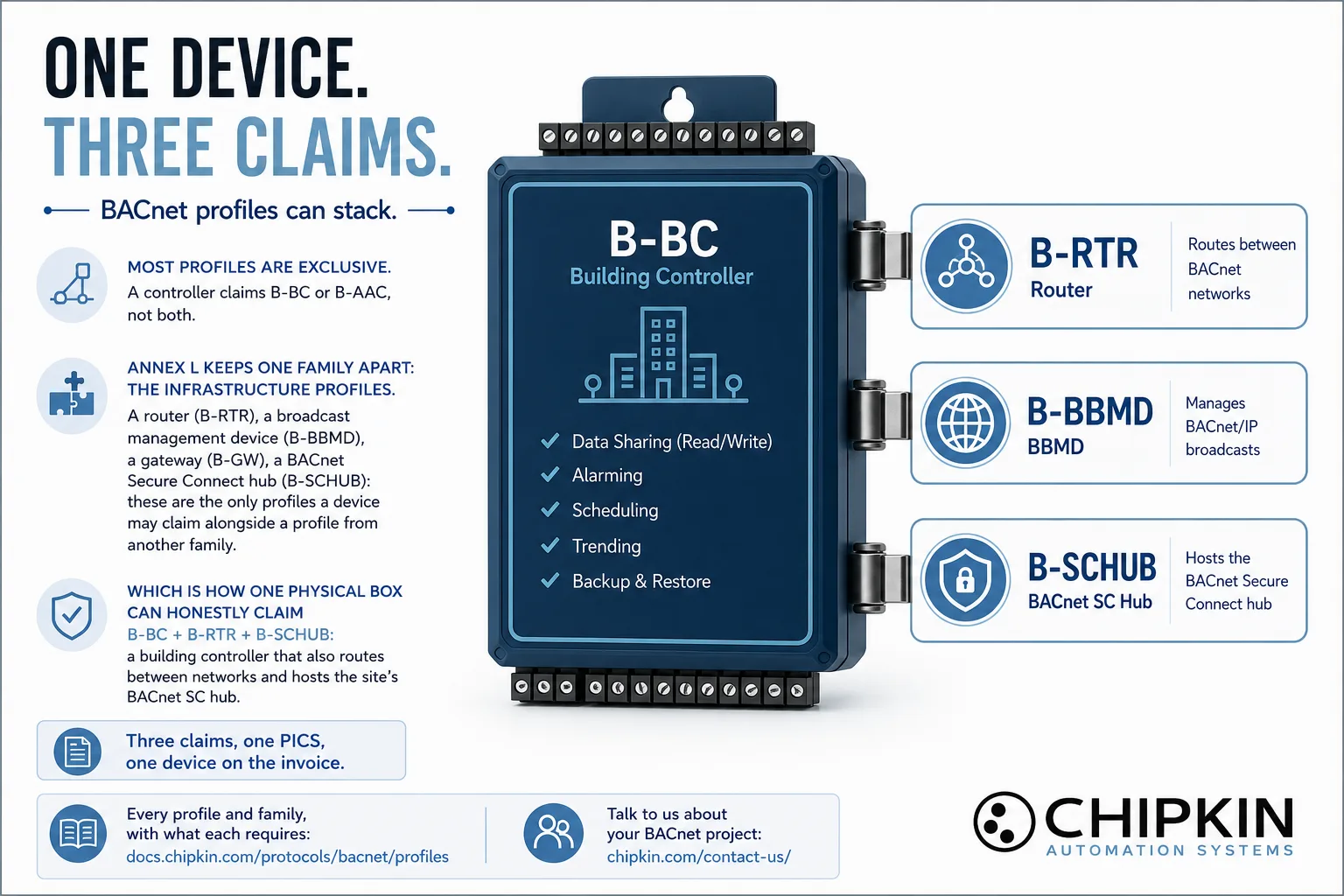
The stacking rule. The miscellaneous family (B-RTR router, B-BBMD broadcast management, B-GW gateway, B-SCHUB Secure Connect hub, and friends) is the only family whose profiles stack alongside a profile from another family. A building controller that also routes, manages broadcasts, or hosts the site’s BACnet SC hub claims both: B-BC plus B-RTR, or B-BC plus B-SCHUB.
The claim is a floor, not a ceiling. A profile states the minimum; devices routinely exceed it. To verify what a device actually does, ask for the PICS and read the profile line and the BIBB list, not the brochure.
How Do You Pick a Profile for Your Product?
Work backward from behavior, not forward from a name. Does the device need to originate alarms? Schedule its own operation? Keep history? Support fleet backup? Each yes moves you up the ladder, and each step up is a real set of BIBBs to implement and defend at testing. Claiming high undersells nothing but costs engineering; claiming low ships sooner and can still exceed the floor. The honest checklist walk takes an afternoon and prevents the BTL-submission surprise, and it is a conversation we have with OEMs all the time.
What the CAS BACnet Stack Supports Today
The CAS BACnet Stack implements the BIBB sets behind the B-role device profiles, from B-SS up through B-BC and the stackable infrastructure profiles, and Chipkin’s BACnet test tooling covers the A-role operator profiles for conformance testing. It has been through our full test suite and is running in shipping products today. If you are choosing a profile for a new product, talk to us before you write it into the PICS; matching the claim to the checklist is exactly the kind of hour that saves a resubmission.
How 6.x Expands This
This is the topic where 6.x has the most to say, because profile coverage is where the majority of the 6.x work went: CAS BACnet Stack 6.x supports every BACnet profile Annex L defines, across all eight families, together with the BIBBs and services each one requires. Building controller or smart sensor, operator workstation or elevator monitor, gateway or Secure Connect hub: whatever profile your product needs to claim, the checklist behind it is implemented.
For an OEM, that changes the shape of the profile decision. It stops being “which profiles does the stack cover” and becomes purely “which profile fits my product,” which is the question that was supposed to be hard. Pick the label; the BIBBs underneath it are there.
Where This Lives in the BACnet Spec
Device profiles touch a specific set of reference material. Each links to its page.
Profiles (all defined in Annex L)
- The profiles reference: every family and every profile.
- The controller ladder: B-BC, B-AAC, B-ASC, B-SA, B-SS.
- The stackable infrastructure profiles: B-RTR, B-BBMD, B-GW, B-SCHUB.
BIBBs (defined in Annex K; the checklist items profiles are made of)
- The BIBBs reference: how the codes read, and how BIBBs compose into profiles.
- Examples from earlier articles in this series: SCHED-I-B (internal scheduling), DM-RD-B (executes ReinitializeDevice), AE-N-I-B (originates alarm notifications).
Object types and services
- The Device object (Clause 12.11): where a device’s identity and capabilities surface on the network.
- ReadProperty: the universal service at the bottom of nearly every BIBB checklist.
Where to Go Next
- Browse the profiles reference and the BIBBs reference side by side; the profile pages list what each label requires.
- Building a product and choosing its profile? Request the CAS BACnet Stack developer kit.
- Have a specific BACnet need? Talk to us about your project.