
What EtherNet/IP Is
EtherNet/IP (EtherNet Industrial Protocol) is an industrial networking protocol that runs the Common Industrial Protocol (CIP) over standard Ethernet TCP/IP. It is widely used in PLC-based automation and frequently appears in building automation crossover projects where PLC data must be bridged to BACnet or Modbus supervisory systems.
EtherNet/IP is managed by the ODVA and shares CIP with DeviceNet and ControlNet.
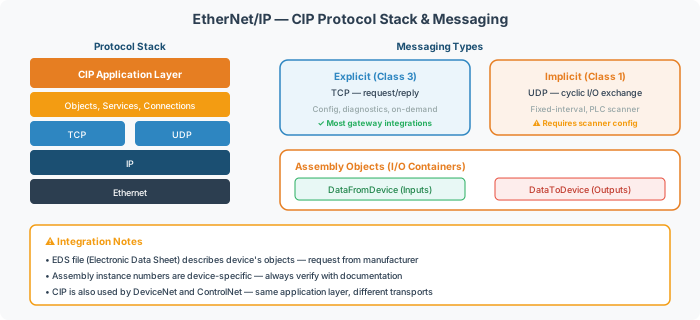
Core Concepts
| Concept | Description |
|---|---|
| CIP | Common Industrial Protocol — the shared application layer that defines objects, services, and messaging |
| Assembly Object | Data containers that group I/O points for exchange between devices |
| EDS File | Electronic Data Sheet — XML file describing a device’s supported objects and parameters |
| DataFromDevice | Assembly containing values read from the device (inputs) |
| DataToDevice | Assembly containing values written to the device (outputs) |
Messaging Types
| Type | Transport | Typical Use |
|---|---|---|
| Explicit (Class 3) | TCP | Configuration, diagnostics, on-demand reads |
| Implicit (Class 1) | UDP multicast | Cyclic I/O exchange at fixed intervals |
Most gateway integrations use explicit messaging. Implicit messaging requires tighter timing and PLC scanner configuration.
Integration Risks
[!WARNING] The #1 configuration mistake is using DATA_TABLE_READ for points that require write access. Writes fail silently — the gateway reads successfully but the PLC never receives setpoint commands.
[!NOTE] Always classify each point as read-only or read/write before configuration. Common write-required points include setpoints, commands, and limit values.
Other common pitfalls:
- Missing or mismatched EDS files preventing PLC auto-configuration
- Assembly Object name/size mismatch between gateway config and PLC scanner
- Firewall rules blocking CIP traffic (TCP 44818, UDP 2222)
Related Pages
- EtherNet/IP Integration Guide: EDS Files, Read/Write Configuration & Common Pitfalls
- BACnet Discovery & Network Architecture Reference — for EtherNet/IP ↔ BACnet crossover projects
- Modbus Addressing & Register Reference — for EtherNet/IP ↔ Modbus crossover projects