
What BACnet/IP Is
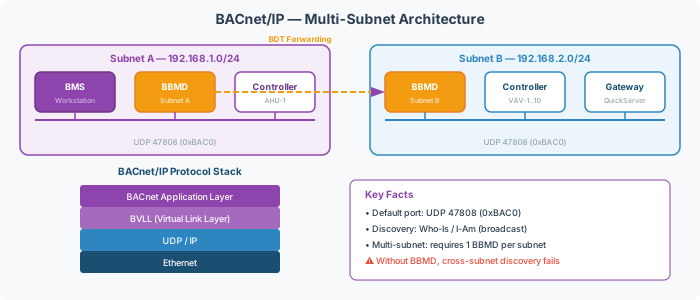
BACnet/IP is the Ethernet transport layer for BACnet. It encapsulates BACnet application-layer messages inside UDP datagrams using the BACnet Virtual Link Layer (BVLL). The default port is UDP 47808 (0xBAC0).
BACnet/IP is the most common BACnet transport for supervisory systems, building management workstations, and IP-connected controllers.
How It Differs from MS/TP
| Aspect | BACnet/IP | BACnet MS/TP |
|---|---|---|
| Transport | UDP/IP over Ethernet | RS-485 serial |
| Speed | 10/100/1000 Mbps | 9600–115200 baud |
| Topology | Switched Ethernet | Daisy-chain bus |
| Addressing | IP address + UDP port | MAC address (0–127) |
| Typical use | Backbone, supervisory | Field controller trunks |
Multi-Subnet Design
BACnet/IP discovery (Who-Is / I-Am) relies on broadcast. On a single subnet, broadcasts reach all devices. Across subnets, a BBMD is required on each subnet to forward broadcasts.
[!WARNING] Without BBMDs, devices on different subnets cannot discover each other — even if IP routing is working. BACnet broadcast traffic is not forwarded by standard IP routers.
Alternatives to BBMD include Foreign Device Registration (FDR) for remote single-device access.
Common Problems
- Devices not found across subnets — Who-Is broadcasts don’t cross IP routers. Every subnet needs a BBMD or the remote device must register as a foreign device. See BACnet Discovery & Network Architecture Reference.
- UDP 47808 blocked — Firewall or VLAN ACL dropping BACnet traffic. Confirm UDP port 47808 is permitted between all BACnet devices and the gateway.
- Device discovers but won’t respond to reads — Device instance conflict or the remote device does not support ReadProperty for the requested object. See BACnet Object Types & Properties Reference.