
Overview
Veeder Root (by Gilbarco) manufactures Automatic Tank Gauging (ATG) systems — the TLS-3XX series — used in fuel storage monitoring, gas stations, and industrial tank farms. These systems track tank levels, temperatures, and leak detection status via a proprietary serial protocol.
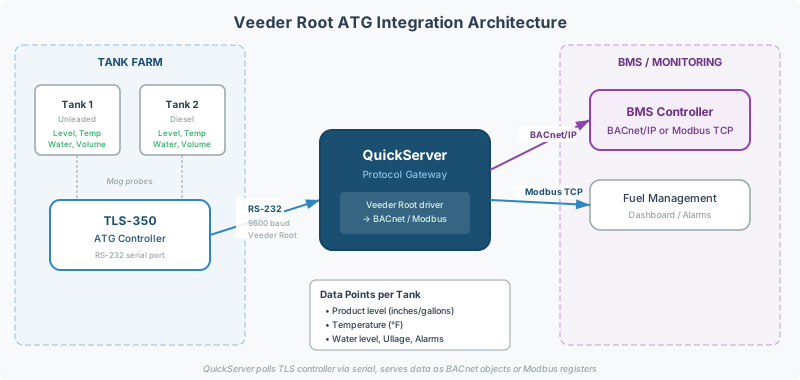
Integrating a Veeder Root panel into a building management system (BMS) or SCADA platform requires a protocol gateway to translate the ATG data into BACnet, Modbus, or EtherNet/IP. A QuickServer handles this conversion.
This guide walks through the intake, wiring, configuration, and commissioning steps for a Veeder Root integration project.
Before You Start
Collect this information before ordering hardware or starting configuration. Veeder Root projects have a high rate of delays due to missing intake information — gathering these details upfront avoids weeks of back-and-forth.
TLS Controller Model
Identify the Veeder Root controller model:
- TLS-350 — Most common, serial interface
- TLS-300 — Older model, serial interface
- TLS-450 / TLS-450 Plus — Newer model, may support TCP/IP in addition to serial
The model determines the protocol variant and driver configuration on the QuickServer.
Number of Tanks
Count the total number of tanks connected to the ATG panel. This determines:
- How many BACnet objects or Modbus registers the gateway will expose
- Whether the gateway’s point tier (250 / 500 / 1000) is sufficient
- The data points per tank: typically level, volume, temperature, water level, and alarm status
[!TIP] Ask for a System Setup Printout from the Veeder Root panel — this lists all connected tanks, sensor types, and tank dimensions. It’s the most reliable source of tank count and configuration.
Connection Type and Serial Settings
Standard Veeder Root serial settings:
| Parameter | Default Value |
|---|---|
| Interface | RS-232 |
| Baud Rate | 9600 |
| Data Bits | 8 |
| Parity | None |
| Stop Bits | 1 |
Confirm these match the actual panel settings — non-default baud rates are rare but possible on newer TLS-450 systems.
Target Protocol
Which protocol does the BMS or SCADA system expect?
| Target Protocol | Common Use Case |
|---|---|
| BACnet/IP | Building management systems (Tridium, Siemens, Johnson Controls) |
| Modbus TCP | SCADA systems, industrial monitoring |
| EtherNet/IP | Allen-Bradley PLC integration |
Existing Gateway (If Replacement)
If replacing an existing Chipkin gateway (e.g., CAS-2700-02B → QuickServer):
- Request the existing config file (
config.csv) — this preserves point mappings - Record the current BACnet Device Instance — preserve it on the new gateway to avoid BMS-side reconfiguration
- Note the serial wiring — the RS-232 pinout may differ between the old and new gateway
[!WARNING] Old CAS-2700-02B configuration files are not directly compatible with QuickServer. The config will need to be rebuilt, but the existing file provides the point list and Device Instance as a reference.
Step 1: Wire the Serial Connection
Connect the Veeder Root panel to the QuickServer serial port via RS-232.
Typical wiring (DB-9):
| QuickServer Pin | Veeder Root Pin | Signal |
|---|---|---|
| Pin 2 (RX) | Pin 3 (TX) | Data from panel to gateway |
| Pin 3 (TX) | Pin 2 (RX) | Data from gateway to panel |
| Pin 5 (GND) | Pin 5 (GND) | Signal ground |
[!NOTE] RS-232 is a point-to-point connection — only one gateway per serial port on the Veeder Root panel. For multi-panel installations, each panel requires its own serial port or a serial-to-TCP converter.
Step 2: Configure the QuickServer
- Connect to the QuickServer web interface — browse to the gateway’s IP address
- Load the Veeder Root driver — select Veeder Root ATG as the source protocol
- Set serial parameters — 9600 / 8 / N / 1 (confirm against actual panel settings)
- Configure tank count — enter the number of tanks connected to the panel
- Map data points — each tank exposes:
- Tank Level (volume in gallons or liters)
- Product Temperature
- Water Level
- Tank Ullage (remaining capacity)
- Alarm Status (leak detection, overfill, low level)
For help with the QuickServer web interface, see the firmware update guide for general navigation concepts, or contact Chipkin support for configuration assistance.
Step 3: Configure the Target Protocol
BACnet/IP Target
- Set the Device Instance — unique on the BACnet network (if replacing a CAS-2700-02B, use the same Device Instance)
- Configure BACnet objects — each tank data point maps to a BACnet Analog Input (AI) or Analog Value (AV) object
- Set the IP address and subnet — must be on the same subnet as the BMS, or configure BBMD for cross-subnet discovery
Modbus TCP Target
- Set the Slave/Unit ID — must be unique on the Modbus network
- Map tank data to Holding Registers — see the Modbus addressing reference for register numbering conventions
- Confirm data types with the SCADA vendor — most tank values are 32-bit floats. See the data types reference.
EtherNet/IP Target
- Generate an EDS file from the QuickServer web interface — the PLC programmer needs this
- Confirm DATA_TABLE_WRITE if any setpoints or commands are needed. See the EtherNet/IP integration guide.
Step 4: Commission and Verify
- Power on the Veeder Root panel and QuickServer
- Check serial communication — the QuickServer web interface shows connection status and incoming data
- Verify tank data — compare values on the QuickServer’s diagnostic page against the Veeder Root panel display
- Test BMS discovery — run a device scan from the BMS or use CAS BACnet Explorer for BACnet installations
- Verify all tanks appear — for multi-tank systems, the BMS may need a full re-scan to discover all tank objects
[!WARNING] On multi-tank systems (10+ tanks), the BMS may initially show only Tank 1 data. This is typically a BMS-side discovery issue, not a gateway problem. Re-scan the BACnet network from the BMS to discover all tank objects.
Common Failures
| Symptom | Likely Cause | Fix |
|---|---|---|
| No serial data | Wiring TX/RX swapped, or wrong baud rate | Check RS-232 pinout and serial settings |
| Gateway connects but shows zeros | Wrong tank count in config, or panel not reporting | Verify panel System Setup Printout, check tank sensor connections |
| BMS sees gateway but no tank objects | Point count exceeds QuickServer tier | Upgrade point tier (250 → 500 → 1000) |
| BMS sees Tank 1 only | BMS needs re-scan after config change | Perform full BACnet device re-scan from BMS |
| Replacing CAS-2700-02B — BMS lost all points | Device Instance changed | Set new gateway’s Device Instance to match old CAS-2700-02B |
| Data values look wrong (negative or overflow) | Data type mismatch on target side | Confirm 32-bit float vs integer mapping with BMS vendor |
Related Articles
- BACnet Discovery & Network Architecture Reference — for BACnet-side discovery and BBMD requirements
- Modbus Addressing & Register Reference — for Modbus-side register mapping
- Modbus Data Types & Byte Order Reference — for float/integer conversion issues
- EtherNet/IP Integration Guide — for EtherNet/IP target configuration
- QuickServer Firmware Update Procedure — keeping gateway firmware current
Chipkin Tools
- QuickServer — Multi-protocol gateway with Veeder Root ATG driver support
- CAS BACnet Explorer — Verify BACnet device discovery and object mapping after commissioning
- CAS Modbus Scanner — Verify Modbus register mapping for Modbus TCP targets
- Chipkin Support — Configuration assistance, wiring diagrams, and commissioning support