
Overview
Modbus register addressing is the single most common cause of integration failures. Chipkin’s support data across 437+ FSE projects shows that off-by-one addressing errors cause approximately 50% of all Modbus exception responses — specifically, exception code 02 (Illegal Data Address).
The root cause is that three different addressing conventions coexist in the industry, and device manufacturers use them interchangeably without always documenting which one they follow. This guide explains each convention, how to identify which one a device uses, and how to convert between them.
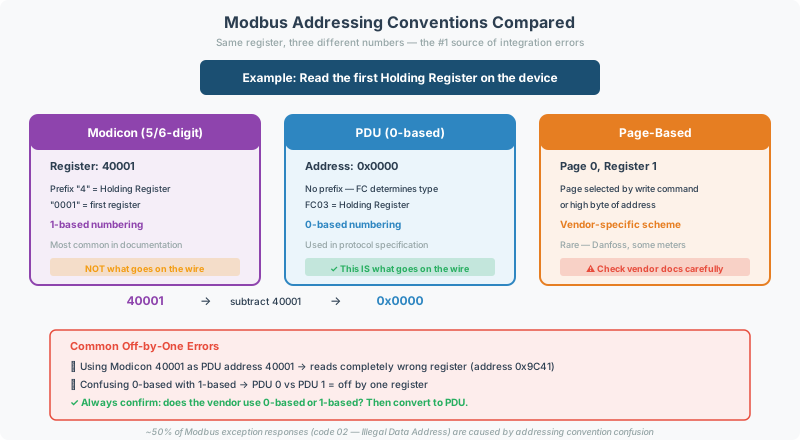
The Three Addressing Conventions
1. Modicon Convention (5-Digit / 6-Digit)
The original Modicon PLC numbering system from the 1970s. This is the most widely used convention in device documentation but is not what appears on the wire.
| Prefix | Data Type | Modicon Range | PDU Address Range | Function Code |
|---|---|---|---|---|
| 0xxxx | Coils (read/write bits) | 00001 – 09999 | 0x0000 – 0x270E | FC01, FC05, FC15 |
| 1xxxx | Discrete Inputs (read-only bits) | 10001 – 19999 | 0x0000 – 0x270E | FC02 |
| 3xxxx | Input Registers (read-only 16-bit) | 30001 – 39999 | 0x0000 – 0x270E | FC04 |
| 4xxxx | Holding Registers (read/write 16-bit) | 40001 – 49999 | 0x0000 – 0x270E | FC03, FC06, FC16 |
Key rule: The leading digit identifies the data type, and the remaining digits are 1-based. Modicon register 40001 maps to PDU address 0x0000.
6-Digit Extended Notation
For devices with more than 9,999 registers per type, the 6-digit notation extends the range:
| Prefix | Data Type | 6-Digit Range | PDU Address Range |
|---|---|---|---|
| 0xxxxx | Coils | 000001 – 065536 | 0x0000 – 0xFFFF |
| 1xxxxx | Discrete Inputs | 100001 – 165536 | 0x0000 – 0xFFFF |
| 3xxxxx | Input Registers | 300001 – 365536 | 0x0000 – 0xFFFF |
| 4xxxxx | Holding Registers | 400001 – 465536 | 0x0000 – 0xFFFF |
2. PDU Convention (0-Based)
This is the actual address that appears in the Modbus protocol data unit (PDU) — the raw bytes on the wire. All Modbus frames use PDU addressing internally.
| PDU Address | Size | Notes |
|---|---|---|
0x0000 – 0xFFFF | 16-bit | Zero-based, no type prefix |
The function code in the frame determines the data type — not the address. PDU address 0x0000 with FC03 reads holding register 0, while PDU address 0x0000 with FC04 reads input register 0.
3. Page-Based / Vendor-Specific Conventions
Some manufacturers define their own addressing schemes, often using “pages” or “groups”:
| Convention | Example | How It Works |
|---|---|---|
| Page-based | Page 1, Register 0 → PDU 0x0100 | Address = (page × page_size) + register_offset |
| Block-based | Block A, Word 5 → PDU 0x0005 | Each block maps to a function code or address range |
| Offset from base | Base 1000 + offset 5 → PDU 0x03ED | Common in older SCADA systems |
| Hexadecimal only | Register 0x1F4 | Used by manufacturers who document in hex without Modicon notation |
[!CAUTION] Page-based addressing is manufacturer-specific. There is no standard formula. Always refer to the device’s Modbus register map documentation and test with a diagnostic tool before building a gateway configuration.
The Off-By-One Problem
The most common Modbus addressing error is a one-register offset. It happens when the documentation and the gateway use different conventions:
Example: Reading Holding Register 40001
| Convention Used By | Address Sent on Wire | Result |
|---|---|---|
Documentation says 40001, gateway uses Modicon (correct) | PDU 0x0000 | ✅ Correct register |
Documentation says 40001, gateway uses PDU directly | PDU 0x9C41 (decimal 40001) | ❌ Way outside valid range |
Documentation says 40001, gateway strips prefix but uses 1-based | PDU 0x0001 | ❌ Off by one — reads register 40002 instead |
Documentation says 40001, gateway strips prefix and uses 0-based | PDU 0x0000 | ✅ Correct register |
[!TIP] When you see a register listed as 40001 in a Modbus table, the device almost always means Modicon notation:
- Strip the leading
4→ address0001- Subtract 1 → PDU address
0x0000If the gateway has a “Modicon” or “1-based” addressing option, use it and enter
40001directly.
How to Identify the Convention
Step 1: Read the Documentation Header
Look for clues in the register map documentation:
| Documentation Style | Likely Convention | Example |
|---|---|---|
| 5-digit numbers starting with 3 or 4 | Modicon (1-based) | 40001, 30001 |
| 6-digit numbers starting with 3 or 4 | Modicon extended (1-based) | 400001, 300001 |
| Small numbers (0–999) without prefix | PDU (0-based) | 0, 100, 500 |
| Hex addresses | PDU (0-based) | 0x0000, 0x1F4 |
| ”Page” or “Group” references | Vendor-specific | Page 1, Reg 0 |
Step 2: Test with a Known Register
- Find a read-only status register with a predictable value (e.g., model number, firmware version, or a temperature reading you can verify)
- Read it using the address from the documentation
- If you get exception code 02, try address ±1
- If the value looks wrong (shifted), the register map may use a different byte order — see Modbus Data Types & Byte Order Reference
Step 3: Verify with Multiple Registers
Once you find the correct offset for one register, read a contiguous block and verify that all values make sense. If register N is correct but register N+1 doesn’t match the expected data type, you may have a non-contiguous register map.
Common Gateway Address Configuration
QuickServer Configuration
When configuring a QuickServer:
| Gateway Setting | When to Use |
|---|---|
| ”Offset=0” or “Zero-based” | Documentation uses PDU addresses (small numbers, no prefix) |
| “Offset=1” or “One-based” | Documentation uses Modicon addresses (40001, 30001) |
| “Modicon” | Gateway automatically strips prefix and adjusts offset |
CAS Modbus Scanner
The CAS Modbus Scanner allows testing both conventions directly:
- Set the start address to the documented value
- Set addressing mode to Modicon or PDU
- Read the register and verify the returned value
- If exception 02, switch conventions and retry
Conversion Reference Table
| Modicon 5-Digit | Modicon 6-Digit | PDU Address (Hex) | PDU Address (Dec) | Function Code |
|---|---|---|---|---|
| 00001 | 000001 | 0x0000 | 0 | FC01/05/15 |
| 00100 | 000100 | 0x0063 | 99 | FC01/05/15 |
| 10001 | 100001 | 0x0000 | 0 | FC02 |
| 10100 | 100100 | 0x0063 | 99 | FC02 |
| 30001 | 300001 | 0x0000 | 0 | FC04 |
| 30100 | 300100 | 0x0063 | 99 | FC04 |
| 40001 | 400001 | 0x0000 | 0 | FC03/06/16 |
| 40100 | 400100 | 0x0063 | 99 | FC03/06/16 |
| 41000 | 401000 | 0x03E7 | 999 | FC03/06/16 |
| 49999 | 409999 | 0x270E | 9998 | FC03/06/16 |
| — | 410000 | 0x270F | 9999 | FC03/06/16 |
| — | 465536 | 0xFFFF | 65535 | FC03/06/16 |
[!TIP] Quick conversion formula: PDU Address = Modicon Address − (Prefix × 10000) − 1 Example:
40100→40100 − 40000 − 1=99→ PDU0x0063
Register Count Limits
Each function code has a maximum number of registers that can be read or written in a single request:
| Function Code | Operation | Max Count | Max Bytes |
|---|---|---|---|
| FC01 / FC02 | Read coils / discrete inputs | 2000 bits | 250 bytes |
| FC03 / FC04 | Read holding / input registers | 125 registers | 250 bytes |
| FC05 | Write single coil | 1 bit | — |
| FC06 | Write single register | 1 register | — |
| FC15 | Write multiple coils | 1968 bits | 246 bytes |
| FC16 | Write multiple registers | 123 registers | 246 bytes |
[!NOTE] Requesting more registers than the device supports in a single read causes exception code 02 or 03. If you need to read a large register range, split it into multiple requests of 100 registers or fewer — some devices support fewer than the protocol maximum.
Related Articles
- How to Read a Modbus Register Map — interpreting manufacturer documentation
- Modbus Addressing & Register Reference — quick-reference addressing tables
- Modbus Exception Codes & Error Handling Reference — diagnosing address-related exceptions
- Modbus Data Types & Byte Order Reference — interpreting multi-register values
- Modbus Troubleshooting Guide — broader diagnostic procedures
Chipkin Tools
- CAS Modbus Scanner — Test both Modicon and PDU addressing conventions in real time
- QuickServer — Protocol conversion gateway with configurable address offset
- QuickServer — Multi-protocol gateway supporting Modicon and PDU addressing modes
- Chipkin Support — Register map analysis and addressing configuration assistance