
Overview
Every Modbus serial frame includes an error-checking field — CRC-16 for RTU mode and LRC for ASCII mode. When a CRC or LRC mismatch occurs, the entire frame is discarded silently — no exception response is returned, no error code is generated. The master simply times out.
CRC errors are the most frustrating Modbus RTU failures to diagnose because they produce no visible error message — just timeouts. This guide covers how error checking works, what causes mismatches, and how to diagnose them using packet captures and serial diagnostic tools.
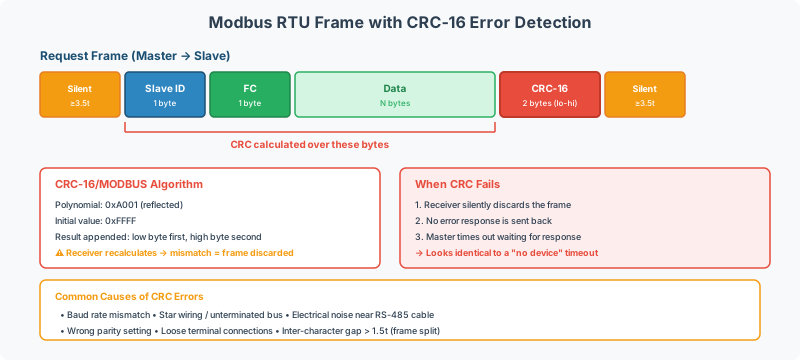
CRC-16 (Modbus RTU)
How It Works
CRC-16 is calculated over all frame bytes except the CRC itself — from the slave address through the last data byte. The result is a 16-bit value appended to the frame in low-byte-first order (little-endian).
| Parameter | Value |
|---|---|
| Algorithm | CRC-16/MODBUS |
| Polynomial | 0x8005 (normal) / 0xA001 (reflected) |
| Initial value | 0xFFFF |
| Input reflection | Yes (LSB first) |
| Output reflection | Yes |
| Final XOR | 0x0000 |
| Byte order in frame | Low byte first, then high byte |
CRC Calculation Steps
- Initialize CRC register to
0xFFFF - For each byte in the message (address through data):
a. XOR the byte with the low byte of the CRC register
b. For each of 8 bits:
- If LSB of CRC = 1: shift right, XOR with
0xA001 - If LSB of CRC = 0: shift right only
- If LSB of CRC = 1: shift right, XOR with
- The final CRC register value is the CRC-16
- Append to frame: low byte first, then high byte
Worked Example
Request: Read 1 holding register from slave 1, address 0 → bytes 01 03 00 00 00 01
| Step | CRC Value |
|---|---|
| Initial | 0xFFFF |
After byte 0x01 (address) | 0xFF80 → 0x40BF… |
| … (continue for all bytes) | … |
| Final CRC | 0x0A84 |
| Frame CRC bytes | 84 0A (low byte first) |
Complete frame: 01 03 00 00 00 01 84 0A
[!TIP] Don’t calculate CRC by hand — use a diagnostic tool or online calculator. The CAS Modbus Scanner calculates CRC automatically. For verification, many free “Modbus CRC calculator” tools are available online.
CRC Error Detection Capability
| Error Type | Detection |
|---|---|
| Any single-bit error | ✅ Always detected |
| Any two-bit error | ✅ Always detected |
| Any odd number of bit errors | ✅ Always detected |
| Burst errors ≤16 bits | ✅ Always detected |
| Random corrupted frame | ~99.998% detection rate (1 in ~65,536 chance of false acceptance) |
LRC (Modbus ASCII)
How It Works
LRC (Longitudinal Redundancy Check) is a simple 8-bit checksum used in ASCII mode. It is calculated over the decoded byte values (not the ASCII characters) from the slave address through the last data byte.
LRC Calculation Steps
- Sum all bytes (address + function code + data) as unsigned 8-bit values
- Take the two’s complement of the sum (negate and mask to 8 bits)
- The result is the LRC byte (transmitted as 2 hex-ASCII characters)
Worked Example
Request bytes: 01 03 00 00 00 01
| Step | Value |
|---|---|
| Sum | 0x01 + 0x03 + 0x00 + 0x00 + 0x00 + 0x01 = 0x05 |
| Two’s complement | 0x100 - 0x05 = 0xFB |
| LRC byte | 0xFB |
| In ASCII frame | Characters 'F' 'B' |
Complete ASCII frame: :0103000000017E\r\n
[!NOTE] LRC is weaker than CRC-16 — it cannot detect all multi-bit errors. This is one reason RTU mode is preferred for production installations. LRC is sufficient for low-noise environments and debugging sessions.
Common Causes of CRC Errors
Electrical / Physical Layer
| Cause | Symptom | Fix |
|---|---|---|
| Missing termination | Intermittent CRC errors, worse at higher baud rates | Add 120Ω termination at both trunk ends — see RS-485 Physical Layer guide |
| Star wiring topology | Random CRC errors across all devices | Re-wire as daisy chain — see Multi-Device Daisy Chain guide |
| Loose screw terminals | Intermittent per-device CRC errors | Re-tighten all connections, tug-test each wire |
| Cable too long | CRC errors increase with distance | Verify within RS-485 distance limits, add repeater if needed |
| Electromagnetic interference | CRC errors correlate with equipment operation (VFD starts, motors, etc.) | Route cables away from noise sources, use shielded cable |
| Ground potential difference | CRC errors on long runs between buildings | Run signal ground (common) wire through entire chain, ground shield at one end only |
| Bad USB-to-serial converter | CRC errors at higher baud rates, works fine at 9600 | Use a quality converter with hardware UART; some cheap converters introduce timing jitter |
Configuration / Protocol Layer
| Cause | Symptom | Fix |
|---|---|---|
| Baud rate mismatch | 100% CRC errors — no successful communication | Match all devices to same baud rate |
| Parity mismatch | 100% CRC errors | Match parity (Even, Odd, or None) on all devices |
| Data bits mismatch | 100% CRC errors | RTU requires 8 data bits; ASCII uses 7 |
| Stop bits mismatch | Intermittent CRC errors | Match stop bit count (usually 1 with parity, 2 without) |
| Inter-character gap | Intermittent CRC errors at higher baud rates | Slow serial ports may exceed the 1.5 character-time threshold — reduce baud rate |
Software / Gateway Layer
| Cause | Symptom | Fix |
|---|---|---|
| Wrong CRC byte order | 100% CRC errors despite correct calculation | CRC must be low byte first in RTU frames |
| CRC calculated over wrong bytes | 100% CRC errors | CRC covers address through data, not the entire frame |
| Half-duplex timing | Occasional CRC errors, device-dependent | Increase turnaround delay between TX and RX |
Diagnosing CRC Errors
Step 1: Isolate the Problem
- Test one device at a time — disconnect all but one device from the bus
- If CRC errors persist with a single device → problem is configuration, cable, or converter
- If CRC errors only appear with multiple devices → topology or termination issue
Step 2: Verify Serial Parameters
Confirm all devices and the master have identical settings:
| Parameter | Must Match |
|---|---|
| Baud rate | 9600, 19200, 38400, etc. |
| Data bits | 8 (for RTU) |
| Parity | Even, Odd, or None |
| Stop bits | 1 or 2 |
Step 3: Capture and Analyze Packets
Using the CAS Modbus Scanner
- Connect the scanner to the RS-485 bus
- Send a known request (e.g., FC03, read 1 register from address 0)
- View the raw hex response — the scanner displays CRC validity
- If CRC invalid, compare the received bytes against the expected CRC
Using Wireshark (Modbus TCP Only)
For Modbus TCP captures:
mbtcpWireshark natively decodes Modbus TCP frames and flags protocol errors. Note that Modbus TCP does not use CRC — it relies on TCP’s built-in error detection. If you’re seeing corrupted data over TCP, the problem is likely at the application layer, not the transport layer.
Using a Serial Port Monitor (Modbus RTU)
For RS-485/RS-232 captures, use a serial port monitor that shows raw hex bytes:
- Capture the raw byte stream
- Identify frame boundaries (look for >3.5 character-time gaps)
- Extract each frame: address + FC + data + CRC
- Recalculate the CRC and compare to the received CRC
- If they don’t match, examine which byte(s) differ
Step 4: Check Physical Layer
If packet analysis confirms corruption (received bytes differ from expected):
- Swap D0/D1 wires — incorrect polarity can cause apparent CRC errors
- Check termination — measure resistance between D0 and D1 at both trunk ends (should be ~60Ω total with 2× 120Ω terminators in parallel)
- Shorten the cable — temporarily connect with a short cable to rule out distance
- Replace the converter — USB-to-serial adapters are a common source of timing-related CRC errors
[!WARNING] CRC errors that appear only at higher baud rates (19200+) and disappear at 9600 baud are almost always caused by either missing termination or a poor quality USB-to-serial converter. Fix the physical layer before attempting software workarounds.
CRC and Gateway Transparency
When a gateway converts between Modbus RTU and Modbus TCP:
| Direction | CRC Handling |
|---|---|
| TCP → RTU | Gateway adds CRC to the serial frame (TCP doesn’t use CRC) |
| RTU → TCP | Gateway strips CRC from the serial frame, builds MBAP header |
| RTU → RTU (through a repeater) | Repeater recalculates and regenerates CRC |
The gateway recalculates the CRC for every serial frame — it never passes through a CRC from one side to the other. If you see CRC errors on the serial side of a TCP-to-RTU gateway, the problem is on the serial side (wiring, termination, baud rate), not on the TCP side.
Related Articles
- Modbus RTU vs ASCII Transmission Modes Explained — framing and error detection comparison
- RS-485 Physical Layer Wiring & Termination Reference — termination, cabling, grounding
- Modbus RTU Multi-Device Daisy Chain Wiring Guide — topology and termination placement
- Modbus Exception Codes & Error Handling Reference — exception responses vs silence
- Modbus Troubleshooting Guide — broader diagnostic flowchart
Chipkin Tools
- CAS Modbus Scanner — Live CRC validation on sent and received frames
- QuickServer — Protocol conversion gateway with CRC error logging and diagnostics
- QuickServer — Multi-protocol gateway with per-port error counters
- Abacus USB-to-RS232/RS485 Converter — Reliable USB-to-serial adapter with hardware UART — see driver guide
- Chipkin Support — Packet capture analysis and CRC diagnostic assistance