
Overview
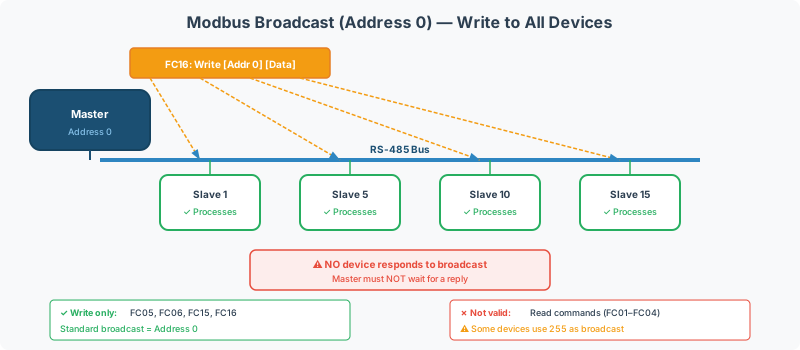
The Modbus specification reserves address 0 as the broadcast address. When a master sends a request to address 0, every slave device on the bus should process the command — but no device responds. This enables simultaneous writes to all devices in a single frame.
In practice, some device manufacturers have treated address 255 as a secondary broadcast address or a “catch-all” diagnostic address. This creates confusion during multi-device commissioning, particularly in solar farm installations and large HVAC systems where dozens of devices share a single RS-485 bus.
This guide covers how broadcast addressing works per the specification, where vendor implementations differ, and how to configure gateway devices to handle broadcast correctly.
Broadcast Address Per the Specification
The Modbus Serial Line specification (V1.02, §2.2) defines the following address ranges:
| Address | Purpose | Response Expected |
|---|---|---|
| 0 | Broadcast — all devices process the request | No |
| 1 – 247 | Individual device addresses | Yes |
| 248 – 255 | Reserved (per specification) | N/A |
Key Rules
- Only write commands are valid as broadcasts — FC05 (Write Single Coil), FC06 (Write Single Register), FC15 (Write Multiple Coils), FC16 (Write Multiple Registers)
- Read commands sent to address 0 are meaningless — if all devices responded simultaneously, the bus would collide
- No response is expected or generated — the master must not wait for a reply after a broadcast
- Broadcast requests use the same frame format as unicast requests — only the address field differs
[!WARNING] Sending a read request (FC03, FC04) to broadcast address 0 is a protocol violation. Most devices will silently ignore it, but some poorly implemented devices may respond — causing bus collisions and corrupted frames. Never use broadcast for reads.
The Node 255 Problem
While the specification reserves addresses 248–255, several device manufacturers have independently adopted address 255 (0xFF) for various purposes:
| Vendor Behavior | Description | Examples |
|---|---|---|
| Secondary broadcast | Device treats address 255 the same as address 0 | Some solar inverters, Chinese-manufactured sensors |
| Unconfigured default | Device ships with address 255 before configuration | Some energy meters, IO modules |
| Diagnostic/test mode | Device responds to address 255 regardless of its configured address | Some PLCs, field controllers |
| Ignored | Device ignores address 255 entirely (spec-compliant behavior) | Most major BAS manufacturers |
Why This Matters for Integration
When configuring a QuickServer gateway, the behavior difference can cause:
- Unexpected multiple responses — if a device responds to both its configured address AND address 255, a gateway scanning the network may detect phantom devices
- Address conflicts — two unconfigured devices both responding on address 255 corrupt each other’s responses
- Broadcast write failures — if a device expects broadcasts on 255 instead of 0, synchronization commands won’t reach it
Common Scenarios
Scenario 1: Solar Farm Inverter Array
Solar inverters frequently need broadcast commands for simultaneous power curtailment or grid frequency response. A typical configuration:
| Configuration | Setting |
|---|---|
| Bus topology | Daisy chain, 10–30 inverters per RS-485 port |
| Addresses | 1–30 (one per inverter) |
| Broadcast address | 0 (per spec) — but verify with inverter manufacturer |
| Broadcast command | FC06 to setpoint register (e.g., active power limit) |
| Response handling | Master sends, waits inter-frame delay, continues polling |
[!CAUTION] Some solar inverter manufacturers (particularly Chinese brands) use address 255 for broadcast instead of address 0. Always verify the broadcast address in the inverter’s Modbus documentation before configuring curtailment commands. Getting this wrong means curtailment commands silently fail — a grid compliance risk.
Scenario 2: Setting All Devices to a Known State
A common commissioning task: reset all setpoints to default values before configuring individual devices.
- Send FC16 (Write Multiple Registers) to address 0 with default setpoint values
- Wait for the turnaround delay (minimum 3.5 character times at the configured baud rate)
- Poll each device individually to confirm the write took effect
[!NOTE] Not all devices support broadcast writes. Some devices accept broadcast on their unit ID filter but do not process the write. Always confirm broadcast write support in the device documentation — or test by writing a known value via broadcast and reading it back individually.
Scenario 3: Clock Synchronization
Some BAS controllers accept a time-of-day broadcast to synchronize all devices on the bus:
- Write current time/date registers to address 0 via FC16
- All devices update their internal clocks simultaneously
- No individual polling needed — reduces bus traffic
Gateway Configuration for Broadcast
Modbus TCP to RTU Gateway
When a Modbus TCP master sends a request with Unit Identifier = 0 in the MBAP header, a compliant TCP-to-RTU gateway should:
- Translate the request to a Modbus RTU frame with slave address 0
- Send the frame on the serial port
- Not wait for a response — return immediately or return a success status to the TCP master
| Gateway Setting | Recommended Value |
|---|---|
| Broadcast address (Modbus RTU side) | 0 |
| Response timeout for broadcast | 0 ms (no response expected) |
| Inter-request delay after broadcast | 50–100 ms (allow devices to process) |
Handling Node 255 Devices
If some devices on the bus require address 255 for broadcast:
- Configure two broadcast commands — one to address 0, one to address 255
- Add a delay between the two broadcasts (minimum 100ms) to prevent bus contention
- Document the discrepancy in the project configuration notes for future maintenance
Diagnosing Broadcast Issues
| Symptom | Likely Cause | Fix |
|---|---|---|
| Broadcast write has no effect | Device doesn’t support broadcast on address 0 | Try address 255, check device documentation |
| One device doesn’t respond to broadcast | That device’s firmware doesn’t implement broadcast | Write to that device individually using its unit ID |
| Multiple responses to broadcast | A device is incorrectly responding to address 0 | Identify the device (disconnect one at a time), update its firmware or isolate it |
| Bus errors after broadcast | Another device is responding to the broadcast, causing collision | Same isolation procedure — find and fix the misbehaving device |
| Gateway returns timeout after broadcast | Gateway is waiting for a response that will never come | Configure the gateway to expect no response for address 0 |
Best Practices
- Always use address 0 for broadcast per the specification — only use 255 as a fallback for non-compliant devices
- Only broadcast write commands — never broadcast reads
- Verify broadcast support for each device type during commissioning, not during production deployment
- Document broadcast behavior in the project configuration — future technicians need to know which address each device type expects
- Use individual writes as a fallback — if broadcast is unreliable, loop through devices individually (slower but deterministic)
Related Articles
- Modbus Exception Codes & Error Handling Reference — what happens when a device rejects a broadcast write
- Modbus Addressing & Register Reference — understanding register numbering conventions
- Modbus Troubleshooting Guide — broader diagnostic procedures
- Modbus RTU Pre-Commissioning Checklist — physical layer verification before configuring broadcasts
Chipkin Tools
- CAS Modbus Scanner — Test broadcast writes and verify per-device response behavior
- QuickServer — Protocol conversion gateway with configurable broadcast handling
- QuickServer — Multi-protocol gateway supporting broadcast on both address 0 and 255
- Chipkin Support — Broadcast addressing consultation for multi-device installations