
Overview
Modbus register addressing is the single most common source of integration errors in building automation and industrial protocol conversion projects. This article covers the addressing conventions, function code mappings, and manufacturer-specific quirks that cause the majority of support issues.
Use this as a quick-reference when configuring a QuickServer gateway, or any Modbus integration.
Function Codes & Register Types
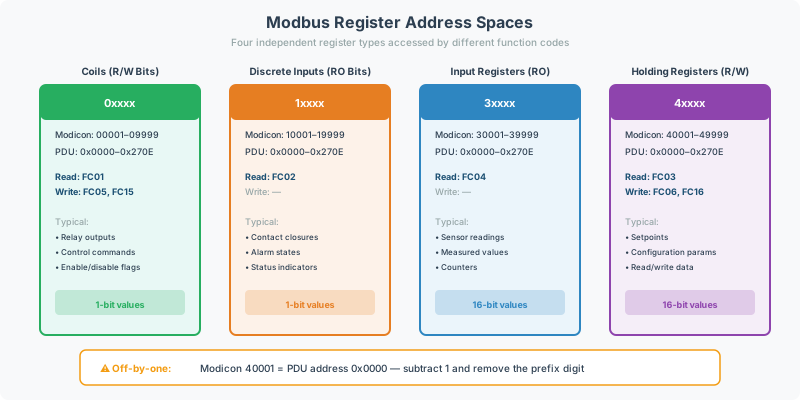
Modbus organizes data into four register types, each accessed by specific function codes:
| Register Type | Address Range (Modicon) | Read FC | Write FC | Access |
|---|---|---|---|---|
| Coils (Discrete Outputs) | 00001–09999 | FC01 | FC05 (single), FC15 (multiple) | Read/Write |
| Discrete Inputs | 10001–19999 | FC02 | — | Read Only |
| Input Registers | 30001–39999 | FC04 | — | Read Only |
| Holding Registers | 40001–49999 | FC03 | FC06 (single), FC16 (multiple) | Read/Write |
For data type details on each register type (value ranges, float handling, byte order), see Modbus Data Types & Byte Order Reference.
Which function code should you use?
- Read-only analog values (temperatures, pressures, power readings) → FC03 or FC04
- Read/write setpoints or configuration → FC03 (read) + FC16 (write)
- Discrete on/off control (relay outputs, enable/disable) → FC05 or FC15
- Discrete status monitoring (alarm contacts, switch states) → FC02
- Device identification → FC43
Addressing Conventions: The #1 Integration Issue
The most common Modbus support issue is a register address off-by-one error caused by mismatched addressing conventions. Three conventions exist in practice:
Standard (1-Based)
Standard Modbus notation numbers registers starting at 1. Most manufacturer documentation uses this convention.
- Holding Register 1 = address 40001 in Modicon notation
- Input Register 1 = address 30001 in Modicon notation
PDU (0-Based)
The raw Modbus protocol frame (Protocol Data Unit) numbers registers starting at 0. Some documentation and software tools use this convention.
- Holding Register 0 = the first holding register
- Register 0 in PDU = Register 1 in standard notation
Modicon (40001+)
The legacy Modicon convention prefixes register addresses with a digit indicating the register type:
- 0xxxx → Coils
- 1xxxx → Discrete Inputs
- 3xxxx → Input Registers
- 4xxxx → Holding Registers
The off-by-one fix: When manufacturer documentation lists a register address and your reads return wrong data, try decrementing the address by 1. This resolves the majority of mismatched-convention issues.
[!TIP] A manufacturer datasheet lists “Register 774” for RPM. If reads return zeros or wrong values, try Register 773. The vendor documented 1-based addressing but the gateway expects 0-based (PDU).
Page-Based Addressing
Some devices use a non-standard “page-based” scheme where registers are organized into 256-register pages:
Formula: Register Address = (Page × 256) + Offset
Example: A generator controller documents RPM on Page 40, Offset 6:
- Register Address = (40 × 256) + 6 = 10246
Page-based addressing is manufacturer-specific and not part of the Modbus standard. If your device documentation references “pages” or “page offsets,” use this formula to calculate the actual register address.
[!TIP] Always ask at project intake whether the device uses standard, Modicon, or page-based addressing. This prevents the most common category of mid-project rework.
Slave / Node ID
Every Modbus RTU device on a serial bus has a unique Slave ID (also called Node ID):
- Valid range: 1–247
- Default assumption: Many tools default to ID 247 — but this is rarely the actual device ID
- Broadcast: Standard broadcast address is Node ID 255, but some devices (particularly solar inverter farms) only respond to broadcast at Node 0
Always confirm the Slave ID before building your configuration. An incorrect ID means you’re polling the wrong device (or getting no response at all).
Serial Communication Settings (Modbus RTU)
Modbus RTU requires matching serial parameters between the master and all slaves on the RS-485 bus. For a complete wiring and connectivity verification procedure, see the Modbus RTU Pre-Commissioning Checklist.
| Parameter | Standard Values | Notes |
|---|---|---|
| Baud Rate | 9600, 19200 | Some devices use non-standard rates (e.g., 192000) |
| Data Bits | 8 | Occasionally 7 on legacy equipment |
| Parity | None, Even | Device-dependent; must match exactly |
| Stop Bits | 1 | Some devices require 2 |
[!WARNING] Some controllers use extremely high baud rates like 192000. If communication fails at standard rates, check the manufacturer documentation for unusual serial settings.
Configuration Intake Checklist
Collect this information before starting any Modbus integration to prevent the most common rework scenarios.
Modbus TCP or RTU?
Determines hardware and wiring requirements. Modbus TCP runs over Ethernet; Modbus RTU runs over RS-485 serial. This choice affects which QuickServer ports to use and whether you need a USB-to-RS-485 adapter for commissioning.
Serial Settings
What are the baud rate, parity, stop bits, and data bits? Mismatched serial settings produce zero communication — the gateway and device simply can’t understand each other. Get these from the manufacturer documentation, not assumptions. See Serial Communication Settings above.
Slave / Node ID
What is the device’s Slave ID? Wrong ID = polling the wrong device or getting no response at all. Manufacturer defaults vary widely — never assume 247.
Addressing Convention
Does the device use Standard (1-based), Modicon (40001+), or Page-based addressing? This is the #1 cause of wrong data reads. Ask the customer to provide a sample register map page with the convention clearly identified.
Register Map
Is a register map (point list) available? Configuration is blocked without it. Request the manufacturer’s Modbus register documentation before starting any work. If the customer doesn’t have one, they need to contact the device manufacturer.
Byte Order for 32-Bit Values
What byte order does the device use for 32-bit float and integer values? Options: Big-Endian (ABCD), Word-Swap (CDAB), Byte-Swap (BADC), Little-Endian (DCBA). Getting this wrong produces garbled data.
Read-Only or Read/Write Points
Which points need to be read-only and which need read/write access? This determines the correct function codes — using the wrong function code can cause exceptions or unintended writes.
Quick Reference: Register Address Ranges
| Modicon Address | Type | Access | Function Codes |
|---|---|---|---|
| 00001–09999 | Coils | Read/Write | FC01, FC05, FC15 |
| 10001–19999 | Discrete Inputs | Read Only | FC02 |
| 30001–39999 | Input Registers | Read Only | FC04 |
| 40001–49999 | Holding Registers | Read/Write | FC03, FC06, FC16 |
Troubleshooting
For common Modbus integration issues — no communication, wrong data values, intermittent timeouts, and CRC errors — see the Modbus Troubleshooting Guide.
Related Articles
- Modbus Data Types & Byte Order Reference — endianness, scaling factors, multi-register values
- Modbus RTU Pre-Commissioning Checklist — wiring and connectivity verification before deployment
- Modbus Troubleshooting Guide — symptom-based diagnostic guide
- Modbus Knowledge Base — general protocol overview
- BACnet Knowledge Base — for Modbus-to-BACnet conversion projects
Chipkin Tools for Modbus Integration
- QuickServer — Protocol conversion gateway
- QuickServer Toolbox — Configuration and diagnostics software for QuickServer gateways
- CAS Modbus Scanner — Standalone Modbus diagnostic and register scanning tool
- USB-to-RS-485 Adapter — Serial adapter for Modbus RTU commissioning
- Chipkin support — Expert protocol integration support