
Overview
LonWorks (Local Operating Network) is an open standard (ISO/IEC 14908) control networking platform created by Echelon Corporation, now maintained by Renesas Electronics. It is widely deployed in building automation — HVAC controllers, lighting systems, and fire safety panels — and is one of the most common legacy protocols encountered in BACnet and Modbus integration projects.
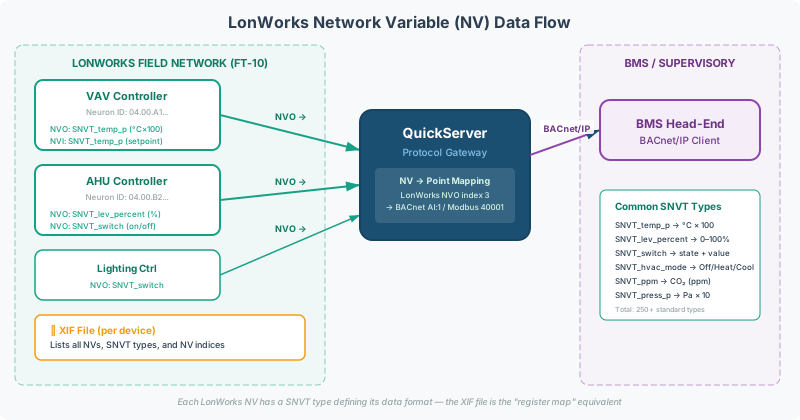
Two concepts are central to every LonWorks gateway integration:
- SNVTs (Standard Network Variable Types) — the standardized data types that define how LonWorks devices expose sensor readings, setpoints, and commands
- XIF files (eXternal Interface Files) — device descriptor files that list all network variables, their SNVT types, and their addressing — the “register map” equivalent for LonWorks
This guide covers both in depth, with practical mapping guidance for QuickServer gateway configurations.
LonWorks Protocol Fundamentals
Network Variables (NVs)
LonWorks devices communicate through network variables — typed data points published or consumed across the network. Every sensor reading, setpoint, and command is a network variable.
Network variables come in two directions:
| Abbreviation | Full Name | Direction | BACnet Equivalent |
|---|---|---|---|
| NVI | Network Variable Input | Write to device | Analog Output, Binary Output |
| NVO | Network Variable Output | Read from device | Analog Input, Binary Input |
[!NOTE] The direction is from the device’s perspective. An NVO (output) is data the device publishes — you read it. An NVI (input) is data the device accepts — you write to it.
Neuron IDs
Every LonWorks node has a unique Neuron ID — a 48-bit hardware identifier burned into the Neuron chip at manufacture. Neuron IDs are required for device binding and cannot be discovered remotely in most configurations. They must be collected from device labels, commissioning records, or the installing contractor.
[!WARNING] Neuron IDs are a hard prerequisite for any LonWorks integration. Without them, the gateway cannot bind to devices. Collect Neuron IDs before ordering hardware or starting configuration.
Physical Layer
LonWorks uses FT-10 (Free Topology, twisted pair) at 78 kbit/s as its primary physical layer. Fiber optic networks require an FTT-10 USB converter for gateway connectivity.
| Media | Speed | Notes |
|---|---|---|
| FT-10 (twisted pair) | 78 kbit/s | Most common in building automation |
| TP/XF-1250 | 1.25 Mbit/s | Higher speed, transformer-isolated |
| Power line | 3.6–5.4 kbit/s | Used in lighting and metering |
| IP (CEA-852 tunneling) | Varies | LonWorks over IP backbone |
Standard Network Variable Types (SNVTs)
SNVTs (pronounced “sniv-its”) are the standardized data types maintained by LonMark International. Each SNVT defines the encoding, resolution, range, and engineering units for a particular type of measurement or command.
Why SNVTs Matter for Integration
Unlike Modbus (where registers are raw integers and the integrator assigns meaning), LonWorks network variables carry built-in type information. The SNVT tells the gateway exactly what data type to expect and what units it represents.
This is both a strength and a constraint:
- Strength: No guesswork about whether a register is a temperature, pressure, or setpoint — the SNVT declares it
- Constraint: The SNVT defines the unit — and that unit cannot be changed at the protocol level
Common SNVT Types
| SNVT | Description | Data Type | Range | Resolution | Unit |
|---|---|---|---|---|---|
SNVT_temp | Temperature (signed) | 16-bit signed | −274.0 to 6279.5 °C | 0.1 °C | °C |
SNVT_temp_p | Temperature (unsigned, positive) | 16-bit unsigned | 0 to 6553.5 °C | 0.1 °C | °C |
SNVT_press | Pressure | 16-bit signed | −3276.8 to 3276.7 kPa | 0.1 kPa | kPa only |
SNVT_lev_percent | Level / percent | 16-bit signed | −163.840% to 163.835% | 0.005% | % |
SNVT_flow | Flow rate | 16-bit unsigned | 0 to 6553.5 L/s | 0.1 L/s | L/s |
SNVT_count | Count | 16-bit unsigned | 0 to 65,535 | 1 | (unitless) |
SNVT_switch | Switch state | Struct (value + state) | 0.0–100.0% + on/off | 0.5% | — |
SNVT_hvac_mode | HVAC operating mode | Enum (8-bit) | 0–255 | — | — |
SNVT_occupancy | Occupancy status | Enum (8-bit) | 0–255 | — | — |
SNVT_time_stamp | Date/time | Struct (7 bytes) | — | 1 s | — |
SNVT_str_asc | ASCII string | 31-byte string | — | — | — |
SNVT_elapsed_tm | Elapsed time | Struct (6 bytes) | — | 1 ms | — |
[!CAUTION]
SNVT_pressis kPa only. There is no PSI option at the protocol level. If the BMS requires PSI, the unit conversion must be done in the gateway configuration (1 kPa = 0.145038 PSI) or in the BMS itself. This is a frequent source of surprise at commissioning.
SNVT Scaling and Encoding
Most SNVTs use fixed-point integer encoding with an implicit scale factor. The raw integer on the wire must be converted to engineering units using the SNVT-defined resolution:
| SNVT | Raw Wire Value | Scale Factor | Engineering Value |
|---|---|---|---|
SNVT_temp_p | 2350 | × 0.1 | 235.0 °C |
SNVT_lev_percent | 20000 | × 0.005 | 100.000% |
SNVT_press | 1013 | × 0.1 | 101.3 kPa |
SNVT_flow | 500 | × 0.1 | 50.0 L/s |
When configuring a QuickServer, the gateway handles SNVT-to-engineering-unit conversion automatically if the SNVT type is correctly specified in the configuration. If the SNVT type is wrong, readings will be off by orders of magnitude.
[!TIP] If a temperature reading shows
3000instead of30.0, the most likely cause is a missing or incorrect scale factor in the gateway configuration. Verify the SNVT type assignment in the config matches the device’s XIF file.
Metric-to-Imperial Conversion
LonWorks SNVTs use metric units exclusively (°C, kPa, L/s). Building Management Systems in North America typically expect imperial units (°F, PSI, CFM).
Configure the unit conversion in the gateway point map:
| SNVT Unit | BMS Unit | Conversion |
|---|---|---|
| °C | °F | °F = (°C × 9/5) + 32 |
| kPa | PSI | PSI = kPa × 0.145038 |
| L/s | CFM | CFM = L/s × 2.11888 |
The QuickServer supports slope/intercept math in the point map configuration to perform these conversions inline.
XIF Files (eXternal Interface Files)
What a XIF File Is
A XIF file is the LonWorks equivalent of a Modbus register map. It is a binary or XML file extracted from a LonWorks device that describes:
- All network variables (NVs) the device exposes
- The SNVT type of each network variable
- The NV index (address) for each variable
- Whether each NV is an input (NVI) or output (NVO)
- Any configuration properties (SCPTs/UCPTs)
Without a XIF file, you are configuring the gateway blind — guessing at NV indexes, SNVT types, and read/write capabilities.
[!WARNING] XIF files are a hard prerequisite for LonWorks gateway configuration. Do not start a configuration build without the XIF file for every device type on the network.
How to Obtain XIF Files
XIF files can be obtained through several methods:
| Method | Tool Required | Notes |
|---|---|---|
| Export from commissioning tool | LNS (LonMaker), Tridium Niagara, or OEM tool | Most reliable — contains the exact NV list as configured |
| Extract from device firmware | Echelon NodeUtil or equivalent | Extracts the default XIF from the Neuron chip directly |
| Request from device manufacturer | None | Ask for the XIF file matching the firmware version installed |
| Extract via gateway discovery | QuickServer NodeUtil mode | QuickServer can discover and extract XIFs from connected devices |
[!TIP] Always verify the XIF file matches the firmware version installed on the device. Manufacturers sometimes add or remove network variables between firmware revisions. A mismatched XIF will produce “phantom” points that cannot be read or missing points that should exist.
XIF File Contents
A typical XIF file for an HVAC controller contains entries like:
| NV Index | Name | Direction | SNVT Type | Description |
|---|---|---|---|---|
| 0 | nvoSpaceTemp | NVO (read) | SNVT_temp_p | Space temperature sensor |
| 1 | nvoDischargeTemp | NVO (read) | SNVT_temp_p | Discharge air temperature |
| 2 | nviSetpoint | NVI (write) | SNVT_temp_p | Temperature setpoint |
| 3 | nvoOccupancy | NVO (read) | SNVT_occupancy | Occupancy status |
| 4 | nviHvacMode | NVI (write) | SNVT_hvac_mode | Operating mode command |
| 5 | nvoDamperPos | NVO (read) | SNVT_lev_percent | Damper position (0–100%) |
| 6 | nvoFanSpeed | NVO (read) | SNVT_lev_percent | Fan speed (0–100%) |
| 7 | nvoAlarm | NVO (read) | SNVT_alarm | Alarm status |
UCPT and SCPT Properties
Beyond standard NVs, LonWorks devices may expose configuration properties:
- SCPT (Standard Configuration Property Type) — predefined by LonMark (e.g.,
SCPTminRnge,SCPTmaxRngefor sensor calibration ranges) - UCPT (User Configuration Property Type) — manufacturer-defined proprietary properties
[!NOTE] UCPT/SCPT properties often contain critical calibration and configuration parameters. Some devices expose runtime data through UCPTs rather than standard NVs — a pattern seen frequently in Siemens LON TEC controllers. Verify with the device manufacturer whether any data points of interest are UCPTs rather than NVs, as the gateway configuration uses a different access method for properties vs. network variables.
Mapping LonWorks to BACnet Objects
The most common LonWorks integration pattern is LonWorks → BACnet/IP using a QuickServer gateway. The gateway reads LonWorks NVs and exposes them as BACnet objects.
NV-to-BACnet Object Mapping
| LonWorks NV | Direction | SNVT Type | BACnet Object | Notes |
|---|---|---|---|---|
| NVO (analog sensor) | Read | SNVT_temp_p, SNVT_press, SNVT_flow | Analog Input (AI) | Read-only measurement |
| NVI (analog setpoint) | Write | SNVT_temp_p, SNVT_lev_percent | Analog Value (AV) or Analog Output (AO) | Writable setpoint |
| NVO (binary state) | Read | SNVT_switch (state byte) | Binary Input (BI) | On/off status |
| NVI (binary command) | Write | SNVT_switch | Binary Output (BO) | On/off command |
| NVO (enum) | Read | SNVT_hvac_mode, SNVT_occupancy | Multi-State Input (MSI) | Map enum values to state names |
| NVI (enum command) | Write | SNVT_hvac_mode | Multi-State Value (MSV) | Writable mode selector |
For detailed guidance on BACnet object type selection, see BACnet Object Types & Properties Reference.
Write Functions: NVUI vs NVPO
When the gateway needs to write to a LonWorks device, the correct write function must be selected:
| Function | Full Name | Use Case |
|---|---|---|
| NVUI | Network Variable Update (Input) | Standard write to an NVI — the default for most setpoints and commands |
| NVPO | Network Variable Poll (Output) | Force-read an NVO — used to explicitly poll a device output |
| WRBX | Write Byte Extended | Direct memory write — advanced, used when NVUI doesn’t apply |
| WRBC | Write Byte Compact | Compact direct memory write — advanced |
[!TIP] Start with NVUI for all write operations. If writes succeed on some devices but not others (e.g., AHU controllers accept writes but FCU controllers don’t), the issue is often that the target device requires a different function or has write protection enabled. Consult the device manufacturer’s documentation for write capabilities.
LonWorks Application IDs
LonWorks devices are classified by application ID (also called functional profile). Common application IDs in building automation:
| App ID | Description | Typical Points |
|---|---|---|
| 8101 | VAV Controller | Zone temp, setpoint, damper position, fan speed |
| 8501 | AHU Controller | Supply/return air temp, fan status, valve positions |
| 8515 | Chiller/Heat Pump | Entering/leaving water temp, compressor status |
| 9086 | Energy Meter | kWh, kW demand, voltage, current |
| 9641 | Boiler Controller | Supply water temp, firing rate, flame status |
[!NOTE] Devices with the same application ID from different manufacturers may not have identical NV lists. Always verify against the actual XIF file — the application ID is a guideline, not a guarantee of compatibility.
Pre-Project Intake Checklist
Collect this information before starting any LonWorks integration. Missing items at this stage are the #1 cause of project delays.
Device Information
- Device manufacturer and model — needed to source the correct XIF file
- Firmware version — XIF files may differ between firmware revisions
- Neuron ID(s) for every device on the network — 48-bit hardware address; cannot be discovered remotely
- XIF file for each device type — required before configuration can begin
- Subnet/Node IDs — required if replacing an existing gateway or node
- Number of devices on the LonWorks trunk
Network Information
- Physical media — FT-10 (twisted pair), fiber optic, or IP tunneling?
- Existing network topology — is there a LonWorks router, repeater, or network manager?
- Other devices on the trunk — any existing gateways or controllers sharing the network?
Integration Requirements
- SNVT types needed — which measurements, setpoints, and commands are required?
- Unit preferences — metric (°C, kPa, L/s) or imperial (°F, PSI, CFM)?
- Desired BACnet point names — LonWorks NVs have technical names (e.g.,
nvoSpaceTemp) but no human-readable descriptions; the BMS integrator must specify the desired object names - Read/write requirements — which points are read-only monitoring vs. writable setpoints/commands?
- Destination protocol — BACnet/IP, BACnet MS/TP, Modbus TCP, or Modbus RTU?
- Device Instance number for the gateway (if BACnet)
[!CAUTION] LonWorks network variables have no description metadata. Unlike BACnet objects (which have a
Descriptionproperty) or Modbus maps (which have documented register descriptions), LonWorks NV names likenvo3ornvoSpaceTempare all you get. The BMS integrator must provide the desired point names separately.
Troubleshooting Common Issues
| Symptom | Likely Cause | Fix |
|---|---|---|
| Temperature reads as 3000 instead of 30.0 | Missing scale factor — raw integer not divided by resolution | Verify SNVT type in config matches XIF; check slope/intercept settings |
| Pressure values in kPa but BMS expects PSI | SNVT_press is always kPa | Add slope = 0.145038 in gateway point map for kPa → PSI conversion |
| Write commands have no effect | Wrong write function (NVUI vs NVPO vs WRBX) | Start with NVUI; consult device documentation for write capabilities |
| Writes work on AHUs but not FCUs | Device-specific write protection or different NV function | Check if FCU requires different NV index or has write-protect enabled in device firmware |
| ”Phantom” points — NVs in config but no data | XIF file doesn’t match installed firmware version | Re-extract XIF from device or request correct version from manufacturer |
| Gateway cannot discover devices | Missing or incorrect Neuron IDs | Verify Neuron IDs from device labels; check physical wiring |
| Intermittent communication on fiber optic | FTT-10 USB converter needed | Standard USB-to-serial adapters don’t work on fiber; use Echelon 75010R or equivalent |
| Config builds fail or produce errors | UCPT/SCPT properties not handled as standard NVs | UCPT/SCPT properties require different access method; check gateway documentation |
| Values show but are stuck / not updating | Device not bound to gateway node | Re-bind using Neuron ID; verify Subnet/Node ID assignments |
| Multi-year project reactivated — nothing works | Neuron IDs or network topology changed | Re-collect Neuron IDs; re-extract XIF files; verify physical network |
Related Articles
- BACnet Object Types & Properties Reference
- Modbus to BACnet Protocol Conversion Guide
- BACnet Discovery & Network Architecture Reference
- Troubleshooting Guide for BACnet MS/TP Networks
Chipkin Tools
- QuickServer — LonWorks FT-10 to BACnet/IP or Modbus TCP gateway with built-in NodeUtil discovery
- QuickServer — Multi-protocol gateway supporting LonWorks, BACnet, Modbus, and 35+ other protocols
- CAS BACnet Explorer — Verify BACnet object exposure from the gateway after LonWorks point mapping
- Chipkin Support — XIF file analysis, SNVT mapping, and LonWorks gateway configuration services