
Overview
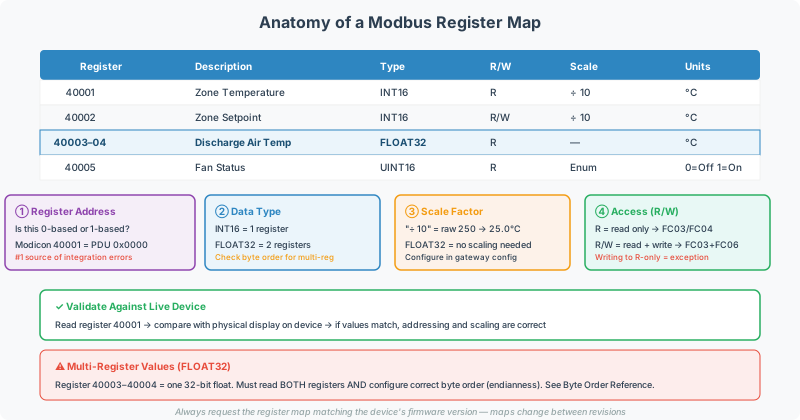
Every Modbus integration starts with a register map — the document from the device manufacturer that defines which registers hold which data. Unfortunately, register maps vary wildly in format, terminology, and addressing conventions between manufacturers.
This guide teaches you how to read and interpret any Modbus register map, avoid the most common misinterpretation pitfalls, and validate your understanding against a live device.
For register addressing fundamentals, see the Modbus Addressing & Register Reference. For data type and byte order specifics, see the Modbus Data Types & Byte Order Reference.
Before You Start
Gather these items before attempting to interpret a register map:
- The manufacturer’s register map document — PDF or spreadsheet (ensure you have the correct revision for the firmware version installed)
- Device model and firmware version — register maps can change between firmware revisions
- A known reference value — at least one physical measurement you can compare against (e.g., a temperature reading on the device’s local display)
- A Modbus diagnostic tool — CAS Modbus Scanner or equivalent, to read live register values
Step 1: Identify the Addressing Convention
This is the single most important step and the #1 source of integration errors across all Modbus projects.
Manufacturers use three different addressing conventions, and they rarely state which one they’re using:
| Convention | Example Address | PDU Offset | Notes |
|---|---|---|---|
| Modicon reference (1-based) | 40001 | 0 | Classic PLC convention — the leading “4” means holding register, and counting starts at 1 |
| Register number (1-based) | 1 | 0 | Omits the Modicon prefix but still starts at 1 |
| PDU offset (0-based) | 0 | 0 | Matches the actual wire protocol — what the device sends and receives |
[!WARNING] If the register map says “Register 1” or “40001”, the actual PDU address is almost certainly 0. If your software tool uses 0-based addressing, you need to subtract 1. This off-by-one error is responsible for more failed Modbus integrations than any other single issue.
How to Determine the Convention
- Check the document header or notes section — look for phrases like “0-based addressing”, “Modbus register offset”, or “reference number”
- Look at the first register number — if it starts at 0, it’s PDU offset; if it starts at 1 or 40001, it’s 1-based
- Check for the Modicon prefix digit — if addresses start with 0, 1, 3, or 4 followed by 4+ digits, it’s Modicon convention:
- 0xxxx = Coils
- 1xxxx = Discrete Inputs
- 3xxxx = Input Registers
- 4xxxx = Holding Registers
- When in doubt, try both — read the register at the documented address, then at address−1; compare the response to a known physical value
Step 2: Identify Register Types and Function Codes
The register map should indicate what type of data each register holds. Map this to the correct Modbus function code:
| Register Map Terminology | Register Type | Read FC | Write FC |
|---|---|---|---|
| ”Holding Register”, “HR”, “4xxxx” | Holding Register | 03 | 06 / 16 |
| ”Input Register”, “IR”, “3xxxx” | Input Register | 04 | — |
| “Coil”, “Digital Output”, “0xxxx” | Coil | 01 | 05 / 15 |
| ”Discrete Input”, “DI”, “Status”, “1xxxx” | Discrete Input | 02 | — |
[!NOTE] Some manufacturers only expose holding registers (FC03/FC06), even for read-only measurements. Others use input registers (FC04) for measurements and holding registers for setpoints. There’s no universal rule — the register map is authoritative.
Step 3: Decode the Data Types
Single-Register Values (16-bit)
Most registers are 16-bit. The register map should specify whether values are:
| Data Type | Size | Range | Example Use |
|---|---|---|---|
| UINT16 (unsigned) | 1 register | 0–65,535 | RPM, counter, raw ADC |
| INT16 (signed) | 1 register | −32,768–32,767 | Temperature (if negative values possible) |
| Scaled integer | 1 register | Varies | Temperature × 10: value 725 = 72.5°F |
Multi-Register Values (32-bit and larger)
When a value spans two registers, you must know:
- Data type — 32-bit float (IEEE 754), 32-bit unsigned integer, or 32-bit signed integer
- Register order — which register is “high” and which is “low”
| Format | Register Order | Byte Sequence |
|---|---|---|
| Big-Endian (AB CD) | High register first | Most common in industrial devices |
| Little-Endian (CD AB) | Low register first | Common in some PLCs |
| Mid-Big (BA DC) | High first, bytes swapped within register | Rare |
| Mid-Little (DC BA) | Low first, bytes swapped within register | Rare |
See Modbus Data Types & Byte Order Reference for detailed byte order examples and diagnostic techniques.
[!TIP] The fastest way to determine byte order: read a known physical value (e.g., room temperature on the device display = 72.5°F), then try all four byte order permutations in your diagnostic tool until one produces the correct floating-point result.
Scale Factors
Many devices store values as scaled integers to avoid floating-point complexity:
| Register Map Says | Meaning | Example |
|---|---|---|
| ”× 10” or “Scale: 0.1” | Divide raw value by 10 | Raw 725 → 72.5°F |
| ”× 100” or “Scale: 0.01” | Divide raw value by 100 | Raw 5025 → 50.25 PSI |
| ”× 0.1” | Multiply raw value by 0.1 | Same as ”÷ 10” |
[!NOTE] Check whether the register map documents the scale factor as a multiplier or a divisor — “Scale: 10” could mean multiply by 10 or divide by 10 depending on the vendor’s convention. Always validate against a known physical reading.
Step 4: Handle Status and Bit-Field Registers
Many devices pack multiple boolean values into a single 16-bit register. The register map will show something like:
| Bit | Description |
|---|---|
| 0 | Running |
| 1 | Alarm Active |
| 2 | Manual Mode |
| 3–15 | Reserved |
To extract individual bits, the gateway configuration needs a bit extract function — reading the full register and masking out individual bits. On a QuickServer, this is configured in the point map.
When mapping to BACnet, each extracted bit becomes a separate Binary Input or Binary Value object.
Step 5: Note Block Read Limitations
Most devices support block reads — reading multiple consecutive registers in a single request (e.g., registers 0–49 in one FC03 request). But some devices have restrictions:
- Maximum block size — some devices only support reading 10–20 registers at a time instead of the protocol maximum of 125
- No block reads — some devices require each register to be read individually (length=1 per request)
- Non-contiguous address spaces — gaps in the register map where no register is defined; reading these addresses returns an error
[!WARNING] If you get intermittent “Illegal Data Address” exceptions (exception code 02), try reducing the block read size. Some devices fail when a block read spans across an undefined register address.
Step 6: Validate Against a Live Device
Never trust the register map alone. Always validate with a live read:
- Connect your diagnostic tool — CAS Modbus Scanner for Modbus RTU or Modbus TCP
- Read a register with a known physical value — compare the displayed reading on the device’s local display to the raw register value
- Verify the addressing convention — if the value at the documented address is wrong, try address−1
- Verify data types — confirm scale factors and byte order match the physical measurement
- Write and verify (if applicable) — write a safe setpoint, confirm it takes effect on the device
Common Register Map Formats by Industry
Power Meters (Schneider, GE, Eaton)
- Typically use holding registers (FC03) for all data
- 32-bit IEEE 754 floats for voltage, current, power
- Byte order varies by manufacturer — Eaton uses Big-Endian (HIGH:LOW), others may differ
- Status registers with bit-packed alarm flags
Generator Controllers (Basler, EMCP, ComAp)
- Mix of holding registers and input registers
- Bit-field status registers requiring bit extraction
- Scale factors common for temperature and pressure values
- Register maps may reference “legacy” parameters that require special configuration
HVAC Chillers and Boilers (York, Carrier, ModuControl)
- Usually holding registers only
- Temperature values with × 10 scale factor (e.g.,
725= 72.5°F) - May use non-standard baud rates (some ModuControl equipment uses 192000 baud)
- State enumerations for operating modes
Solar Inverters
- Often holding registers with SunSpec standard register definitions (starting at register 40000)
- Some only respond to Slave ID 0 (broadcast)
- Dual RS-485 trunk architecture on larger farms
Troubleshooting Register Map Issues
| Symptom | Likely Cause | Fix |
|---|---|---|
| All values read as 0 | Wrong register address (off-by-one) | Try address − 1 |
| Values are wildly wrong (e.g., 7250 instead of 72.5) | Missing scale factor | Apply ÷ 10 or ÷ 100 |
| 32-bit float reads as garbage | Wrong byte order | Try all 4 permutations |
| ”Illegal Data Address” exception | Register doesn’t exist at that address | Verify address convention; check firmware version |
| ”Illegal Function” exception | Wrong function code (e.g., FC04 instead of FC03) | Check if data is in holding or input registers |
| Intermittent read failures | Block read spanning undefined registers | Reduce block size or read individual registers |
| Value stuck at 65535 / 32767 | Sensor fault or unsigned/signed mismatch | Check device diagnostic display; verify UINT16 vs INT16 |
For more troubleshooting patterns, see the Modbus Troubleshooting Guide.
Related Articles
- Modbus Addressing & Register Reference
- Modbus Data Types & Byte Order Reference
- Modbus RTU Pre-Commissioning Checklist
- Modbus Troubleshooting Guide
- Register Map - Knowledge Base
- Modbus Function Codes - Knowledge Base
Chipkin Tools
- CAS Modbus Scanner — Read and write Modbus registers on RTU or TCP devices for validation
- QuickServer — Multi-protocol gateway for Modbus to BACnet, EtherNet/IP, and more
- QuickServer — Protocol converter with web-based configuration for Modbus integration
- Chipkin Support — Register map interpretation assistance and configuration help