
Overview
DNP3 (Distributed Network Protocol 3) is the dominant SCADA communications protocol in North American electric, water, and gas utilities. Standardized as IEEE 1815-2012, it was purpose-built for reliable communications between master stations (SCADA/control centers), Remote Terminal Units (RTUs), and Intelligent Electronic Devices (IEDs) in environments subject to electromagnetic interference, aging components, and poor transmission media.
Unlike simpler protocols such as Modbus, DNP3 provides:
- Typed data objects — binary inputs, analog inputs, counters, and control outputs with defined data types and flags
- Event-driven reporting — outstations report only changed data, reducing bandwidth
- Time-stamped events — reconstructing sequences of events between polls
- Unsolicited responses — outstations push critical events without waiting to be polled
- Control operations — structured command sequences with feedback (Select-Before-Operate)
This guide covers the two areas that cause the most integration issues: control point configuration (getting write commands to work) and Ethernet/TCP setup (migrating from serial to IP-based SCADA).
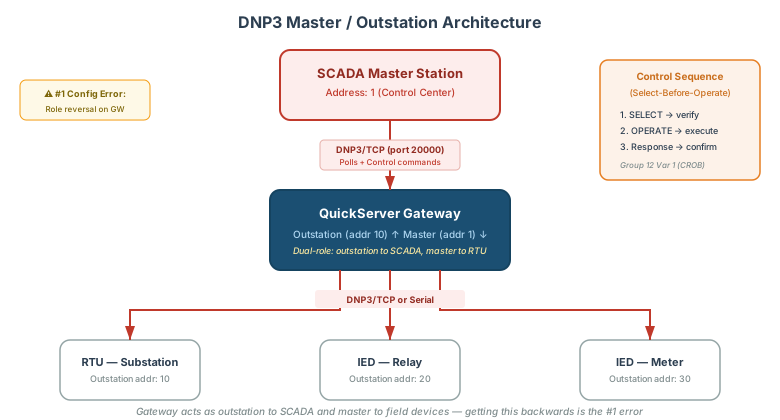
DNP3 Architecture: Masters and Outstations
DNP3 uses a Master/Outstation model:
| Role | Also Called | Function | Gateway Role |
|---|---|---|---|
| Master | Client, Control Center | Polls outstations, sends commands | Initiates requests |
| Outstation | Server, Slave, RTU/IED | Responds to polls, reports events | Responds to master requests |
[!CAUTION] Role reversal is the #1 configuration error in DNP3 gateway projects. When a QuickServer bridges two DNP3 networks, it acts as master on one side and outstation on the other. Getting this backwards produces cryptic errors like “Connection closed by slave” or IIN2.0 “No Function Support” responses — symptoms that look like a protocol problem but are actually a configuration problem.
Addressing
Every DNP3 device has a numeric address (0–65,519). Communication requires specifying both source and destination addresses in every message:
| Parameter | Description | Example |
|---|---|---|
| Master Address | Address of the polling station | 1 (common default) |
| Outstation Address | Address of the remote device | 10 |
| Source Address | Sender’s address (in frame header) | Matches the sender’s role |
| Destination Address | Receiver’s address (in frame header) | Must match the receiver’s configured address |
[!TIP] Unlike Modbus (which uses a single Unit ID), DNP3 requires both source and destination addresses to be correct. If either is wrong, the outstation silently ignores the request — no error response, no indication of misconfiguration. Always verify addresses at both ends before troubleshooting other issues.
DNP3 Data Objects (Groups and Variations)
DNP3 organizes all data into Groups (object type) and Variations (encoding format). This is the DNP3 equivalent of a Modbus register map — but with significantly more structure.
Core Data Object Types
| Object Type | Group(s) | Direction | Description | BACnet Equivalent |
|---|---|---|---|---|
| Binary Input (BI) | 1, 2 | Read | Digital status from field devices (contact closure, relay state) | Binary Input (BI) |
| Binary Output (BO) | 10, 11, 12 | Read/Write | Digital control outputs (breaker trip/close, valve open/close) | Binary Output (BO) |
| Analog Input (AI) | 30, 32 | Read | Analog measurements (voltage, current, temperature, flow) | Analog Input (AI) |
| Analog Output (AO) | 40, 41, 42, 43 | Read/Write | Analog setpoints and control (tap position, power setpoint) | Analog Output (AO) |
| Counter | 20, 21, 22 | Read | Accumulated pulse counts (energy kWh, water volume) | Analog Input (AI) |
| Frozen Counter | 21, 23 | Read | Snapshot of counter at a specific time | Analog Input (AI) |
Groups and Variations Reference
Each Group has multiple Variations that define the data encoding:
Binary Input (Group 1 — static, Group 2 — event):
| Group | Variation | Description | Data Width |
|---|---|---|---|
| 1 | 1 | Binary Input — packed format (8 per byte) | 1 bit |
| 1 | 2 | Binary Input — with flags | 1 byte |
| 2 | 1 | Binary Input Event — without time | 1 byte |
| 2 | 2 | Binary Input Event — with absolute time | 7 bytes |
| 2 | 3 | Binary Input Event — with relative time | 3 bytes |
Analog Input (Group 30 — static, Group 32 — event):
| Group | Variation | Description | Data Width |
|---|---|---|---|
| 30 | 1 | 32-bit Analog Input with flag | 5 bytes |
| 30 | 2 | 16-bit Analog Input with flag | 3 bytes |
| 30 | 3 | 32-bit Analog Input without flag | 4 bytes |
| 30 | 4 | 16-bit Analog Input without flag | 2 bytes |
| 30 | 5 | 32-bit float with flag | 5 bytes |
| 30 | 6 | 64-bit float with flag | 9 bytes |
| 32 | 1 | 32-bit Analog Input Event without time | 5 bytes |
| 32 | 2 | 16-bit Analog Input Event without time | 3 bytes |
| 32 | 3 | 32-bit Analog Event with time | 11 bytes |
| 32 | 4 | 16-bit Analog Event with time | 9 bytes |
Analog Output (Group 40 — static, Group 41 — command):
| Group | Variation | Description | Data Width |
|---|---|---|---|
| 40 | 1 | 32-bit Analog Output Status with flag | 5 bytes |
| 40 | 2 | 16-bit Analog Output Status with flag | 3 bytes |
| 40 | 3 | 32-bit float Analog Output Status | 5 bytes |
| 40 | 4 | 64-bit float Analog Output Status | 9 bytes |
| 41 | 1 | 32-bit Analog Output Block | 5 bytes |
| 41 | 2 | 16-bit Analog Output Block | 3 bytes |
| 41 | 3 | 32-bit float Analog Output Block | 5 bytes |
| 41 | 4 | 64-bit float Analog Output Block | 9 bytes |
Counter (Group 20 — static, Group 22 — event):
| Group | Variation | Description | Data Width |
|---|---|---|---|
| 20 | 1 | 32-bit Counter with flag | 5 bytes |
| 20 | 2 | 16-bit Counter with flag | 3 bytes |
| 20 | 5 | 32-bit Counter without flag | 4 bytes |
| 20 | 6 | 16-bit Counter without flag | 2 bytes |
| 22 | 1 | 32-bit Counter Event with flag | 5 bytes |
| 22 | 5 | 32-bit Counter Event with time | 11 bytes |
[!WARNING] Group/Variation mismatch is a common cause of “IIN2.0 — No Function Support” errors. If the master requests a Group/Variation the outstation doesn’t support, it returns this internal indication. Always verify which variations the outstation’s device profile supports before building the gateway configuration.
Static vs Event Data (Class 0, 1, 2, 3)
DNP3 assigns every data point to a Class, which controls how and when data is reported:
| Class | Name | Behavior | Use Case |
|---|---|---|---|
| Class 0 | Static | Current value — returned on integrity poll | Baseline snapshots, initial state |
| Class 1 | Event (high priority) | Change-of-value events — highest priority | Critical alarms, breaker trips |
| Class 2 | Event (medium priority) | Change-of-value events — medium priority | Analog value changes, status updates |
| Class 3 | Event (low priority) | Change-of-value events — lowest priority | Non-critical logs, counters |
The polling cycle works as:
- Integrity Poll (Class 0+1+2+3) — sent on startup or reconnection; retrieves all static data and queued events
- Event Polls (Class 1, 2, 3) — sent periodically; returns only data that changed since last poll
- Unsolicited Responses — outstation pushes Class 1/2/3 events without waiting for a poll (if enabled)
[!TIP] Configure Class 1 event polls at a faster rate than Class 2/3 to prioritize critical alarms. A typical configuration: Class 1 every 1 second, Class 2 every 5 seconds, Class 3 every 30 seconds, Integrity Poll every 300 seconds.
Control Point Configuration (Group 12 — CROB)
Control points are the most complex part of DNP3 integration. The Control Relay Output Block (CROB, Group 12) is the standard mechanism for binary control operations — breaker trip/close, valve open/close, pump start/stop.
CROB Structure
A CROB command contains:
| Field | Size | Description |
|---|---|---|
| Control Code | 1 byte | Operation type + Trip/Close + Queue/Clear |
| Count | 1 byte | Number of times to execute (usually 1) |
| On Time | 4 bytes | Milliseconds the output is energized |
| Off Time | 4 bytes | Milliseconds the output is de-energized |
| Status | 1 byte | Response status code (0 = success) |
Control Code Breakdown
The control code byte encodes three pieces of information:
| Bits | Name | Values |
|---|---|---|
| 0–3 | Operation Type | 0x01 = Pulse On, 0x02 = Pulse Off, 0x03 = Latch On, 0x04 = Latch Off |
| 4–5 | Trip/Close | 0x00 = NUL, 0x40 = Close, 0x80 = Trip |
| 6 | Clear | 0x20 = Clear queued operations |
| 7 | Queue | 0x10 = Queue the operation |
Common control code combinations:
| Hex Code | Operation | Typical Use |
|---|---|---|
0x03 | Latch On (NUL) | Turn on a motor, open a valve |
0x04 | Latch Off (NUL) | Turn off a motor, close a valve |
0x41 | Pulse On + Close | Close a breaker (pulsed operation) |
0x81 | Pulse On + Trip | Trip a breaker (pulsed operation) |
Select-Before-Operate (SBO) vs Direct Operate
DNP3 defines two control modes:
| Mode | Function Codes | Sequence | Use Case |
|---|---|---|---|
| Select-Before-Operate (SBO) | FC 3 (Select) → FC 4 (Operate) | Two-step: select the point, then execute | Safety-critical controls (breakers, protective relays) |
| Direct Operate | FC 5 (Direct Operate) | One-step: execute immediately | Non-critical controls (lights, dampers) |
| Direct Operate No Ack | FC 6 (Direct Operate No Ack) | One-step, no confirmation | Low-latency controls where speed matters more than confirmation |
[!CAUTION] SBO has a timeout. After sending a Select (FC 3), the Operate (FC 4) must follow within the outstation’s configured timeout (typically 2–10 seconds). If the operate arrives late, the outstation rejects it. If control commands work intermittently, check whether the SBO timeout is too short for the network latency.
Active vs Passive Control Points
When configuring control points on a QuickServer, each Binary Output can be configured as:
| Mode | Behavior | When to Use |
|---|---|---|
| Active | Gateway sends CROB commands to the outstation | Gateway is the master and controls field devices |
| Passive | Gateway accepts CROB commands from a master | Gateway is the outstation and receives commands from SCADA |
[!WARNING] “Control points stuck as status-only” is almost always a passive-vs-active misconfiguration. If you can read Binary Output status (Group 10) but cannot write controls (Group 12), verify that the control points are configured as active on the master side and that the outstation supports the Group 12 variation being sent.
Analog Output Commands (Group 41)
For analog control operations (setpoints, positions, power levels), use Group 41 — Analog Output Block:
| Variation | Data Type | Range | Use Case |
|---|---|---|---|
| 41.1 | 32-bit signed integer | −2,147,483,648 to 2,147,483,647 | High-precision setpoints |
| 41.2 | 16-bit signed integer | −32,768 to 32,767 | Standard setpoints |
| 41.3 | 32-bit float (IEEE 754) | ±3.4 × 10³⁸ | Engineering-unit setpoints |
| 41.4 | 64-bit double | ±1.7 × 10³⁰⁸ | High-precision scientific |
Analog Output commands also support SBO and Direct Operate modes, using the same function codes (FC 3/4/5/6) as binary controls.
DNP3 Protocol Levels (L1–L4)
DNP3 devices are certified to subset levels that define which features they support:
| Level | Features | Typical Device |
|---|---|---|
| Level 1 | Basic read of BI, BO, AI, AO, counters. Direct Operate only. No events. | Simple sensors, basic RTUs |
| Level 2 | Level 1 + event reporting (Class 1/2/3), integrity polls, SBO controls, time sync | Standard IEDs, meters, relays |
| Level 3 | Level 2 + frozen counters, analog deadband, unsolicited responses, file transfer | Advanced RTUs, gateway devices |
| Level 4 | Level 3 + floating-point data types, double-bit binary, octet strings | Full-featured SCADA devices |
[!CAUTION] Protocol level mismatch = zero communication. If the master requests features above the outstation’s supported level, it receives “Function Not Supported” errors. More importantly, if the outstation transmits using data types the master doesn’t understand, the master silently ignores the data with no error indication on the serial link — LEDs blink but no data appears. Always confirm both devices’ protocol levels before starting configuration.
How to Determine a Device’s Protocol Level
- Check the manufacturer’s DNP3 Device Profile — a standardized document listing supported objects, variations, and function codes
- Request the device’s conformance level from the manufacturer
- Test with an integrity poll — monitor which objects and variations appear in the response
Ethernet / TCP Configuration
Migrating from Serial to DNP3 over TCP/IP
DNP3 was originally designed for serial links (RS-232 / RS-485). The DNP3 over TCP transport (defined in IEEE 1815) wraps DNP3 application-layer messages in TCP connections, enabling IP-based SCADA communication.
Connection Parameters
| Parameter | Standard Value | Notes |
|---|---|---|
| TCP Port | 20000 | DNP3 standard port; some implementations use 20001+ for secondary channels |
| Transport | TCP (connection-oriented) | UDP is allowed by the standard but rarely used in practice |
| IP Mode | Master initiates TCP connection to outstation | Outstation listens on port 20000 |
| Keep-alive | Recommended | Detect connection drops on unreliable networks |
| TLS | Optional (IEC 62351-3) | Recommended for wide-area networks |
[!NOTE] The master always initiates the TCP connection. The outstation listens. This is the opposite of some other protocols and can cause confusion when configuring firewalls — the outstation’s port 20000 must be reachable from the master.
Gateway Ethernet Configuration
When configuring a QuickServer for DNP3 over TCP:
As DNP3 Master (polling outstation devices):
| Setting | Value | Notes |
|---|---|---|
| Role | Master / Client | Initiates TCP connections |
| Remote IP | Outstation’s IP address | Must be reachable on the network |
| Remote Port | 20000 | Or device-specific port |
| Local DNP3 Address | Master address (e.g., 1) | Must match outstation’s expected master address |
| Remote DNP3 Address | Outstation address (e.g., 10) | Must match outstation’s configured address |
As DNP3 Outstation (serving data to SCADA master):
| Setting | Value | Notes |
|---|---|---|
| Role | Outstation / Server | Listens for TCP connections |
| Listen Port | 20000 | Or any agreed port |
| Local DNP3 Address | Outstation address (e.g., 10) | Must match master’s configured destination |
| Allowed Master IP | SCADA master’s IP | Restrict connections for security |
| Allowed Master Address | Master’s DNP3 address (e.g., 1) | Reject messages from unexpected masters |
Multi-Master Considerations
A single DNP3 outstation typically serves one master per TCP connection. When multiple SCADA masters need access to the same data:
| Approach | Implementation | Limitation |
|---|---|---|
| Multiple TCP connections | Outstation accepts connections from multiple master IPs | Each master gets its own event buffer; events consumed by one master are not seen by others |
| DNP3 proxy/repeater | Gateway mirrors data to multiple outstation ports | Adds latency; requires additional configuration |
| Separate IP interfaces | Use a gateway with multiple Ethernet ports | Hardware-dependent; not all gateways support this |
[!WARNING] Event buffer contention: When two masters poll the same outstation, each integrity poll clears the event buffers. Master A receives events, then Master B’s poll returns empty because the events were already consumed. Use separate event classes per master or configure the outstation to retain events until all masters have polled.
Serial-to-Ethernet Bridge Configuration
The most common DNP3 gateway use case is bridging serial outstations (RS-232/RS-485) to an Ethernet/IP SCADA network:
[Serial IED] ←RS-232/485→ [QuickServer] ←TCP/IP→ [SCADA Master]
   Outstation                Master | Outstation        Master
The gateway runs two DNP3 stacks simultaneously:
| Side | Role | Transport | Polls/Responds |
|---|---|---|---|
| Serial side | Master | RS-232 or RS-485 | Polls serial IEDs on a schedule |
| Ethernet side | Outstation | TCP port 20000 | Responds to SCADA master requests |
Configuration steps:
- Configure the serial port (baud rate, parity, stop bits, RS-232 vs RS-485)
- Configure the serial-side DNP3 master (addresses, poll intervals, object list)
- Configure the Ethernet-side DNP3 outstation (listen port, addresses, exposed objects)
- Map serial objects to Ethernet objects — the gateway’s internal point map links serial-side data to Ethernet-side presentation
[!TIP] Configure the serial side first and verify communication (data reads successfully) before configuring the Ethernet side. This isolates serial issues (baud rate, wiring, addressing) from Ethernet issues (port, IP, role, firewall).
DNP3 to BACnet / Modbus Mapping
DNP3 gateways frequently bridge utility protocols to building automation protocols. The mapping follows a predictable pattern:
DNP3 → BACnet Object Mapping
| DNP3 Object | Group | BACnet Object | Notes |
|---|---|---|---|
| Binary Input | 1 | Binary Input (BI) | Status flags map to Reliability property |
| Binary Output Status | 10 | Binary Output (BO) | Present Value = output state |
| Binary Output Control | 12 | Binary Output (BO) | BACnet Write → CROB command to outstation |
| Analog Input | 30 | Analog Input (AI) | Apply engineering unit scaling in gateway |
| Analog Output Status | 40 | Analog Value (AV) | Current setpoint value |
| Analog Output Command | 41 | Analog Output (AO) | BACnet Write → AO Block command to outstation |
| Counter | 20 | Analog Input (AI) | Map to units: pulses or kilowatt-hours |
For detailed BACnet object type guidance, see BACnet Object Types & Properties Reference.
DNP3 → Modbus Register Mapping
| DNP3 Object | Group | Modbus Register Type | Notes |
|---|---|---|---|
| Binary Input | 1 | Discrete Input (1xxxx) | Read-only single bit |
| Binary Output | 10/12 | Coil (0xxxx) | Read/write single bit |
| Analog Input | 30 | Input Register (3xxxx) | 16-bit or 32-bit depending on variation |
| Analog Output | 40/41 | Holding Register (4xxxx) | Read/write analog value |
| Counter | 20 | Input Register (3xxxx) | 32-bit counters may need two registers |
For Modbus addressing conventions, see Modbus Addressing & Register Reference.
Pre-Project Intake Checklist
Collect this information before starting any DNP3 integration. Missing items cause project delays measured in weeks, not days.
Device Information
- Device manufacturer and model — e.g., Siemens Siprotec 7UT635, SEL-751, GE D60
- DNP3 Device Profile document — lists supported Groups, Variations, Function Codes, and protocol level
- Outstation address(es) for every device — numeric (0–65,519)
- Master address — address the devices expect to be polled from
- Protocol level — L1, L2, L3, or L4
- Number of devices on the network
Transport Information
- Serial or Ethernet? — RS-232 (point-to-point) or RS-485 (multi-drop) or TCP/IP?
- Serial settings (if applicable) — baud rate, parity, stop bits, data bits
- IP address and port (if TCP) — default port 20000
- Firewall rules — can the master reach the outstation on port 20000?
Data Point Requirements
- Point list — which Binary Inputs, Analog Inputs, Counters are needed?
- Control requirements — which Binary Outputs and Analog Outputs need write capability?
- Control mode — SBO (safety-critical) or Direct Operate?
- Group/Variation preferences — 16-bit vs 32-bit, with/without timestamps, float vs integer?
- Event class assignments — which points are Class 1 (critical) vs Class 2/3?
Integration Requirements
- Destination protocol — BACnet/IP, BACnet MS/TP, Modbus TCP, or Modbus RTU?
- Gateway role on each side — which side is master, which is outstation?
- Unsolicited responses — supported and desired? (Reduces polling traffic)
- Time synchronization — does the outstation need time sync from the master?
- Fragment size — standard 2K or larger? (Large point counts may need custom firmware)
[!WARNING] Fragment size limits can silently truncate data. The standard DNP3 fragment size is 2,048 bytes. If a response exceeds this, it’s split into multiple fragments. Some older masters don’t reassemble multi-fragment responses correctly. For large point counts (500+), verify multi-fragment handling works end-to-end before commissioning.
Troubleshooting Common Issues
| Symptom | Likely Cause | Fix |
|---|---|---|
| No response from outstation | Address mismatch — source or destination wrong | Verify both master and outstation addresses match at both ends |
| ”IIN2.0 — No Function Support” | Requesting unsupported Group/Variation or Function Code | Check device profile; reduce to a supported variation (e.g., Group 30 Var 2 instead of Var 5) |
| “Connection closed by slave” | Master/outstation roles reversed in gateway config | Swap the role assignment — master connects, outstation listens |
| Control commands have no effect | Active/passive misconfiguration on control points | Verify control points set to Active on the master side |
| Controls work once then stop | SBO timeout expired between Select and Operate | Increase SBO timeout or switch to Direct Operate if safety allows |
| Serial LEDs blink but no data | Protocol level mismatch (device expects L3, gateway sends L1) | Match gateway’s protocol level to device requirement |
| Analog values are wrong or zero | Group/Variation data width mismatch (16-bit vs 32-bit) | Match the variation to the outstation’s actual data width |
| Events missing on second master | Event buffer consumed by first master’s poll | Assign separate event classes per master, or use unsolicited reporting |
| TCP connection drops repeatedly | Firewall, NAT, or keep-alive timeout | Enable TCP keep-alive; verify firewall allows persistent connections on port 20000 |
| Upload fails with no error | Config file extension case sensitivity | Rename .CSV → .csv — some gateways reject uppercase extensions |
| Large point maps cause timeouts | Fragment size exceeded (>2K) | Request custom firmware with larger fragment support (e.g., 16K) |
| “Function Not Supported” on Write | Outstation doesn’t support control function codes | Verify device profile supports FC 3/4/5/6 for controls; some IEDs are read-only |
Common DNP3 Devices
These devices are frequently encountered in Chipkin integration projects:
| Manufacturer | Model | Type | Typical Application |
|---|---|---|---|
| Siemens | Siprotec 4 (7UT635, 7UT6135) | Protective relay | Substation transformer protection |
| Schweitzer (SEL) | SEL-751, SEL-351 | Protective relay | Feeder protection, recloser control |
| GE / GE Vernova | D60, D30 | Protective relay | Distance protection, line differential |
| Orion | Orion LX | RTU / gateway | Substation automation (requires L4) |
| ABB | REF615, REB670 | Protective relay | Busbar and feeder protection |
| Schneider | Easergy P3 | Protective relay | Distribution automation |
[!NOTE] Protective relays are the most common DNP3 devices in gateway projects. Each manufacturer has a unique DNP3 device profile — the same Groups/Variations that work on a SEL relay may not work on a Siemens relay. Always request the device profile document before configuration.
Related Articles
- BACnet Object Types & Properties Reference
- Modbus Addressing & Register Reference
- Modbus to BACnet Protocol Conversion Guide
- LonWorks SNVT Reference & XIF Mapping Guide
Chipkin Tools
- QuickServer — DNP3 Serial/TCP master and outstation with configurable protocol level support
- QuickServer — Multi-protocol gateway supporting DNP3, BACnet, Modbus, and 35+ other protocols
- CAS BACnet Explorer — Verify BACnet object exposure after DNP3-to-BACnet gateway mapping
- Chipkin Support — DNP3 device profile analysis, control point configuration, and gateway setup services