
What Modbus RTU Is
Modbus RTU (Remote Terminal Unit) is Modbus transported over RS-485 serial with binary framing and CRC-16 error checking. It is the most common Modbus variant in field device integration.
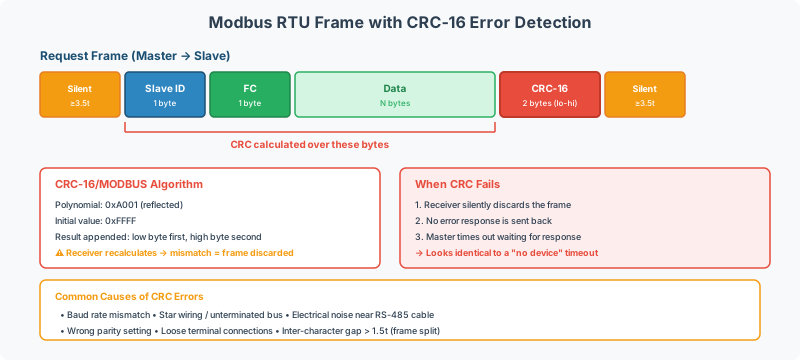
RTU vs TCP
| Aspect | Modbus RTU | Modbus TCP |
|---|---|---|
| Transport | RS-485 serial | Ethernet TCP/IP |
| Framing | Binary with CRC-16 | MBAP header (no CRC) |
| Addressing | Slave ID (1–247) | IP address + Unit ID |
| Topology | Multidrop bus | IP network |
| Speed | 9600–115200 baud | 10/100/1000 Mbps |
Key Serial Parameters
All devices on an RS-485 trunk must agree on these settings:
| Parameter | Common Values |
|---|---|
| Baud rate | 9600, 19200, 38400, 115200 |
| Data bits | 8 |
| Parity | None, Even |
| Stop bits | 1, 2 |
[!WARNING] A single device with mismatched serial settings can disrupt the entire trunk. Verify every device before connecting.
Pre-Commissioning
Before connecting devices:
- Confirm serial parameters for every device on the trunk
- Verify unique Slave IDs (1–247)
- Confirm register map revision and addressing convention
- Check RS-485 wiring topology (daisy-chain, not star)
- Apply termination resistors at both bus ends
See Modbus RTU Pre-Commissioning Checklist for a complete walkthrough.
Common Problems
- Entire trunk stops communicating — One device with mismatched baud rate, parity, or stop bits disrupts all other devices on the bus. Verify every device’s serial parameters before connecting. See Modbus RTU Pre-Commissioning Checklist.
- Intermittent timeouts — Duplicate Slave IDs or RS-485 wiring faults (star topology, missing termination). See Modbus Troubleshooting Guide.
- No response on correct address — Device may require a specific inter-frame gap or have non-standard timeout requirements. See Modbus Troubleshooting Guide.
- Wrong register values — Addressing convention mismatch (0-based vs 1-based). See Modbus Addressing & Register Reference.