
Overview
Modbus TCP wraps the standard Modbus protocol data unit (PDU) inside a TCP/IP packet using the MBAP header (Modbus Application Protocol header). This header replaces the slave address and CRC/LRC fields used in Modbus RTU and ASCII serial modes.
Understanding the MBAP header is essential for debugging Modbus TCP communication with Wireshark, configuring TCP-to-RTU gateways, and implementing custom Modbus TCP clients or servers.
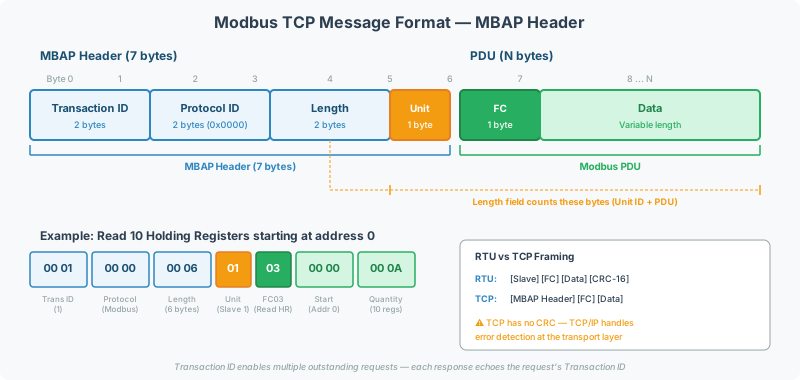
MBAP Header Structure
The MBAP header is 7 bytes prepended to every Modbus TCP request and response:
| Field | Size | Byte Position | Description |
|---|---|---|---|
| Transaction Identifier | 2 bytes | 0–1 | Request/response correlation ID (set by client) |
| Protocol Identifier | 2 bytes | 2–3 | Always 0x0000 for Modbus |
| Length | 2 bytes | 4–5 | Number of bytes following (Unit ID + PDU) |
| Unit Identifier | 1 byte | 6 | Slave/device address (or 0xFF for direct TCP devices) |
Complete Modbus TCP Frame
[MBAP Header (7 bytes)] + [Function Code (1 byte)] + [Data (N bytes)]| Component | Size | Example (Hex) |
|---|---|---|
| Transaction ID | 2 bytes | 00 01 |
| Protocol ID | 2 bytes | 00 00 |
| Length | 2 bytes | 00 06 |
| Unit ID | 1 byte | 01 |
| Function Code | 1 byte | 03 |
| Data | 4 bytes | 00 00 00 01 |
| Total | 12 bytes | 00 01 00 00 00 06 01 03 00 00 00 01 |
This example reads 1 holding register starting at address 0 from Unit ID 1.
Field Details
Transaction Identifier
| Property | Detail |
|---|---|
| Set by | Client (master) |
| Echoed by | Server (slave) — must match in response |
| Purpose | Correlates requests with responses for concurrent communication |
| Typical values | Sequential counter: 0x0001, 0x0002, 0x0003… |
The Transaction ID allows a client to send multiple requests without waiting for each response — the client matches responses to requests using the ID. This enables pipelining that is impossible in serial Modbus RTU (which is strictly request-response).
[!TIP] When debugging with Wireshark, filter by Transaction ID to match a specific request with its response. If response Transaction IDs don’t match request IDs, the server implementation has a bug.
Protocol Identifier
| Property | Detail |
|---|---|
| Value | Always 0x0000 for standard Modbus |
| Purpose | Allows multiplexing with other protocols on the same TCP connection |
| In practice | Always zero — no other protocols use this field |
[!NOTE] A non-zero Protocol Identifier indicates either a non-standard Modbus variant, a protocol implementation bug, or packet corruption. Standard Modbus TCP clients and servers should reject frames with Protocol ID ≠ 0.
Length
| Property | Detail |
|---|---|
| Covers | Unit Identifier + Function Code + Data |
| Does NOT cover | Transaction ID + Protocol ID + Length field itself |
| Minimum | 0x0002 (Unit ID + Function Code with no data) |
| Maximum | 0x00FD (253 — Unit ID + FC + 251 bytes of data) |
The Length field tells the receiver how many bytes follow the Length field itself. It enables the receiver to detect complete frames within the TCP byte stream.
Unit Identifier
| Property | Detail |
|---|---|
| Purpose | Identifies the target device when multiple devices share a single TCP connection |
| For direct TCP devices | Typically 0xFF (255) or 0x01 (1) — device-specific |
| For TCP-to-RTU gateways | Maps to the RTU slave address on the serial side |
| Broadcast | 0x00 — see broadcast addressing |
[!WARNING] The Unit Identifier in Modbus TCP serves the same purpose as the slave address in Modbus RTU, but they are handled differently. In RTU, a device only responds to its own address. In TCP, the gateway uses the Unit Identifier to route the request to the correct serial device. If the Unit Identifier doesn’t match any downstream serial device, the gateway returns exception 0A or 0B.
Modbus TCP vs Modbus RTU: Key Differences
| Feature | Modbus RTU (Serial) | Modbus TCP (Ethernet) |
|---|---|---|
| Transport | RS-485 / RS-232 | TCP/IP (Ethernet) |
| Default port | N/A (serial) | 502 |
| Error check | CRC-16 (2 bytes) | None — relies on TCP checksums |
| Framing | Silent intervals (timing-based) | MBAP header (Length field) |
| Device address | Slave Address (1 byte, in frame) | Unit Identifier (1 byte, in MBAP header) |
| Concurrent requests | No — strict request/response | Yes — Transaction IDs enable pipelining |
| Max PDU size | 253 bytes | 253 bytes (same) |
| Connection management | N/A (bus is always on) | TCP connection setup/teardown |
No CRC in Modbus TCP
Modbus TCP does not include its own CRC or checksum. Error detection is provided by:
- TCP checksum — covers the entire TCP segment (header + payload)
- Ethernet FCS — frame check sequence at the data link layer
This means CRC errors are never a problem on Modbus TCP. If you see corrupted data over Modbus TCP, the issue is at the application layer (wrong register map, byte order, or scaling), not the transport layer.
TCP Connection Management
Default Port
Modbus TCP servers listen on TCP port 502. Some devices allow configuring an alternate port for security or multi-instance scenarios.
Connection Limits
| Parameter | Typical Value | Notes |
|---|---|---|
| Max simultaneous connections | 1–8 | Device-dependent — cheaper devices may support only 1 |
| Connection timeout | 30–120 seconds | Server drops idle connections |
| Keep-alive | TCP keep-alive recommended | Prevents stale connections after network interruptions |
[!CAUTION] Many embedded Modbus TCP devices support only 1 or 2 simultaneous TCP connections. If your gateway opens a connection and a maintenance laptop also connects, the device may reject the gateway’s connection. Coordinate access to avoid connection conflicts.
Connection Lifecycle
- Client opens TCP connection to server on port 502
- Client sends MBAP + PDU — one or more Modbus requests
- Server processes and responds — MBAP header echoes the Transaction ID
- Connection stays open — multiple request/response cycles on the same connection
- Connection closes — either side can close after an idle timeout
[!TIP] For gateway devices, configure persistent connections (keep the TCP connection open between polls) rather than opening and closing for each request. This reduces latency and avoids TCP handshake overhead.
Example: Wireshark Analysis
Capture Filter
To capture only Modbus TCP traffic:
tcp port 502Display Filter
To filter Modbus TCP frames in a capture:
mbtcpReading a Modbus TCP Frame in Wireshark
Wireshark natively decodes the MBAP header and PDU:
| Wireshark Field | Corresponds To |
|---|---|
mbtcp.trans_id | Transaction Identifier |
mbtcp.prot_id | Protocol Identifier (should be 0) |
mbtcp.len | Length |
mbtcp.unit_id | Unit Identifier |
modbus.func_code | Function Code |
modbus.regnum16 | Starting register address |
modbus.word_cnt | Number of registers requested |
Filtering for Errors
Show only exception responses:
modbus.func_code >= 0x80Show responses from a specific Unit ID:
mbtcp.unit_id == 1TCP-to-RTU Gateway Translation
When a QuickServer operates as a Modbus TCP-to-RTU gateway:
Request Path (TCP → Serial)
| Action | Details |
|---|---|
| Receive MBAP + PDU from TCP client | Parse Transaction ID, Unit ID, Function Code, Data |
| Store Transaction ID | Needed to build the response |
| Build RTU frame | [Unit ID] [FC] [Data] [CRC-16] |
| Send on serial port | RS-485 at configured baud rate |
Response Path (Serial → TCP)
| Action | Details |
|---|---|
| Receive RTU frame from serial device | [Slave Addr] [FC] [Data] [CRC-16] |
| Verify CRC | Discard frame if CRC invalid |
| Strip CRC and slave address | Keep FC + Data |
| Build MBAP header | Use stored Transaction ID, Protocol ID = 0, Length = 1 + FC + Data length |
| Send TCP response | Route to the TCP client that made the request |
Timing Considerations
| Parameter | TCP Side | RTU Side |
|---|---|---|
| Response timeout | 1–5 seconds typical | 100–500ms typical |
| Concurrent requests | Supported (via Transaction IDs) | Not supported (one at a time on serial) |
| Queueing | Gateway queues TCP requests | Sends serial requests sequentially |
[!NOTE] When multiple TCP clients send requests to the same serial device, the gateway serializes them on the RS-485 bus. This means TCP response times include queueing delay — each request must wait for all previous serial requests to complete. Monitor total poll cycle time to ensure it stays within acceptable limits.
Common Configuration Issues
| Problem | Symptom | Fix |
|---|---|---|
| Wrong TCP port | Connection refused | Verify device is listening on port 502 (or the configured port) |
| Unit ID doesn’t match device | Exception 0A/0B from gateway; no response from direct device | Check the device’s expected Unit ID in its documentation |
| Connection limit exceeded | Connection drops or refused | Disconnect unused Modbus TCP clients; check device max connection count |
| Firewall blocking port 502 | Connection timeout | Open TCP port 502 inbound on the firewall |
| Transaction ID mismatch | Responses assigned to wrong requests | Client-side bug — verify the client increments Transaction IDs correctly |
| Stale TCP connection | Timeouts after network interruption | Enable TCP keep-alive; implement reconnection logic |
Related Articles
- Modbus Exception Codes & Error Handling Reference — exception codes 0A and 0B for gateway errors
- Modbus RTU vs ASCII Transmission Modes Explained — serial framing comparison
- Modbus Function Code Deep Dive — PDU structure for each function code
- Modbus Troubleshooting Guide — diagnostic procedures for TCP and serial
- Modbus Addressing & Register Reference — register addressing in the PDU
Chipkin Tools
- CAS Modbus Scanner — Test Modbus TCP connections with configurable Unit ID and port
- QuickServer — Protocol conversion gateway supporting Modbus TCP master and slave with TCP-to-RTU bridging
- QuickServer — Multi-protocol gateway with Modbus TCP and RTU on independent ports
- Chipkin Support — Modbus TCP configuration analysis and Wireshark capture review