
Overview
Modbus defines two serial transmission modes for communication over RS-485 (and RS-232): RTU (Remote Terminal Unit) and ASCII. Both modes carry the same data and support the same function codes, but they differ in how bytes are encoded on the wire, how frames are delimited, and how errors are detected.
Modbus RTU is the dominant mode in building automation and industrial control — approximately 95% of field installations use RTU. Modbus ASCII exists primarily for legacy compatibility and specific debugging scenarios.
This guide explains the technical differences, performance implications, and the rare situations where ASCII mode is preferred.
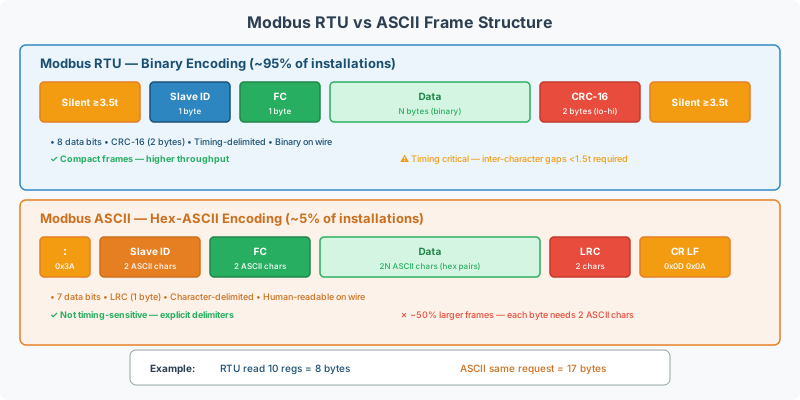
Side-by-Side Comparison
| Feature | Modbus RTU | Modbus ASCII |
|---|---|---|
| Encoding | Binary (1 byte = 1 byte on wire) | Hex-ASCII (1 byte = 2 ASCII characters on wire) |
| Frame start delimiter | Silent interval (≥3.5 character times) | Colon : (0x3A) |
| Frame end delimiter | Silent interval (≥3.5 character times) | CR+LF (0x0D 0x0A) |
| Error check | CRC-16 (2 bytes) | LRC (1 byte) |
| Data bits | 8 | 7 |
| Throughput | Higher (compact frames) | ~50% lower (doubled byte count) |
| Human readable | No (binary) | Yes (hex characters) |
| Timing critical | Yes (inter-character timeout) | No (explicit delimiters) |
| Industry usage | ~95% of installations | ~5% (legacy, debugging) |
Modbus RTU Frame Structure
RTU mode transmits each byte as a raw binary value. The frame has no explicit start/end characters — instead, silence on the bus marks frame boundaries:
| Field | Size | Description |
|---|---|---|
| Silent interval | ≥3.5 char times | Frame start (no data on bus) |
| Slave Address | 1 byte | Device address (1–247, or 0 for broadcast) |
| Function Code | 1 byte | Operation to perform (function codes reference) |
| Data | 0–252 bytes | Request/response payload |
| CRC | 2 bytes | CRC-16 error check (low byte first) |
| Silent interval | ≥3.5 char times | Frame end |
RTU Timing Requirements
The inter-character gap within a frame must be less than 1.5 character times. If the gap exceeds 1.5 character times, the receiver treats it as a frame boundary, discarding the partial frame.
| Baud Rate | 1 Character Time | 1.5 Char Timeout | 3.5 Char Timeout |
|---|---|---|---|
| 9,600 | 1.042 ms | 1.563 ms | 3.646 ms |
| 19,200 | 0.521 ms | 0.781 ms | 1.823 ms |
| 38,400 | 0.260 ms | 0.391 ms | 0.911 ms |
| 115,200 | 0.087 ms | 0.130 ms | 0.304 ms |
[!WARNING] At baud rates above 19,200, the inter-character timeout becomes very short. USB-to-serial converters and software-based serial ports may introduce latency that exceeds these thresholds, causing frames to be split erroneously. If you see CRC errors at higher baud rates, try reducing the baud rate or using a hardware serial port.
CRC-16 Error Detection
RTU mode uses a CRC-16 (Cyclic Redundancy Check) calculated over all bytes in the frame (address through data, excluding the CRC itself). The CRC polynomial is 0xA001 (reversed representation of 0x8005).
- Detection capability: Detects all single-bit errors, all double-bit errors, any odd number of errors, and bursts up to 16 bits
- False acceptance rate: ~1 in 65,536 for random corrupted frames
Modbus ASCII Frame Structure
ASCII mode encodes each byte as two hexadecimal ASCII characters (e.g., byte 0x4A becomes characters '4' 'A'). The frame uses explicit start and end characters:
| Field | Size (chars) | Description |
|---|---|---|
| Start | 1 char | Colon : (0x3A) |
| Slave Address | 2 chars | Hex-encoded device address |
| Function Code | 2 chars | Hex-encoded function code |
| Data | 0–504 chars | Hex-encoded payload (2 chars per byte) |
| LRC | 2 chars | Hex-encoded LRC checksum |
| End | 2 chars | CR (0x0D) + LF (0x0A) |
Example: Read Holding Register 0 from Slave 1
RTU frame (hex bytes): 01 03 00 00 00 01 84 0A (8 bytes)
ASCII frame (printable characters): :0103000000017E\r\n (17 characters)
The ASCII frame is more than twice the size of the equivalent RTU frame.
LRC Error Detection
ASCII mode uses a Longitudinal Redundancy Check — a simple 8-bit checksum:
- Sum all bytes (address + function code + data) as unsigned 8-bit values
- Take the two’s complement of the sum
- The result is the LRC byte (transmitted as 2 hex characters)
- Detection capability: Detects all single-bit errors and most multi-byte errors
- Weaker than CRC-16 — some multi-bit error patterns can go undetected
- Simpler to implement — just addition, no polynomial division
ASCII Timing
ASCII mode has no timing-based frame detection. The colon : marks the start and CR+LF marks the end. This makes ASCII mode:
- More tolerant of delays — pauses between characters don’t break the frame
- Works over slow or unreliable links — modems, radio links, satellite connections
- Easier to debug — frames are human-readable in a terminal program
Performance Comparison
Throughput
For a typical read of 10 holding registers from one device:
| Mode | Request Size | Response Size | Total Bytes | Time at 9600 baud |
|---|---|---|---|---|
| RTU | 8 bytes | 25 bytes | 33 bytes | ~34 ms |
| ASCII | 17 chars | 51 chars | 68 chars | ~71 ms |
RTU mode is approximately 2× faster than ASCII mode for the same data, due to the compact binary encoding.
Polling 10 Devices (10 Registers Each)
| Mode | Total Cycle Time (9600 baud) | Total Cycle Time (19200 baud) |
|---|---|---|
| RTU | ~1.2 sec | ~0.6 sec |
| ASCII | ~2.5 sec | ~1.2 sec |
For applications where poll cycle time matters (fast-changing process values, large device counts), RTU is strongly preferred.
When to Use Each Mode
Use Modbus RTU (Default Choice)
- Standard building automation — HVAC controllers, energy meters, sensors
- Industrial control — PLCs, drives, motor controllers
- Performance-sensitive — many devices, fast poll rates required
- New installations — RTU is the modern default
Use Modbus ASCII (Rare Cases)
| Scenario | Why ASCII Works Better |
|---|---|
| Modem/radio links | ASCII’s explicit delimiters tolerate latency and buffering that breaks RTU timing |
| Satellite communication | Variable propagation delays make RTU’s timing requirements impossible to meet |
| Manual debugging | Frames are human-readable in any serial terminal — no hex decoder needed |
| Legacy equipment | Some very old devices (pre-1990s) only support ASCII mode |
| Protocol analyzers without Modbus decoding | ASCII frames are self-describing in raw hex dumps |
[!TIP] If you need to manually debug a Modbus serial connection and don’t have a protocol analyzer, temporarily switching to ASCII mode lets you read frames directly in a terminal program like PuTTY or HyperTerminal. Switch back to RTU for production.
Configuration on Gateway Devices
QuickServer
When configuring a QuickServer serial port:
| Setting | RTU | ASCII |
|---|---|---|
| Protocol mode | Modbus RTU | Modbus ASCII |
| Data bits | 8 | 7 |
| Parity | Even (recommended) or None | Even (recommended) or None |
| Stop bits | 1 (with parity) or 2 (without) | 1 (with parity) or 2 (without) |
| Inter-request delay | 5–20ms | 5–20ms (less critical) |
[!CAUTION] Do not mix RTU and ASCII devices on the same RS-485 bus. All devices on a shared serial bus must use the same transmission mode. If one device requires ASCII and all others use RTU, that device needs its own dedicated serial port.
Detecting Which Mode a Device Uses
If the device documentation doesn’t specify:
- Try RTU first — configure 8 data bits, send a read request, check for a valid response
- If no valid response, try ASCII — configure 7 data bits, check again
- If neither works, verify baud rate, parity, and wiring first — the transmission mode is rarely the problem
The CAS Modbus Scanner supports both modes and can auto-detect the correct configuration.
Mixed Network Considerations
| Configuration | Supported | Notes |
|---|---|---|
| RTU + ASCII on same bus | No | Different data bit counts and framing — incompatible |
| RTU on one port, ASCII on another | Yes | Gateway converts between them internally |
| RTU serial → Modbus TCP | Yes | Modbus TCP has its own framing (MBAP header), independent of serial mode |
| ASCII serial → Modbus TCP | Yes | Same — gateway handles conversion |
Related Articles
- Modbus Exception Codes & Error Handling Reference — error responses common to both modes
- Modbus RTU Pre-Commissioning Checklist — verifying serial parameters before going live
- RS-485 Physical Layer Wiring & Termination Reference — physical layer is identical for both modes
- Modbus Troubleshooting Guide — diagnostic procedures for serial communication
Chipkin Tools
- CAS Modbus Scanner — Test both RTU and ASCII modes with auto-detection
- QuickServer — Protocol conversion gateway supporting RTU and ASCII on independent serial ports
- QuickServer — Multi-protocol gateway with configurable transmission mode per port
- Chipkin Support — Serial communication parameter analysis and configuration