
Overview
A Modbus RTU network connects multiple slave devices to a single master on a shared RS-485 bus. The physical topology is a daisy chain (also called a bus or trunk) — not a star. Getting the topology wrong is the most common cause of communication failures in multi-device installations.
This guide covers everything needed to design, wire, and commission a Modbus RTU daisy chain from 2 to 32+ devices, including addressing rules, termination, and repeater placement for long runs.
Daisy Chain Fundamentals
Correct Topology: Daisy Chain (Bus)
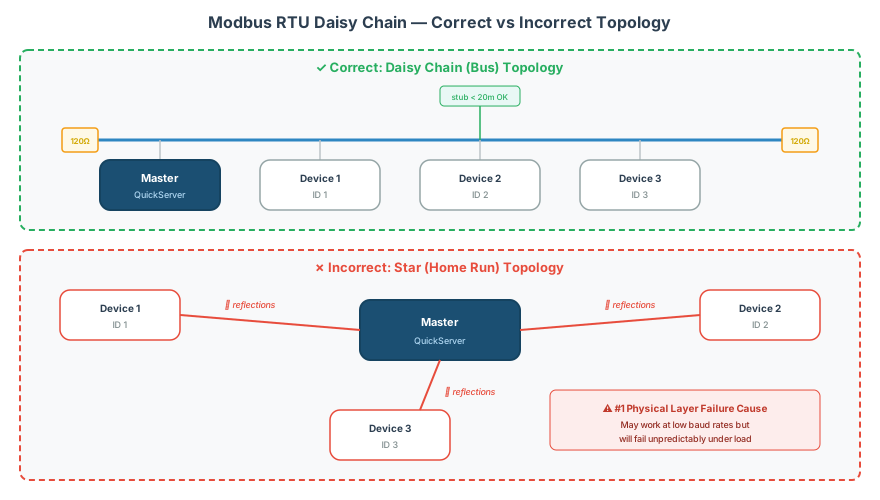
A proper Modbus RTU bus connects devices in series — the cable runs from one device to the next in a continuous chain:
[Master] ------- [Device 1] ------- [Device 2] ------- [Device 3]
  Term.                                                    Term.
Termination resistors (120Ω or 150Ω) are placed at both ends of the trunk — at the master and at the last device. No termination in the middle.
Incorrect Topology: Star (Home Run)
A star topology — where each device has its own cable run back to the master — causes signal reflections and communication errors:
              [Device 1]
             /
[Master] --- [Device 2]    ← WRONG — star topology
             \
              [Device 3]
[!CAUTION] Star wiring is the #1 physical layer cause of intermittent Modbus RTU failures. Even if it works at low baud rates during commissioning, it will fail unpredictably at higher speeds or with more devices. Always use daisy chain topology.
Short Stubs (Derivations)
The specification allows short stubs (derivations) off the main trunk — but they must be kept as short as possible:
| Parameter | Maximum |
|---|---|
| Stub length | 20 meters (66 feet) |
| Number of stubs | Minimize — each stub degrades signal quality |
| Termination on stubs | Never — only terminate trunk ends |
Stubs longer than 20m should be avoided. If a device cannot be reached by the main trunk, extend the trunk to that device instead of using a long spur.
Wiring Specifications
2-Wire RS-485 (Standard Modbus RTU)
The standard configuration uses two data wires plus a common ground:
| Wire | Label | RS-485 Signal | Color (Recommended) |
|---|---|---|---|
| Data + | D1 (or A) | Non-inverting | Yellow |
| Data − | D0 (or B) | Inverting | Brown |
| Common | GND / Common | Signal ground | Grey |
[!WARNING] The labeling of A/B and D0/D1 is inconsistent across manufacturers. Some devices label D1 as “A” and others label D1 as “B”. Always verify polarity by checking whether a known working device communicates — if communication fails, swap the two data wires. See the RS-485 Physical Layer Wiring & Termination Guide for detailed wiring specifications.
Cable Requirements
| Parameter | Specification |
|---|---|
| Wire gauge | AWG 24 minimum (AWG 22 recommended for long runs) |
| Cable type | Shielded twisted pair (STP) preferred |
| Impedance | 100–130Ω characteristic impedance |
| Maximum trunk length | 1,200m (3,900 ft) at 9,600 baud; 1,000m typical for mixed baud rates |
| Cat5 cable | Works for short runs (<600m) but not ideal — impedance mismatch and increased crosstalk |
Addressing Rules
Address Range
| Address | Purpose |
|---|---|
| 0 | Broadcast — all devices process, none respond |
| 1 – 247 | Valid individual device addresses |
| 248 – 255 | Reserved per specification |
Best Practices
- Sequential addressing — assign 1, 2, 3… for easy identification
- Leave gaps for expansion — if installing 10 devices, use addresses 1–10 and leave 11+ available
- Document the address map — record which physical device is at which address in the project documentation
- Verify uniqueness — two devices at the same address cause frame collisions and garbled responses
- Set addresses before connecting to the bus — use a point-to-point connection (master + one device) to configure each device’s unit ID before wiring the full daisy chain
[!TIP] Some devices allow address configuration via DIP switches on the enclosure. Others require Modbus commands (typically FC06 to a configuration register) or a manufacturer’s software tool. Check the device documentation for the addressing method before starting commissioning.
Communication Parameters
All devices on the same bus must use identical serial communication parameters:
| Parameter | Common Values | Notes |
|---|---|---|
| Baud rate | 9600, 19200, 38400, 115200 | All devices must match |
| Data bits | 8 | Almost always 8 |
| Parity | None, Even, Odd | Even is recommended per spec; None is common in practice |
| Stop bits | 1 or 2 | 2 stop bits when parity = None (per spec) |
[!NOTE] The Modbus specification recommends 8 data bits, even parity, 1 stop bit (8E1) as the default. However, many field devices ship configured as 8N1 (no parity, 1 stop bit) or 8N2 (no parity, 2 stop bits). Match whatever the majority of devices on your network use — changing all devices to a common setting is usually necessary during commissioning.
Baud Rate Selection
| Scenario | Recommended Baud Rate |
|---|---|
| Short run (<100m), few devices | 19200 or 38400 |
| Medium run (100–500m), 5–15 devices | 9600 or 19200 |
| Long run (500–1200m), many devices | 9600 |
| Noisy industrial environment | 9600 (lower speeds tolerate more noise) |
[!TIP] Some older field devices (Veeder Root TLS series, older York controllers) support non-standard baud rates like 192000. If one device on the bus requires a non-standard rate, it may need its own dedicated serial port rather than sharing a bus with standard-rate devices.
Device Count Limits
Standard RS-485 Limits
| Configuration | Max Devices |
|---|---|
| Standard RS-485 (unit load = 1) | 32 devices per segment (including master) |
| With 1/4 unit load transceivers | Up to 128 devices per segment |
| With 1/8 unit load transceivers | Up to 256 devices per segment |
With Repeaters
RS-485 repeaters extend both the device count and cable distance:
[Master] ---1200m--- [Repeater] ---1200m--- [Repeater] ---1200m--- [End]
  32 devices            32 devices            32 devices
Each repeater segment supports a full complement of devices and resets the maximum cable distance.
| Repeater Placement | When to Use |
|---|---|
| After 32 devices | Standard unit-load transceivers |
| After 1,000m of cable | Signal quality degrades beyond this |
| Between electrically noisy areas | Isolates noise from clean segments |
Commissioning Procedure
Step 1: Address Each Device Individually
- Connect the master to one device at a time (point-to-point)
- Verify communication at the expected baud rate and parity
- Set the device’s slave address
- Read back a known register to confirm the address change
- Label the device physically with its address number
- Disconnect and repeat for each device
Step 2: Wire the Daisy Chain
- Run the trunk cable from the master’s RS-485 port to the first device
- Continue the trunk from device to device in sequence
- Do not star — each device connects to the previous one and the next one
- Install termination at both ends of the trunk
- Connect the signal ground (common) wire throughout the chain
Step 3: Test Communication
- Power on all devices
- Poll each device individually by address — verify a response from each one
- If a device doesn’t respond, check:
- Address uniqueness (no duplicates)
- Baud rate and parity match
- Wiring polarity (swap D0/D1 if needed)
- Physical connection integrity
- Test a sequential poll of all devices — note the total cycle time
Step 4: Optimize Polling
| Parameter | Guideline |
|---|---|
| Inter-request delay | 5–20ms between requests (adjust based on slowest device) |
| Response timeout | 100–500ms depending on device response time |
| Retry count | 1–3 retries before flagging a device as offline |
| Poll cycle target | Design for <30 seconds total cycle for all devices |
[!NOTE] The total poll cycle time depends on the number of devices, the number of registers per device, the baud rate, and the inter-request delay. For 10 devices reading 20 registers each at 9600 baud, expect approximately 2–5 seconds per complete cycle. For 30 devices, expect 10–15 seconds. See the Modbus RTU Pre-Commissioning Checklist for timing calculations.
Troubleshooting Multi-Device Networks
| Symptom | Likely Cause | Fix |
|---|---|---|
| All devices timeout | Wiring fault, wrong baud rate, or polarity reversed | Verify with one device only (point-to-point) |
| One device intermittent | Long spur off trunk, loose connection, or marginal signal | Check stub length, re-terminate connections |
| Responses from wrong device | Duplicate address on bus | Isolate devices and check address assignments |
| Garbled responses | Baud rate mismatch on one device, or star topology | Verify all devices match baud/parity, check wiring topology |
| Works with few devices, fails with many | Missing termination, or exceeding 32-device limit | Add termination resistors, add repeater if >32 devices |
| Errors increase with cable length | Missing termination, wrong cable type, or electrical noise | Verify termination, switch to shielded twisted pair, check for noise sources |
| One device works alone but not on bus | Address conflict, or device pulling bus voltage out of spec | Isolate device, check its RS-485 transceiver specifications |
Related Articles
- RS-485 Physical Layer Wiring & Termination Reference — detailed cable specs, termination calculations, and pinout diagrams
- Modbus RTU Pre-Commissioning Checklist — systematic verification before going live
- Modbus Broadcast Address: Node 0 vs Node 255 Explained — broadcast writes to all devices
- Modbus Exception Codes & Error Handling Reference — interpreting error responses
- Modbus Troubleshooting Guide — broader diagnostic flowchart
Chipkin Tools
- CAS Modbus Scanner — Scan address ranges to discover devices on a bus
- QuickServer — Protocol conversion gateway supporting multi-device serial polling
- QuickServer — Multi-protocol gateway with configurable poll rates and retry logic
- Chipkin Support — Multi-device daisy chain design and troubleshooting assistance