
Overview
RS-485 is the physical layer that carries Modbus RTU data between devices. While the Modbus protocol defines what is transmitted, RS-485 defines how the electrical signals travel over the wire — voltage levels, impedance, termination, and maximum distances.
Most Modbus RTU communication failures that appear random or intermittent are caused by physical layer problems: missing termination, star wiring, incorrect grounding, or exceeding cable length limits. This guide provides the complete reference for RS-485 wiring in Modbus RTU installations, based on the Modbus Serial Line specification (V1.02, §3) and TIA/EIA-485.
RS-485 Electrical Fundamentals
Signal Characteristics
RS-485 uses differential signaling — data is encoded as the voltage difference between two wires, not the voltage relative to ground. This provides excellent noise immunity:
| Parameter | Specification |
|---|---|
| Signaling | Differential (balanced) |
| Driver output voltage | ±1.5V to ±6V differential |
| Receiver sensitivity | ±200mV minimum differential |
| Common mode range | −7V to +12V |
| Data rate | Up to 10 Mbps (Modbus typically 9600–115200 baud) |
Why Differential Signaling Matters
Electromagnetic noise affects both wires equally (common mode noise). The receiver measures only the difference between the two wires, so common mode noise cancels out. This is why RS-485 works reliably over long distances in electrically noisy industrial environments where RS-232 would fail.
2-Wire vs 4-Wire Configuration
2-Wire (Half-Duplex) — Standard for Modbus RTU
The standard Modbus RTU configuration uses 2 data wires plus a common ground:
| Wire | Signal Name | Modbus Serial Line Label | Recommended Color |
|---|---|---|---|
| Data + | D1 (non-inverting) | D1 | Yellow |
| Data − | D0 (inverting) | D0 | Brown |
| Common | Signal Ground | Common | Grey |
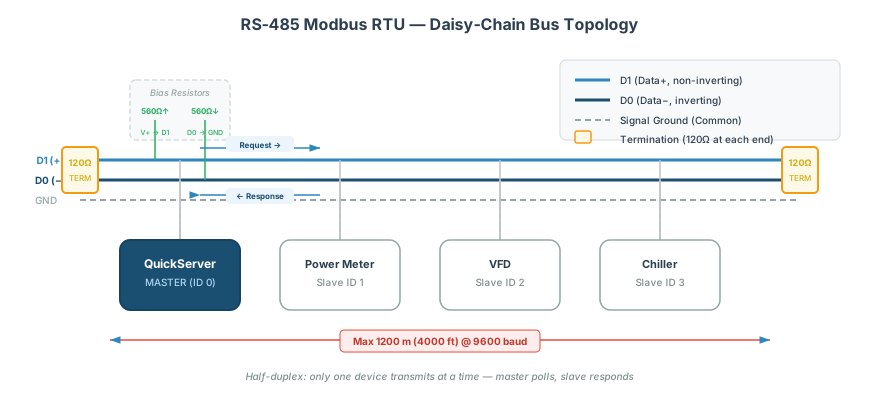
In 2-wire mode, the master and slaves share the same pair for both transmitting and receiving. Only one device transmits at a time — the master sends a request, then all devices listen; the addressed slave responds, then all devices listen again.
[!WARNING] D0/D1 vs A/B labeling: The Modbus specification uses D0 (inverting) and D1 (non-inverting). Many device manufacturers label these as A and B, but the A/B assignment is inconsistent across vendors. If communication fails after wiring, swap D0 and D1 — this is the most common RS-485 wiring mistake.
4-Wire (Full-Duplex) — Rarely Used
Some installations use 4 data wires for full-duplex communication:
| Wire Pair | Purpose |
|---|---|
| TX+ / TX− | Master transmit (slave receive) |
| RX+ / RX− | Master receive (slave transmit) |
| Common | Signal ground |
4-wire mode is uncommon in building automation. Use it only when specifically required by the device documentation.
Termination
Why Termination Is Required
At the frequencies used by Modbus RTU, the RS-485 cable behaves as a transmission line. Without proper termination, signals reflect off the cable ends and interfere with the original data, causing CRC errors and spurious characters.
Termination Placement
Termination resistors go at both ends of the trunk (main cable run) and nowhere else:
[Term. 120Ω] --- [Master] --- [Device 1] --- [Device 2] --- [Device N] --- [Term. 120Ω]| Rule | Detail |
|---|---|
| Number of terminators | Exactly 2 — one at each end of the trunk |
| Resistor value | 120Ω (TIA/EIA-485) or 150Ω (Modbus specification) |
| Placement | Between D1 and D0 at each trunk endpoint |
| Never on stubs | Derivations / spur cables do not get termination |
| Never in the middle | Only at the physical ends of the cable |
[!TIP] Some devices have built-in termination that can be enabled via a jumper or DIP switch. Check the device documentation before adding external resistors — double-terminating a device (internal + external) overcorrects.
RC Termination Option
For better noise immunity, use an RC termination instead of a simple resistor:
| Component | Value | Purpose |
|---|---|---|
| Resistor | 120Ω | Impedance matching |
| Capacitor | 1nF (in series with resistor) | Reduces DC loading, improves high-frequency termination |
The RC termination reduces the DC current draw compared to a simple resistor, which is beneficial on buses with polarization resistors since it preserves the bias voltage.
Polarization (Bias Resistors)
Purpose
When no device is transmitting, the RS-485 bus is in a high-impedance (tri-state) condition. Without bias, noise can cause the receivers to detect false start bits, producing garbage data.
Polarization resistors hold the bus at a known idle state between transmissions:
| Resistor | Connection | Value | Purpose |
|---|---|---|---|
| Pull-up | D1 to V+ (5V) | 450–650Ω | Holds D1 high when idle |
| Pull-down | D0 to GND | 450–650Ω | Holds D0 low when idle |
Impact on Device Count
Polarization resistors appear as additional load on the bus. A 560Ω polarization set reduces the effective device capacity by approximately 4 unit loads (from 32 to 28 devices with standard transceivers).
[!NOTE] Many Modbus master devices (including QuickServer devices) include built-in polarization. Check whether your master device has internal bias before adding external bias resistors — over-biasing can reduce the signal voltage margin.
Cable Specifications
Recommended Cable
| Parameter | Specification |
|---|---|
| Type | Shielded twisted pair (STP) |
| Wire gauge | AWG 24 minimum (AWG 22 or AWG 20 for runs >500m) |
| Characteristic impedance | 100–130Ω |
| Capacitance | <50 pF/m |
| Shield | Foil or braid, drain wire |
Maximum Cable Distances
| Baud Rate | Maximum Trunk Length | Notes |
|---|---|---|
| 9,600 | 1,200m (3,900 ft) | Standard Modbus installations |
| 19,200 | 1,200m (3,900 ft) | Same physical limit, timing more critical |
| 38,400 | 1,200m (3,900 ft) | Marginal at maximum distance |
| 115,200 | ~500m (1,600 ft) | Reduce distance at higher speeds |
[!WARNING] Cat5/Cat5e/Cat6 cable has a characteristic impedance of ~100Ω and works for RS-485, but the maximum reliable distance is reduced to approximately 600m (2,000 ft) due to higher capacitance per meter compared to dedicated RS-485 cable. Use Cat5 only for short runs or temporary installations.
Maximum Stub (Derivation) Length
| Parameter | Maximum |
|---|---|
| Individual stub length | 20m (66 ft) |
| Total stub length (sum of all stubs) | Minimize — each stub degrades signal quality |
Connector Pinouts
RJ45 Pinout (Common for Modbus RTU)
Many building automation devices use RJ45 connectors for RS-485:
| Pin | Signal | Color (T-568B) |
|---|---|---|
| 1 | — | White/Orange |
| 2 | — | Orange |
| 3 | — | White/Green |
| 4 | D1 (Data +) | Blue |
| 5 | D0 (Data −) | White/Blue |
| 6 | — | Green |
| 7 | — | White/Brown |
| 8 | Common (GND) | Brown |
[!CAUTION] RJ45 pinouts for RS-485 are not standardized across manufacturers. The pin assignments above follow the Modbus specification, but many devices use different pin configurations — especially older equipment. Always verify the pinout in the device documentation before connecting.
Terminal Block Connections
For screw terminal connections (most common in building automation):
- Strip 6–8mm of insulation from each wire
- Insert wire into the correct terminal (D1, D0, Common/GND)
- Tighten the screw terminal firmly — loose connections cause intermittent failures
- Tug test — gently pull each wire to verify it’s secured
Grounding and Shielding
Signal Ground (Common)
The signal ground wire must run through the entire daisy chain, connecting the ground/common terminal on every device. Without a common ground reference, the differential receivers may see common mode voltages outside their −7V to +12V range and interpret noise as data.
| Rule | Detail |
|---|---|
| Run common/ground wire through entire chain | Connects every device’s ground terminal |
| Use the cable’s dedicated ground conductor | Not the shield drain wire |
| Earth ground at ONE point only | Prevents ground loops |
Shield Grounding
| Best Practice | Why |
|---|---|
| Connect shield to earth ground at one end only | Prevents ground loop currents flowing through the shield |
| Leave shield floating at the far end | Unconnected at the non-grounded end |
| Use the master/controller end for grounding | Most likely to have a clean earth ground connection |
[!WARNING] Grounding the shield at both ends creates a ground loop — current flows through the shield due to potential differences between the ground points. This injects noise directly into the cable that the shield was supposed to block.
Electrical Noise Mitigation
| Noise Source | Mitigation |
|---|---|
| VFDs (variable frequency drives) | Route RS-485 cable at least 300mm from VFD power cables; cross at 90° if unavoidable |
| Fluorescent lighting ballasts | Use shielded cable; avoid running parallel to lighting circuits |
| Motor starters / contactors | Add ferrite chokes at device terminals; increase inter-request delay |
| Welding equipment | Isolate with optical repeaters; use separate cable trays |
| Long parallel power cable runs | Maintain minimum 300mm separation; cross at right angles |
Quick Reference Summary
| Parameter | Value |
|---|---|
| Topology | Daisy chain (bus), NOT star |
| Wires | 2 data (D1, D0) + 1 common ground |
| Termination | 120Ω or 150Ω at BOTH trunk ends |
| Max trunk length | 1,200m at 9600 baud |
| Max stub length | 20m |
| Max devices | 32 per segment (standard unit-load transceivers) |
| Cable | Shielded twisted pair, AWG 24+, 100–130Ω impedance |
| Shield ground | ONE end only |
Related Articles
- Modbus RTU Multi-Device Daisy Chain Wiring Guide — multi-device topology, addressing, and commissioning
- Modbus RTU Pre-Commissioning Checklist — systematic verification before going live
- Modbus Troubleshooting Guide — symptom-based diagnostic procedures
- Modbus Exception Codes & Error Handling Reference — interpreting error responses
Chipkin Tools
- CAS Modbus Scanner — Verify RS-485 communication with individual devices
- QuickServer — Protocol conversion gateway with RS-485 ports and built-in bias
- QuickServer — Multi-protocol gateway supporting RS-485 with configurable termination
- Abacus USB-to-RS232/RS485 Converter — USB adapter for connecting a PC to an RS-485 bus — see driver installation guide
- Chipkin Support — RS-485 network design and troubleshooting assistance