
Overview
When a Modbus slave device goes offline, what should a gateway report to upstream clients? This is one of the most overlooked issues in protocol conversion — and it can have serious consequences in building automation and industrial control.
Unlike BACnet, which has a built-in Reliability property on every object to signal data quality, Modbus has no concept of data validity. A Modbus register is just a 16-bit number. There is no flag, status bit, or metadata that says “this value is current” or “this value is stale.”
This creates a critical question for every Modbus integration: if the gateway can’t reach a Modbus device, what value should it serve to the upstream system?
The Stale Data Problem
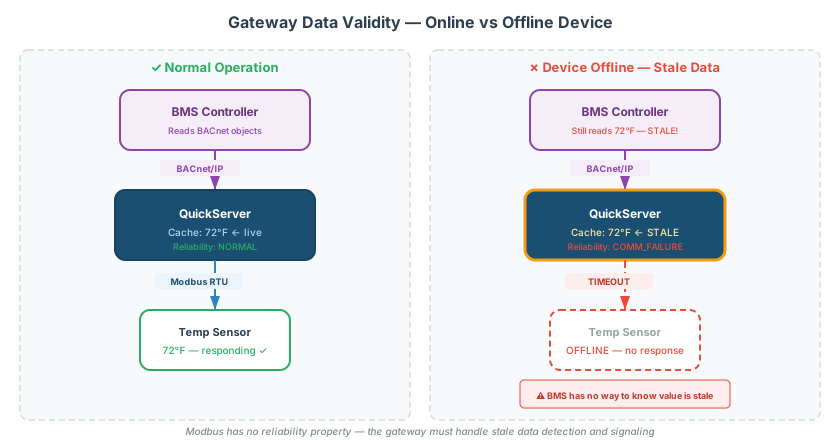
Consider a typical architecture:
BMS (BACnet client) → Gateway → Modbus RTU slave (HVAC controller)The gateway polls the Modbus slave every few seconds and caches the register values. The BMS reads the cached values from the gateway via BACnet.
When the Modbus slave goes offline:
- The gateway’s poll requests time out — no response from the slave
- The gateway’s cached register values are now stale — they reflect the last-known state, not the current state
- The BMS continues reading the cached values from the gateway
- The BMS has no way to know the values are stale
This is dangerous. A temperature sensor that was reading 72°F when it went offline will continue to report 72°F through the gateway — even if the actual space temperature is climbing because the HVAC system failed.
Why Modbus Has No Reliability Concept
Modbus was designed in 1979 as a simple master-slave protocol for PLCs. The protocol assumes:
- The master knows whether it received a valid response (it either got a reply or a timeout)
- Any error handling is the master’s responsibility
- There is no concept of object quality, reliability, or data freshness
This works fine in a direct master-slave architecture where the master application directly handles timeouts. It breaks down when a gateway sits in the middle, because the upstream client (e.g., a BMS) is not the Modbus master — the gateway is.
BACnet Comparison
BACnet solves this with the Reliability property available on every BACnet object:
| BACnet Reliability Value | Meaning |
|---|---|
NO_FAULT_DETECTED | Value is current and valid |
COMMUNICATION_FAILURE | Cannot reach the source device |
UNRELIABLE_OTHER | Value may be stale or suspect |
A well-designed BACnet integration checks Reliability before trusting Present_Value. Modbus has no equivalent mechanism.
Gateway Strategies for Offline Devices
Different gateways handle offline Modbus devices differently. Understanding these strategies is critical when specifying or commissioning a protocol conversion job.
Strategy 1: Serve Last-Known Value (Default on Many Gateways)
The gateway continues serving the last successfully read value indefinitely.
| Pros | Cons |
|---|---|
| Simple implementation | BMS cannot detect device failure |
| No spurious alarms from momentary glitches | Stale data can mask real problems |
| Operator may make decisions based on outdated values |
[!CAUTION] This is the most common default behavior and the most dangerous for safety-critical applications. If a temperature sensor goes offline, the BMS will continue to show the last reading — potentially for hours or days.
Strategy 2: Serve a Default/Fallback Value
The gateway replaces stale data with a predefined value (e.g., 0, -1, or a known “invalid” sentinel like 9999) after a configurable timeout.
| Pros | Cons |
|---|---|
| BMS can detect failure if it’s programmed to alarm on the sentinel value | Requires BMS-side programming to recognize the sentinel |
| Clear indication that something is wrong | Value of 0 may look valid for some point types |
[!TIP] Using a sentinel value like -999 or 9999 is more reliable than 0, which could be interpreted as a valid reading (e.g., 0°C for a temperature sensor or 0 PSI for a pressure sensor).
Strategy 3: Map Reliability to a Separate Object
When converting Modbus to BACnet, the gateway creates a BACnet Reliability property that tracks communication status. The Present_Value holds the last-known reading, while Reliability changes to COMMUNICATION_FAILURE when polling fails.
| Pros | Cons |
|---|---|
| Full BACnet-compliant quality signaling | Requires the BMS to check Reliability (many don’t by default) |
| Best practice for BACnet integrations | More complex gateway configuration |
Strategy 4: Serve Exception on Read
Some gateways return a Modbus exception (e.g., 0x04 — Slave Device Failure) to upstream Modbus clients when the downstream device is offline.
| Pros | Cons |
|---|---|
| Standard Modbus error mechanism | Only works for Modbus-to-Modbus scenarios |
| Client immediately knows the read failed | Some clients don’t handle exceptions gracefully |
QuickServer Configuration
QuickServer gateways provide configurable data-validity handling:
Timeout Configuration
Configure how long the gateway waits before declaring a Modbus device offline:
- Poll timeout — how long to wait for a single response before retrying
- Retry count — how many consecutive failures before marking the device offline
- Offline threshold — total time (timeout × retries) before triggering fallback behavior
Data Array Behavior on Offline
QuickServer Data Arrays can be configured to:
- Hold last value — keep the most recent valid reading
- Clear to zero — reset to 0 (or a configured default)
- Set to configurable value — use a sentinel value
BACnet Reliability Mapping
When the server-side protocol is BACnet, the gateway can set the Reliability property of the corresponding BACnet object based on the Modbus communication status. This is the recommended approach for Modbus-to-BACnet conversions.
Design Recommendations
For New Installations
- Define the stale-data policy during the design phase, not during commissioning
- Document the expected behavior for each point type when the source device goes offline
- Use BACnet Reliability mapping when the upstream protocol supports it
- Configure sentinel values for direct Modbus-to-Modbus gateway scenarios
- Set up BMS alarms on reliability changes or sentinel values
For Troubleshooting Existing Installations
If a BMS is showing suspect values (readings that haven’t changed in hours, or values that don’t match physical conditions):
- Check the gateway’s Modbus poll status — is it still successfully communicating with the slave?
- Check the timeout and retry configuration — how long before the gateway marks a device offline?
- Check what the gateway does with stale data — hold, clear, or sentinel?
- If converting to BACnet, check whether the BMS is monitoring the Reliability property
[!WARNING] A common commissioning mistake is testing the “happy path” only — verifying that values read correctly when everything is online. Always test the failure path: disconnect the Modbus slave and verify that the gateway and BMS respond appropriately.
Quick Reference
| Scenario | Recommended Strategy |
|---|---|
| Modbus → BACnet conversion | Map BACnet Reliability property to Modbus communication status |
| Modbus → Modbus gateway | Serve sentinel value (-999 or 9999) after timeout |
| Safety-critical monitoring | Serve sentinel value + BMS alarm on the sentinel |
| Legacy BMS (doesn’t check Reliability) | Serve sentinel value that triggers existing alarm logic |
| Temporary communication glitch | Hold last value briefly (5–10s), then switch to fallback |
Related Articles
- Modbus to BACnet Protocol Conversion Guide — end-to-end conversion workflow
- Modbus Exception Codes & Error Handling Reference — understanding error responses
- Modbus Troubleshooting Guide — systematic diagnosis of communication failures
- Modbus TCP MBAP Header & Message Format Reference — TCP message structure
- BACnet Object Types & Properties Reference — BACnet Reliability and other properties
Chipkin Can Help
Configuring data-validity handling correctly requires understanding both the source and destination protocols. Chipkin support can configure your QuickServer gateway with appropriate timeout, retry, and fallback settings for your specific installation.