
Overview
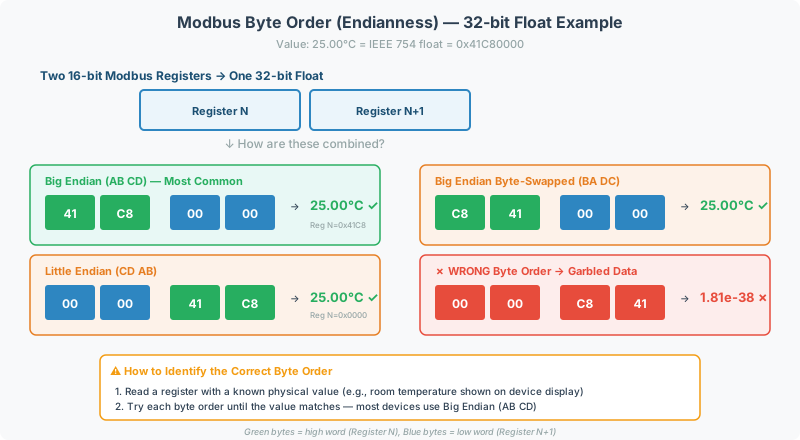
After register addressing, byte order (endianness) is the second most common source of Modbus integration errors. When combining two 16-bit Modbus registers into a 32-bit float or integer value, the byte arrangement must match between the source device and the gateway. A mismatch produces garbled data — zeros, negative numbers, or nonsensical exponent values.
This article covers byte order conventions, data type handling, scaling factors, and a device-specific lookup table for common equipment.
Modbus Register Data Types
Every Modbus register is 16 bits (2 bytes). Larger values require combining multiple registers.
Single-Register Types (16-Bit)
These types fit in one register — no byte order concerns.
| Data Type | Range | Example Value | Typical Use |
|---|---|---|---|
| UINT16 (unsigned integer) | 0 to 65,535 | 4096 = fan speed RPM | Status codes, raw sensor counts, enumerated states |
| INT16 (signed integer) | -32,768 to 32,767 | -120 = -12.0°C (with ÷10 scaling) | Temperatures, pressures, bipolar analog signals |
| Boolean / Bit | 0 or 1 | 1 = alarm active | Coils and discrete inputs (FC01, FC02) |
Multi-Register Types (32-Bit)
These require two registers — byte order is critical. See Byte Order below.
| Data Type | Range | Example Value | Typical Use |
|---|---|---|---|
| UINT32 (unsigned 32-bit integer) | 0 to 4,294,967,295 | 1,200,000 = energy kWh totalizer | Counters, totalizers, accumulated runtime hours |
| INT32 (signed 32-bit integer) | -2,147,483,648 to 2,147,483,647 | -500,000 = reverse power flow in watts | Bidirectional power, differential pressure |
| Float32 (IEEE 754 single-precision) | ±1.18 × 10⁻³⁸ to ±3.40 × 10³⁸ (~7 significant digits) | 72.5 = temperature °F; 101.325 = pressure kPa | Most analog values: temperature, humidity, voltage, current, power |
[!NOTE] Float32 is the most common multi-register type in building automation. If a device datasheet lists analog values (temperatures, pressures, power), assume Float32 unless stated otherwise.
Float32 examples in practice:
| Raw Hex (2 registers) | Float32 Value | What It Represents |
|---|---|---|
0x4291_0000 | 72.5 | Room temperature (°F) |
0x42CA_0000 | 101.0 | Barometric pressure (kPa) |
0x447A_0000 | 1000.0 | Power consumption (W) |
0x0000_0000 | 0.0 | Zero reading — or possibly wrong byte order |
0xFF7F_FFFF | NaN | Invalid / sensor fault |
Extended Types (64-Bit and Beyond)
These are rare in building automation but do appear on some devices.
| Data Type | Registers | Range | Typical Use |
|---|---|---|---|
| Float64 (IEEE 754 double-precision) | 4 | ±5.0 × 10⁻³²⁴ to ±1.8 × 10³⁰⁸ (~15 significant digits) | High-precision scientific instruments, energy totalizers |
| 48-bit integer | 3 | 0 to 281,474,976,710,655 | Flow meter totalization (see Multi-Register Values) |
[!WARNING] Some device documentation uses “double” to mean two 16-bit registers (32-bit total), not IEEE 754 double-precision (64-bit). Always confirm whether “double” means 32-bit or 64-bit at project intake.
Byte Order (Endianness) for 32-Bit Values
When two 16-bit Modbus registers form a 32-bit value, four byte arrangements are possible. Given bytes a (MSB), b, c, d (LSB):
| Order | Notation | Description | Common Names |
|---|---|---|---|
| ABCD | Big-Endian | High word first, high byte first | Standard, IBM, “normal” |
| CDAB | Word-Swap | Low word first, high byte within each word | Mid-Big, sw |
| BADC | Byte-Swap | High word first, bytes reversed within each word | Mid-Little, sb |
| DCBA | Little-Endian | Everything reversed | Intel, “reversed” |
ABCD (Big-Endian) is the most common convention, but enough devices use other orders that you should never assume — always verify.
How to Identify the Correct Byte Order
- Check the manufacturer datasheet for byte order or endianness specification
- Read a known value — if a temperature sensor reads 72°F on the display, read the raw registers and test each byte order until the converted value matches
- Test systematically — try ABCD first, then CDAB, BADC, DCBA. Most real devices use either ABCD or CDAB
[!TIP] If 32-bit float reads return zeros, negative numbers, or values like 1.73e-38, the byte order is almost certainly wrong. Try word-swap (CDAB) first — it’s the most common non-standard order. See the Modbus Troubleshooting Guide for a full diagnostic walkthrough.
QuickServer Byte Order Flags
When configuring a QuickServer gateway, use these format flags to control byte order conversion:
| Configuration Syntax | Byte Order | When to Use |
|---|---|---|
2.i16-1.float | ABCD (Big-Endian) | Default; most devices |
2.i16-1.float-sw | CDAB (Word-Swap) | GE meters, many industrial devices |
2.i16-1.float-sb | BADC (Byte-Swap) | Less common; test if sw doesn’t work |
2.i16-1.float-s | DCBA (Little-Endian) | Rare; full reversal |
Known Device Byte Orders
This table documents byte order requirements confirmed through real-world integrations:
| Manufacturer | Device | Protocol | Byte Order | Scaling | Notes |
|---|---|---|---|---|---|
| GE | EPM6000 Power Meter | Modbus RTU | CDAB (word-swap) | ÷100 | Most common non-standard order |
| Eaton | Foreseer | Modbus TCP | ABCD (Big-Endian) | — | Standard order |
| Thermo Fisher | AquaSensors AV38 | Modbus RTU | Word-order reversal | — | IEEE754 float; verify with scanner |
| CORDEX | CXC HP Controllers | Modbus TCP | CDAB (word-swap) | — | Initially deployed as big-endian; corrected |
| Schneider | SE5000 Power Meters | Modbus RTU | Float32 (ABCD) | — | Dual memory arrays needed for multi-protocol |
| York | Quantum Q4 Chiller | Modbus RTU | Standard | ÷10 | Temperature values require scaling |
| Mitsubishi | FX5 PLC | Modbus TCP | Integer only | ÷10 | No native float; pre-scaled integers |
[!TIP] Don’t see your device? Use the systematic test method above. Once confirmed, document the result for future projects.
Scaling Factors
Some devices store values as scaled integers rather than floating-point numbers. The raw register value must be divided (or multiplied) by a scaling factor to get the real-world value:
| Pattern | Example | Devices |
|---|---|---|
| ÷10 | Raw 725 → 72.5°F | York Quantum Q4 chillers, Mitsubishi FX5 PLCs |
| ÷100 | Raw 7250 → 72.50°F | GE EPM6000 power meters |
| ÷1000 | Raw 72500 → 72.500 | High-precision sensors |
Always check the register map for scaling notes. If register values are consistently 10× or 100× the expected value, a scaling factor is likely missing from your configuration. For register addressing fundamentals, see Modbus Addressing & Register Reference.
Multi-Register Values (Beyond 32-Bit)
Most Modbus values use 1 or 2 registers. Occasionally, devices use 3 or more registers for a single data point:
48-Bit Integers (3 Registers)
Some flow meters use three 16-bit registers (MSW → LSW) for totalization counters. QuickServer gateways cannot natively combine 3 registers into a single value.
Workaround options:
- Pass the three raw register values separately and combine them in the downstream system
- Use a custom script or middleware to perform the combination
64-Bit Doubles (4 Registers)
Rare in building automation. If a device datasheet specifies 64-bit doubles, confirm with the manufacturer — many devices that claim “double” actually use 32-bit floats occupying 2 registers.
Troubleshooting
For detailed symptom-based diagnostics, see the Modbus Troubleshooting Guide. Quick reference for data type issues:
- Data reads as zeros → byte order mismatch (try CDAB), register offset, or data type mismatch (reading integer as float)
- Data reads as negative or exponent values → wrong byte order, signed-vs-unsigned confusion, or missing scaling factor
- Correct on device display but wrong in BACnet → verify with a Modbus scanner first to isolate Modbus side vs. BACnet conversion
Configuration Intake Questions
Add these to your standard Modbus intake checklist to prevent byte-order rework:
| # | Question | Impact |
|---|---|---|
| 1 | What is the byte order for 32-bit values? (Big-endian, word-swap, byte-swap, little-endian, unknown) | Prevents the #2 most common integration error |
| 2 | Are there any known scaling factors? (÷10, ÷100, ÷1000) | Prevents “data values are wrong” callbacks |
| 3 | Do 32-bit values use floating-point or integer format? | Prevents data type mismatch |
| 4 | Does the manufacturer documentation specify register pair byte order? | Gets definitive answer vs. trial-and-error |
Related Articles
- Modbus Addressing & Register Reference — register ranges, function codes, addressing conventions
- Modbus RTU Pre-Commissioning Checklist — wiring and connectivity verification before deployment
- Modbus Troubleshooting Guide — symptom-based diagnostic guide
- Modbus Knowledge Base — general protocol overview
Chipkin Tools
- QuickServer — Protocol gateway with built-in byte order conversion flags (
-sw,-sb,-s) - QuickServer — Next-generation protocol conversion gateway
- CAS Modbus Scanner — Read raw register values to verify byte order before building configurations
- Chipkin support — Expert help with byte order diagnosis and configuration